vivo 官方游戏发现和互动客户端,提供推荐、资讯攻略、社区与游戏管理。 | Official vivo game discovery and community client with recommendations, guides and game management.
中文
vivo游戏中心面向希望集中发现和管理手机游戏的Android用户,提供游戏推荐、资讯攻略、社区互动、新游预约和礼包活动。本页依据vivo官网整理安卓版官方安装来源、7.2.15.1版本资料、下载管理步骤与常见问题,帮助你核对包名、文件大小和设备提示,再决定是否安装;具体游戏的登录、付费与活动规则请查看官方说明。
功能:游戏发现、资讯攻略与玩家互动
vivo 将游戏中心介绍为面向 vivo 玩家的一站式游戏内容推荐和互动平台,整合游戏推荐、资讯、攻略社区、互动及游戏管理。官方当前产品元数据还介绍了游戏礼券、新游预约和竞技内容。礼包、预约与活动条件应以对应游戏和活动页面为准,不能把宣传中的福利理解为每个账号都必然可领取。
这个下载项是游戏中心客户端,安装后再在客户端内选择具体游戏。官网专题页提供“登录 vivo 帐号查看我的游戏”入口,说明该账号入口用于查看个人游戏;页面没有声明浏览所有内容都必须先登录。
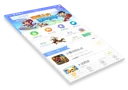
来源:vivo 官方产品页。这是官网提供的产品界面宣传图,未标注为 7.2.15.1 的界面截图。
Android 官方下载与安装步骤
- 打开 vivo 官方产品页,在左侧选择“游戏中心”,确认正文描述的是游戏内容推荐和玩家互动平台。
- 在游戏中心区域选择“点击下载”,或使用本页提供的官方 vivo CDN 安装来源。公开元数据对应的包名为
com.vivo.game,版本为 7.2.15.1;本次官方 CDN 响应头报告文件大小为 116,200,622 字节。
- 下载完成后,按照 vivo 官方安装说明,打开浏览器的下载管理,选择已下载的游戏中心安装包。核对应用名称、官方来源和设备兼容提示,再按系统显示的安装流程操作。
- 安装完成后打开游戏中心,选择需要的游戏;查看“我的游戏”时使用官方 vivo 帐号入口。部分游戏登录会提示安装 vivo 安全服务插件,是否需要以该游戏的官方流程为准。
- 官网没有列出本包的最低 Android 版本或完整机型清单。若系统显示不兼容、来源异常或安装失败,先停止安装并通过 vivo 官方帮助渠道核对设备条件。
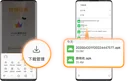
来源:vivo 官方专题安装说明。该教程图展示历史安装界面和示例文件,图中的旧文件大小不是本次版本的大小。
版本更新:7.2.15.1 与可核实的日期资料
截至 2026 年 10 月 20 日,vivo 官方专题页实际调用的公开产品元数据返回版本 7.2.15.1、版本代码 72151,对应包名 com.vivo.game。同一条记录的 date 字段为 2026-03-23 16:22:05;字段未注明时区,因此这里保留原文,不将它转换为 UTC 发布时间。
这条官方记录同时给出可匿名访问的 vivo CDN APK。通过 HEAD 核对时,服务器返回 Android 安装包类型、116,200,622 字节,以及 Mon, 23 Mar 2026 06:30:35 GMT 的 Last-Modified 响应头;Last-Modified 是服务器文件信息,不能替代官方发布说明。本次没有下载安装包正文、安装应用或核对包内签名。
已查看的产品页、安装页和元数据没有提供 7.2.15.1 的逐项修复或新增功能日志。推荐文案介绍的是产品功能,不能当作这次版本的变更列表;更新前请重新核对官方安装入口。

来源:vivo 官方公开产品元数据,截图仅裁去页面空白,未改写响应内容。
常见问题 FAQ:来源、兼容性与账号
vivo 游戏中心安卓版从哪里下载?
从 vivo 官方产品页进入“游戏中心”,或使用由该官方专题页产品数据给出的 vivo CDN APK。不要把页面上的应用商店、浏览器或互传下载项误认为游戏中心。
非 vivo 手机可以保证安装和使用吗?
不能由本次资料作此保证。官网面向 vivo 游戏玩家介绍产品,但未提供本包的完整设备清单或最低 Android 版本;应以设备安装提示和 vivo 当前官方说明为准。
为什么还会要求安装安全服务插件?
vivo 官方教程说明,部分游戏在下载后登录时可能提示安装 vivo 安全服务插件。它不是本页额外提供的下载项,应先核对提示来自官方客户端和具体游戏。
7.2.15.1 包含哪些新功能?
公开资料确认了版本和日期字段,未列出逐项更新日志,因此本页不推测具体新增功能或修复项。
下载游戏中心是否代表所有游戏免费?
不代表。已查看的公开页没有列出客户端安装费用;具体游戏、内购、礼包和活动条件应在官方对应页面中查看。
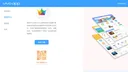
来源:vivo 官方产品页。下载时核对左侧“游戏中心”和对应产品描述。
English
Get vivo Game Center for Android from vivo. Explore games, guides and offers, follow official installation steps, and check version 7.2.15.1 before setup.
Features: game discovery, guides and community
vivo describes Game Center as a game content recommendation and interaction platform for vivo players. Its official product page combines recommendations, news, strategy communities, interaction and game management. The current official metadata also describes game coupons, new game reservations and competitive content. Conditions for offers and reservations belong to each game or activity; promotional wording does not establish that every account receives every benefit.
This download installs the Game Center client. Users then select individual games within the client. The official tutorial offers a vivo account entry to view “My games”; it does not state that every browsing feature requires sign-in.
Source: vivo official product page. This is publisher-supplied interface artwork, not a confirmed screenshot of version 7.2.15.1.
Android download and installation
- Open the official vivo product page and select the Game Center section. Confirm that its description refers to game recommendations and player interaction.
- Select its download control, or use the official vivo CDN source provided here. The public product record identifies package
com.vivo.game, version 7.2.15.1. The CDN response reports 116,200,622 bytes.
- Once the download finishes, follow the official vivo installation guide: open the browser's download manager and select the Game Center installer. Check the displayed app name, official source and compatibility notice, then follow the device's installation prompts.
- Open Game Center and choose the games you want. Use the official vivo account entry to view My games. The tutorial says some games may request vivo Security Service during sign-in; follow the specific game's official flow if it is required.
- The reviewed sources do not give a minimum Android version or a complete device list for this package. If the device reports incompatibility, an unexpected source or an installation failure, stop and check the device conditions with vivo support.
Source: vivo official installation tutorial. Its historical interface and example file sizes do not describe the current package size.
Version updates: 7.2.15.1 and the official date field
As checked on 20 October 2026, the public product metadata used by vivo's official tutorial returns version 7.2.15.1, version code 72151 and package com.vivo.game. Its date value is 2026-03-23 16:22:05. The field does not specify a time zone, so it is preserved verbatim and is not converted into a UTC release timestamp.
The same record provides an anonymously accessible vivo CDN APK. A HEAD request returned the Android package content type, 116,200,622 bytes and a Last-Modified header of Mon, 23 Mar 2026 06:30:35 GMT. Last-Modified is server file metadata rather than a release announcement. The package body was not downloaded, installed or signature-checked during this research.
The reviewed product page, tutorial and metadata do not supply an itemized changelog for 7.2.15.1. Recommendation text describes product features; it does not establish which features changed in this release. Recheck the official source before updating.
Source: vivo official product metadata. The capture is cropped to remove blank space; the response was not rewritten.
FAQ: source, device support and accounts
Where can I download vivo Game Center for Android?
Use the Game Center section of vivo's official product page, or the vivo CDN APK supplied by the official tutorial's product record. The same product page also lists App Store, Browser and EasyShare, so check the selected section.
Is installation guaranteed on non-vivo phones?
The reviewed sources do not establish that. The product is described for vivo players, and no complete device list or minimum Android version is disclosed for this package. Follow the device notice and current vivo guidance.
Why might a game request vivo Security Service?
The official tutorial says some games request that plugin at sign-in after download. It is not an additional download provided by this page. Check that the prompt belongs to the official client and the selected game.
What is new in version 7.2.15.1?
The public record confirms its version and date field, but supplies no itemized change list. Specific additions and fixes are therefore not inferred here.
Does installing Game Center make every game free?
No such claim is made by the reviewed pages. They do not list an installation charge for this client; check each game's price, in-app purchases, offers and activity conditions separately.
Source: vivo official product page. Confirm Game Center in the left navigation and its matching product description before downloading.