面向受支持 PC 游戏的免费开源模组管理器,可下载、安装、启用及整理模组。 | Free, open source mod manager for supported PC games, with mod download, installation and activation workflows.
中文
Nexus Mod Manager社区版是面向Windows的免费开源模组管理工具,可整理、安装和启用受支持游戏的模组。本页提供NMM下载来源、0.92.14更新日志、安装步骤与常见问题,帮助你区分社区维护版和旧官方客户端,核对系统依赖及文件校验值,再为已有游戏配置合适的管理流程;安装模组前建议备份存档。
NMM Community Edition 的模组管理功能
Nexus Mod Manager(NMM)把模组归档下载、安装、更新和启用管理集中在一个桌面客户端中。项目 README 介绍了下载暂停与恢复、模组启用和停用,以及配置方案管理。它适合已经拥有受支持游戏、希望整理模组文件的玩家;游戏本体、模组作者的安装说明和依赖仍需分别准备。
仓库列出的支持对象包括 Skyrim、Skyrim Special Edition、Fallout 4、Fallout: New Vegas、The Witcher 3 和 Stardew Valley 等。这个列表不能保证任意游戏版本、模组组合或存档都可兼容。实际选择时先核对游戏发行版和模组依赖,再在少量模组上验证流程,避免一次启用大量内容后难以定位冲突。
需要区分维护关系:项目 Wiki 将旧官方 NMM 客户端标为已由 Vortex 接替;本页整理的是同一项目仓库继续发布的 NMM Community Edition,由社区维护。它不是 Vortex,也不能据此推断 Nexus Mods 当前首推 NMM。
来源:0.92.14 标签内的原始产品标识与项目 README。这是产品标识,不是运行中的软件界面截图。
Nexus Mod Manager 下载与安装步骤
- 打开项目 0.92.14 发行页,核对仓库为
Nexus-Mods/Nexus-Mod-Manager,版本为 0.92.14,选择 NMM-0.92.14.exe。不要把页面上的 Source code 当成可直接安装的应用。
- 安装前备份现有模组配置和重要游戏存档。项目发布元数据显示该安装器大小为 107,228,132 字节;可将本地文件的 SHA-256 与发行页提供的
3156bf520178856a75cfa7fe08995100c700d6e7969f59f35299d3608f767b34 比对。这里引用的是发布者提供的摘要,本次未下载文件进行独立计算。
- 当前标签的项目文件目标框架为 .NET Framework 4.6.2,安装脚本也检查该依赖,允许 x86/x64,并要求管理员权限。先确认系统可满足依赖;这项源码配置不等于对所有旧 Windows 系统的实机支持保证。
- 由你决定运行安装器后,阅读许可证和版本说明,选择安装目录,并检查快捷方式与文件关联选项。脚本列出了
.NXM、nxm:、.FOMOD 和 .OMOD 关联;若已有其他模组管理器,应按自己的工作流决定由谁处理这些文件或链接。
- 完成安装后从 NMM 快捷方式或
NexusClient.exe 启动,按程序提示核对游戏位置,先导入少量已确认适用于该游戏版本的模组。启动失败时先检查依赖和项目问题页,不要靠关闭系统防护排错。
发行说明明确提示本批版本因证书过期而未完全代码签名。遇到 Windows 安全提示时,先停下核对项目来源、版本、摘要和具体提示;如果仍无法确认文件可信,就不要运行。软件源自开源仓库并不构成安全保证。
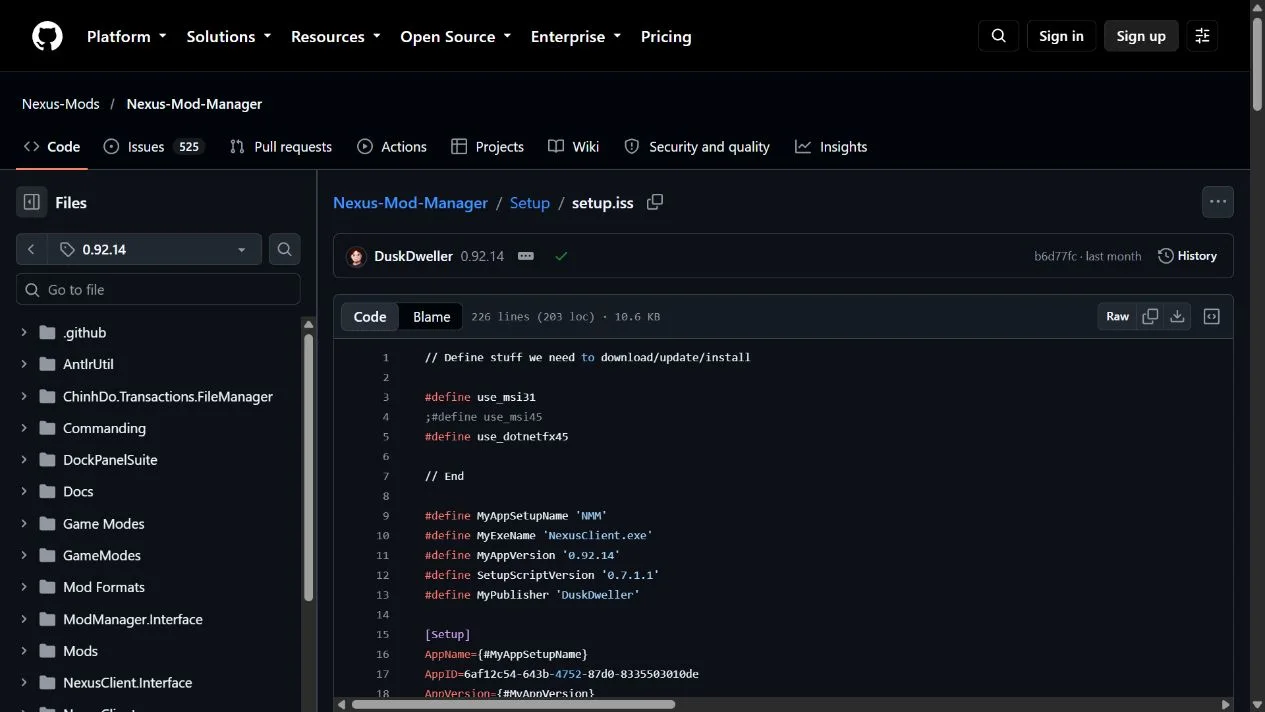
来源:版本固定的安装脚本。安装流程依据公开脚本整理,本次没有执行安装或运行程序。
0.92.14 版本更新:分类列表与排序焦点修复
截至 2026 年 10 月 20 日,项目发行页将 0.92.14 标为 Latest,GitHub 发布元数据同时确认它不是草稿或预发布版本,发布时间为 2026-09-15T08:29:08Z。本页下载项对应该版 Windows 安装器,不能用仓库最近提交时间代替版本发布时间。
0.92.14 的官方项目日志写明没有新增功能,包含以下两项修复:
- 修复在选择模组时 Category View 视图位置跳动的问题。
- 修复“Focus top row on Install Date changes”选项,使它仅在视图按 Install Date 排序时生效。
如果你正遇到分类列表跳动或安装日期排序下的焦点行为异常,这两项说明比笼统的“性能提升”更能帮助判断更新是否相关。它们不意味着所有界面问题都已解决。更新前保留配置、模组归档和存档备份,并查看发行页的签名说明。
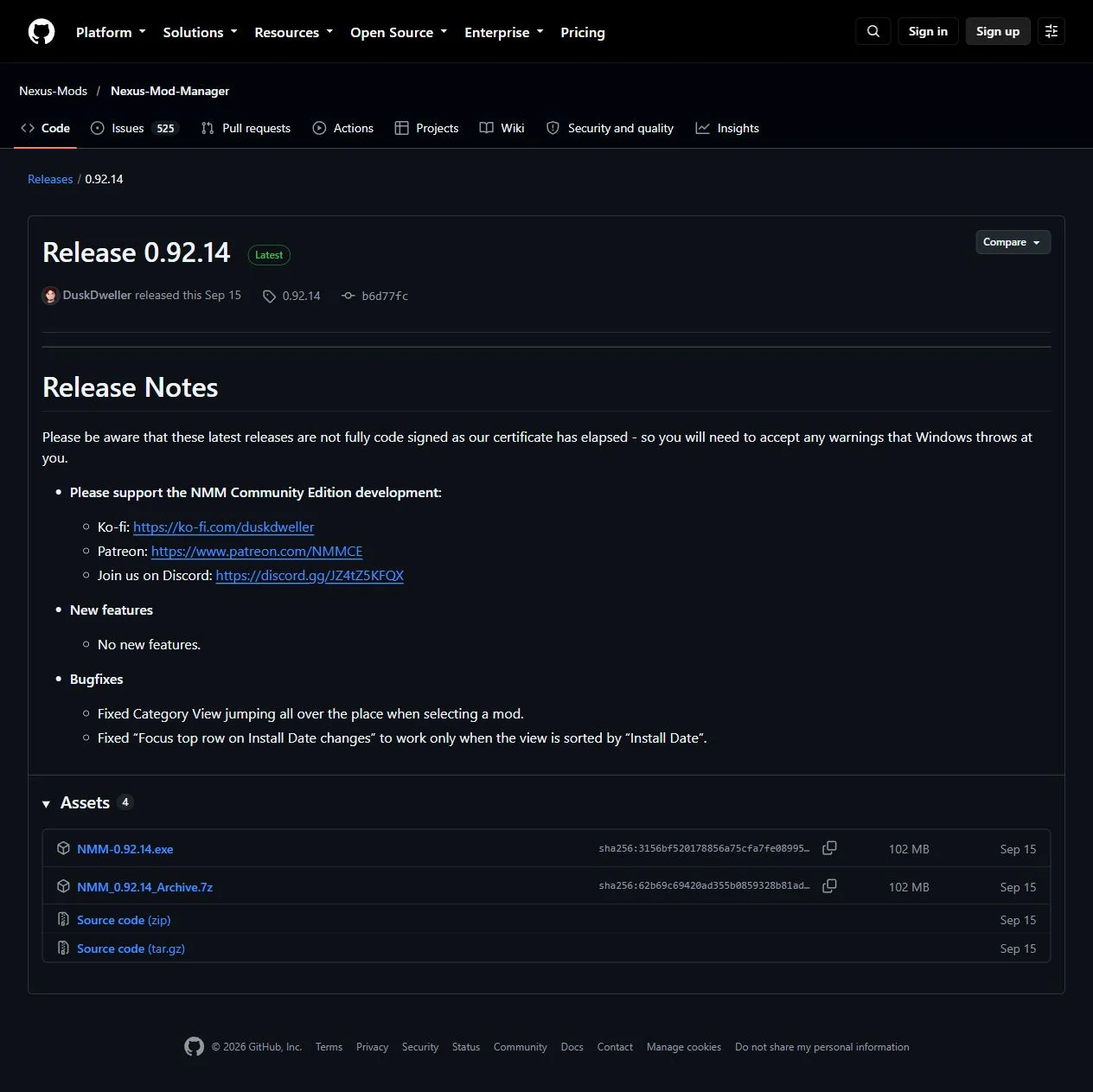
来源:0.92.14 发布说明。截图展示网页原文,不是软件界面或独立安全检测结果。
常见问题 FAQ:下载来源、启动与兼容性
Nexus Mod Manager 下载需要登录或付费吗?
本页记录的 GitHub 安装器链接在未登录状态的公开发行页中提供。项目 README 将 NMM 说明为免费开源软件,仓库许可证标注 GPL-2.0。游戏购买、模组作者的授权和 Nexus Mods 的下载服务条件另行适用,不能由 NMM 免费推断它们全部免费或无需账号。
NMM 是 Vortex 吗,现在还在维护吗?
不是。2019 年编辑的项目 Wiki 说明旧官方客户端已由 Vortex 接替;当前仓库则继续发布 Community Edition,已核实的 0.92.14 是 2026 年发行。选用时应结合现有模组配置和社区版的兼容情况,不要把旧版停更说明理解为社区版没有新发行。
下载后打不开,先检查什么?
先核对下载文件、Windows 环境与 .NET Framework 4.6.2 依赖,再记录具体错误并查项目问题页。若程序能打开但无法管理模组,继续检查游戏版本、路径和该模组的依赖;不要通过连续添加更多模组来试错。
为什么有未完整代码签名的提示,可以称为安全版吗?
发布者在该版说明中承认证书已过期,因此会出现相关警告。这里没有验证安装器内容或签名,不能给出“安全版”承诺;摘要只能帮助核对文件一致性,不能替代来源判断与风险评估。
能管理任何游戏的所有模组吗?
不能据此保证。NMM 只列出特定游戏模式,而每个模组还可能依赖游戏版本、插件或前置内容。准备 Nexus Mod Manager Community Edition 下载时,先核对受支持游戏和项目发行说明,再选择适合自己配置的版本。

来源:项目 Wiki。该页编辑日期为 2019 年,需与当前社区版发行说明一起理解。
English
Download Nexus Mod Manager Community Edition 0.92.14 for Windows. Check installation, mod management, release fixes and source details before setting it up.
NMM Community Edition mod management features
Nexus Mod Manager (NMM) brings mod archive downloads, installation, updates and activation into a desktop client. Its README describes pause and resume for downloads, enabling and disabling mod files, and using configurations and profiles. It is intended for players who already have a supported game and need to organize its mods. Game files, each mod's instructions and dependencies remain separate requirements.
The project's supported-game list includes Skyrim, Skyrim Special Edition, Fallout 4, Fallout: New Vegas, The Witcher 3 and Stardew Valley. This does not establish compatibility for every game edition, mod combination or save. Check the exact game edition and each mod's dependencies, then verify a small group before enabling a large collection that would be harder to troubleshoot.
Maintenance status matters: the project Wiki says the old official NMM client was discontinued in favor of Vortex. This page covers NMM Community Edition, which continues to receive releases in the same project repository. It is community maintained and is distinct from Vortex; its availability does not establish that NMM is Nexus Mods' current recommended manager.
Sources: original artwork in tag 0.92.14 and project README. This is product identification artwork, not a screenshot of the running application.
Nexus Mod Manager download and installation
- Open the project's 0.92.14 release page. Confirm repository
Nexus-Mods/Nexus-Mod-Manager, version 0.92.14, and asset NMM-0.92.14.exe. The automatically generated Source code archives are not application installers.
- Back up existing mod configurations and important game saves before installing. Published asset metadata reports 107,228,132 bytes. You can compare the downloaded file's SHA-256 with
3156bf520178856a75cfa7fe08995100c700d6e7969f59f35299d3608f767b34 from the release page. This is the publisher-provided digest; the installer was not downloaded or independently hashed for this research.
- The tagged project file targets .NET Framework 4.6.2. The installer script checks that dependency, permits x86/x64 and requests administrator privileges. Confirm that your system can meet the dependency. Source configuration does not establish tested support for every older Windows release.
- If you decide to run the installer, read its license and release information, choose an installation directory, and review shortcut and association options. The script lists
.NXM, nxm:, .FOMOD and .OMOD associations. If another manager is installed, choose the handler that fits your workflow.
- After installation, launch NMM from its shortcut or
NexusClient.exe, check the game location when prompted, and begin with a small set of mods confirmed for that game edition. If startup fails, check dependencies and project issues first; disabling system protection is not a troubleshooting requirement.
The release notes explicitly state that these releases are not fully code signed because the certificate has expired. If Windows shows a security warning, pause and check the repository, version, digest and exact warning. Do not run a file whose trust you cannot establish. An open source repository is not itself a safety guarantee.
Source: version-pinned installer script. These steps summarize public source configuration; no installer was executed and the application was not run.
Release 0.92.14 updates: category view and focus fixes
As checked on 20 October 2026, the project release page marks 0.92.14 as Latest. GitHub metadata confirms that it is neither a draft nor a prerelease, with publication time 2026-09-15T08:29:08Z. The download here points to that version's Windows installer. A repository's latest commit timestamp is not its release date.
The project's 0.92.14 notes state that there are no new features and list two fixes:
- Fixed Category View jumping when a mod is selected.
- Restricted “Focus top row on Install Date changes” to views sorted by Install Date.
If you encounter category-list movement or unexpected focus changes while sorting by installation date, these entries identify the specific behavior addressed. They do not imply that every interface issue is resolved. Keep configuration, mod archives and save backups before updating, and review the release's code-signing notice.
Source: 0.92.14 release notes. The image records the public webpage, not the application interface or an independent security assessment.
FAQ: download source, startup and compatibility
Does the Nexus Mod Manager download require an account or payment?
The GitHub installer is listed on a public release page while signed out. The README describes NMM as free and open source, and GitHub identifies its repository license as GPL-2.0. Game purchases, individual mod licenses and Nexus Mods service conditions apply separately. A free manager does not make every game or mod service free or accountless.
Is NMM the same as Vortex, and is it maintained?
They are different managers. The Wiki, edited in 2019, says the old official client was discontinued in favor of Vortex. The repository continues to publish Community Edition releases, including the verified 0.92.14 release from 2026. Consider existing configurations and community-edition compatibility when choosing; the historical notice does not mean community releases stopped.
What should I check if NMM will not open?
Check the downloaded file, Windows environment and .NET Framework 4.6.2 dependency, then record the exact error and consult project issues. If the application opens but a mod does not work, inspect the game edition, paths and mod dependencies. Adding more mods is not a useful way to isolate the original problem.
Why does the release mention incomplete code signing? Is it a verified safe build?
The maintainer explicitly reports an expired certificate and related Windows warnings. The installer contents and signature were not independently checked here, so this page makes no verified-safe claim. A matching digest helps establish file consistency; it does not replace source assessment or risk evaluation.
Can it manage every mod for every game?
No such compatibility is established. NMM lists specific game modes, and each mod may depend on game versions, plugins or other mods. Before a Nexus Mod Manager Community Edition download, check supported games and the project's release notes, then choose the version that fits your existing setup.
Source: project Wiki. The page was edited in 2019 and must be read alongside current community release information.