

Defender Control
Windows v2.1
Sordum Defender Control 2.1 历史便携工具:版本日志、颜色状态、停止维护与恢复限制。 / Historical Windows utility, portable setup, status colors, release notes and discontinued maintenance.
Windows
Conteúdo assistido por IA
Informações
Conheça as informações básicas do software e suas fontes
Visão geral do software
- Desenvolvedor
- Sordum Team
- Atualização
- 21 de out. de 2026
- Idiomas disponíveis
- Não informado
- Requisitos do sistema
- Historical vendor list: Windows Vista/7/8/8.1/10/11, 32/64-bit. Development discontinued; current-build compatibility not established. / 历史系统列表不代表当前构建兼容,作者已停止更新。
- Tamanho do arquivo
- Não informado
- Cliques em links de download
- 1
Licença
Freeware under Sordum terms; not an assertion of open-source licensing / Sordum免费软件条款,非开源许可声明
Fontes e verificação
- Tipo de recurso
- software
- Preço
- Vendor offers the historical utility as freeware / 厂商以免费软件形式提供历史版本
- Data de verificação das informações
- 21 de out. de 2026
- Política de privacidade
- Não informado
Mais informações do programaConsulte o nome do pacote, a soma de verificação e o SHA-256
- Nome do pacote
- Não informado
- Soma de verificação
- Não informado
- SHA-256
- Não informado
Sordum Defender Control 2.1 历史便携工具:版本日志、颜色状态、停止维护与恢复限制。 / Historical Windows utility, portable setup, status colors, release notes and discontinued maintenance.
中文
Defender Control 是 Sordum 的便携式 Windows Defender 状态管理工具,官网保留 2.1 版本,并已宣布停止更新。本文说明 Defender Control 下载来源、解压运行步骤、历史更新日志和恢复防护注意事项,帮助你了解兼容性限制,在操作前确认现有防护、备份与恢复方案。
Defender Control 下载前:先了解停止维护状态
Defender Control 由 Sordum 发布,作用是查看并切换 Microsoft Defender 状态;它不是杀毒软件,也不会提供替代防护。官网仍展示便携版 2.1,但 Sordum Team 在 2022 年 10 月 4 日的置顶回复中明确表示不再更新,并提到部分用户遇到关闭后无法重新开启 Defender 的问题。
因此应把它视为历史系统工具,不能将旧网页的支持系统列表理解为对今天所有 Windows 构建的兼容保证。涉及单位管理、设备策略或已有安全软件时,先按照设备管理员与安全软件厂商的文档处理;不要用状态切换工具代替故障诊断或权限管理。
状态颜色与实际防护:界面提示需要复核
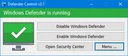
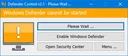
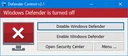
官方说明绿色表示 Microsoft Defender 正在运行,红色表示关闭,橙色可能表示无法启动或实时防护关闭。颜色可以帮助理解工具的反馈,但不能代替 Windows 安全中心、安全服务和其他防护软件的实际状态检查。
关闭 Defender 会改变系统防护状态;若没有其他有效防护,电脑可能失去相关实时保护。不要仅为加速复制、解决下载提示或安装来源不明的软件而关闭防护,也不要把官网“误报”的说法当作独立安全检测结果。先核对问题与软件来源,再决定是否需要使用此类工具。
Defender Control 便携版安装与首次运行步骤
- 打开 Sordum 官方产品页,阅读 2.1 版本说明和作者停止更新的回复,再决定是否需要该历史工具。
- 如确需获取,使用页面指向的 官方下载落地页,核对文件及产品名称。本文未下载、执行或扫描程序,所列入口不是已检测的安装包。
- 官网介绍的是便携程序:将压缩包解压到独立目录,再运行其中的程序。运行前确认文件来源、现有防护和恢复方案;出现安全检测告警时先核查,不自动添加排除项或关闭系统防护。
- 首次查看状态后,可与 Windows 安全中心核对。若涉及状态调整,先记录原状态,确保有适合该系统的恢复办法;对不受支持或受管理的设备,向管理员或厂商寻求帮助。
官网说明启用按钮后可重启并等待系统重新激活 Defender,但置顶回复也记录了恢复失败投诉,故不能保证这个流程在当前系统一定有效。已有恢复问题时应先使用官方系统修复与支持渠道,避免连续尝试不同“永久关闭”工具。
Defender Control 2.1 更新日志与兼容性边界
官网版本段落明确列出 2.1 的更新日期为 2022 年 3 月 1 日,改动为采用不同的阻止方式及代码改进。文章页头还包含更早发表时间和后续页面修订信息,它们不是新的应用版本。没有来源证明这些页面日期代表 2.1 之后的发行版。
历史支持列表包括 Windows Vista、7、8、8.1、10、11 的 32/64 位系统;这属于厂商当时的声明,不代表逐个验证了当前版本。作者后来宣布停止更新,应同时考虑这一维护状态。本文不将“永久有效”、性能提升或安全保证作为可证实结果。
常见问题 FAQ:安全提示、打不开与恢复防护
Defender Control 本身能保护电脑吗?
不能。它是状态管理工具,不是防病毒引擎。判断当前防护应查看系统安全中心及实际安装的安全产品,避免只依据该工具的一项状态提示。
为什么下载或运行会被安全软件拦截?
这类工具会改变安全组件行为。厂商对误报的解释不能替代独立判断;保留告警信息,核对来源与文件,在不确定时停止运行并向安全厂商求助。本文不建议为消除告警而自动加白。
关闭后无法重新启用怎么办?
官网提到启用后重启并等待,但作者也承认存在恢复失败投诉。先核对 Windows 安全中心和设备策略,记录系统版本及错误,再联系微软、设备管理员或相关安全软件支持。不要假定重复点击就能恢复。
Windows 11 上还能使用吗?
历史页面列出 Windows 11,作者已停止更新,不能据此承诺当前构建兼容。进行 Defender Control 下载前先评估维护状态与恢复能力;当前任务如果只是查看防护状态,可先通过 Windows 自带安全界面检查。
English
Defender Control 2.1 download guide: review Sordum’s portable Windows utility, discontinued support, setup, status colors, release notes and recovery cautions.
Defender Control download: discontinued maintenance matters
Defender Control is a Sordum utility for viewing and switching Microsoft Defender status. It is not antivirus software and supplies no replacement protection. The official page still presents portable version 2.1. In a pinned October 4, 2022 reply, Sordum Team states that the program will no longer be updated and acknowledges reports of Defender failing to re-enable after being turned off.
Treat it as a historical system utility. An old supported-OS list is not proof of compatibility with every current Windows build. On managed devices or systems using another security product, follow the administrator's and security vendor's guidance instead of using a switching utility as a substitute for diagnosis or policy management.
Status colors and actual protection require separate checks
Sordum describes green as Defender running, red as disabled, and orange as Defender unable to start or real-time protection off. These indicators help interpret the utility but do not replace checks in Windows Security, system services and any other installed security product.
Turning Defender off changes system protection. Without another effective security product, relevant real-time defenses may be absent. Do not disable protection simply to speed up copying, suppress a download warning or install an unverified program. The developer's false-positive explanation is not an independent security assessment; investigate the source and problem before deciding whether this utility is appropriate.
Portable installation and initial inspection steps
- Open the official Sordum product page, read the 2.1 notes and the pinned discontinuation reply, and assess whether this historical utility is needed.
- If appropriate, follow its official download landing page and confirm the product and filename. This guide has not downloaded, executed or scanned the program; the landing page is not an independently verified package.
- Sordum describes a portable program: extract the archive into its own folder before running it. Check the source, current protection and recovery options first. Investigate security alerts instead of automatically adding exclusions or disabling defenses.
- Compare the displayed status with Windows Security. Before any status change, record the previous state and establish a recovery method for the particular system. Consult support or an administrator for unsupported or managed devices.
The developer suggests enabling Defender and rebooting, then allowing time for activation. Its pinned reply also acknowledges recovery failures, so this is not a guaranteed procedure on current systems. If recovery is already failing, use the relevant Windows repair and support channels instead of repeatedly trying different permanent-disable utilities.
Defender Control 2.1 release notes and compatibility limits
The explicit 2.1 release-note section is dated March 1, 2022. It lists a different blocking method and code improvements. Earlier article publication and later page-edit dates identify changes to the webpage; they do not prove a subsequent application release.
The historical vendor list names Windows Vista, 7, 8, 8.1, 10 and 11 in 32-bit and 64-bit variants. That is a vendor statement from the product's history, not fresh testing of every present build. Read it alongside the later discontinuation announcement. Permanent effectiveness, performance gains and unconditional safety are not established here.
FAQ: alerts, launch problems and restoring protection
Does Defender Control protect the computer itself?
No. It manages status and does not provide an antivirus engine. Use Windows Security and the installed security product to assess actual protection instead of relying on one indicator.
Why might a security product block it?
The utility changes security-component behavior. A developer's false-positive claim does not settle the assessment. Retain the alert, verify the source and file, and consult the security vendor if uncertain. Automatically allowlisting the program is not advised here.
What if Defender will not re-enable afterward?
The vendor suggests enabling and rebooting but also records recovery-failure complaints. Check Windows Security and device policy, record the build and errors, and seek Microsoft, administrator or security-vendor support. Repeated clicks do not establish a recovery plan.
Does it work on current Windows 11 builds?
The historical page lists Windows 11, but development has stopped. This does not establish present compatibility. Before Defender Control download, assess maintenance and recovery limits. If you only need to inspect protection status, start with Windows' built-in security interface.
Plataformas e requisitos do sistema
- Windows
- Historical vendor list: Windows Vista/7/8/8.1/10/11, 32/64-bit. Development discontinued; current-build compatibility not established. / 历史系统列表不代表当前构建兼容,作者已停止更新。
Fontes e verificação
Informações verificadas em: 21 de out. de 2026
Publicado pela primeira vez: 21 de out. de 2026· Revisão editorial: 21 de out. de 2026
Recursos semelhantes

DownKyi(哔哩下载姬)停维与历史版本说明
DownKyi(哔哩下载姬)曾是 Windows 视频下载工具,官方仓库现已宣布永久停止维护。本页说明 DownKyi 下载来源、1.6.1 历史更新与安装前核对要点,帮助你识别同名项目和旧版资料。最后核验发行来自 2023 年,不能据此保证当前服务兼容;新装或解析失败时,应先确认停维公告、内容授权与官方观看方式。

FolderMove
FolderMove 3.0 通过移动应用或游戏目录并在原路径创建符号链接来调整文件存储位置。本页说明 Windows 与 .NET 要求、便携运行、个人非商业许可、迁移备份和目标不可访问时的检查;官网未列逐项更新日志。 FolderMove portable setup, symbolic-link and recovery-preparation guide.
Populares nesta categoria
Ver todos
X-Mouse Button Control
XMBC 鼠标映射:Windows安装、应用配置与层、2.20.5修复、五键限制和重复输入排查。 / XMBC setup, application profiles and layers, v2.20.5 fixes, five-button limits and repeat troubleshooting.

Armoury Crate
Armoury Crate 设备管理与 Aura Sync 下载指南:核对华硕机型、Windows 安装要求、应用6.4.7及不同安装包版本。 ASUS device controls, lighting, official setup and version checks.

DS4Windows
DS4Windows 是 Windows 手柄映射与虚拟控制器工具。本页整理 DS4Windows 3.5 社区延续版、DualShock/DualSense 配置、安装依赖和双输入排查。 / DS4Windows maps gamepad input and creates virtual controllers on Windows. This guide covers the v3.5 community continuation, setup, profiles, and duplicate-input troubleshooting.
JoyToKey
JoyToKey 手柄映射工具:Windows 安装与 ZIP 设置、7.4 命令输入、配置迁移和共享软件许可说明。 / Windows controller mapping guide covering setup, version 7.4 commands, profile migration and shareware licensing.

FurMark
FurMark 显卡压力测试与基准工具指南,介绍官方下载和平台选择、安装准备、测试条件记录、版本更新,以及打不开、画面异常和分数差异的排查思路。 FurMark GPU stress test guide with official setup, version notes, controlled comparisons and practical FAQs.

驱动总裁(SysCeo Windows 驱动管理工具)
SysCeo 驱动总裁 Windows 在线版本 2.21.0.0,官方页面日期为 2026-09-15,列出桌面与 PE 驱动安装、在线和离线驱动库及 Boot Camp 匹配。本页整理页面更新说明、安装前硬件核对、系统还原准备和 MD5 的用途;下载入口只链接官方产品页,不提供站外文件直链。 / SysCeo lists Windows 2.21.0.0, desktop and PE use, online/offline libraries and Boot Camp matching. This guide explains release notes and cautious setup; the download entry links only to official product information.
Encontrou informações incorretas ou um link com problema?Ajude-nos a melhorar