XMBC 鼠标映射:Windows安装、应用配置与层、2.20.5修复、五键限制和重复输入排查。 / XMBC setup, application profiles and layers, v2.20.5 fixes, five-button limits and repeat troubleshooting.
中文
X-Mouse Button Control 是 Windows 鼠标按键映射工具,可按应用配置快捷键、滚轮动作与操作层。本文整理 X-Mouse Button Control 下载安装步骤、2.20.5 更新日志,以及侧键无效、配置切换和重复输入的排查,帮助你保留基础点击,再逐项设置,确认鼠标驱动提供的标准按钮信号。
X-Mouse Button Control 下载前:应用配置与按钮信号
X-Mouse Button Control(XMBC)由 Phillip Gibbons 开发,是 Windows 鼠标映射工具,与鼠标或轨迹球厂商没有隶属关系。它可为应用或窗口建立配置,把鼠标按钮、滚轮或倾斜滚轮分配为模拟按键、剪贴板、音量或其他动作;每个配置最多可设置十层不同映射。默认配置切换与鼠标移入指定应用、窗口或区域有关,不能只用“当前前台程序”解释所有切换行为。
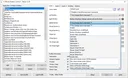
程序依赖 Windows 标准鼠标消息,最多处理五个鼠标按钮,并非适用于任意数量的游戏鼠标按键。若第四、第五键原本就没有提供系统标准信号,仅安装 XMBC 不一定能让它们被识别;应先确认硬件和原厂驱动的配置方式。
X-Mouse Button Control 安装步骤:先做单一应用映射
- 打开 XMBC 官方页面,选择 Latest version 安装包,或 Portable version ZIP。当前稳定入口对应 2.20.5;程序源代码组件列表与完整应用安装包不是同一对象。
- 安装包会自动选择 x64 或 x86 版本,按向导完成即可。便携包应完整解压到可写文件夹后启动。官网当前支持 Windows 10、11 和所列 Windows Server 图形界面版本;虽然提到更老系统可能运行,也明确属于不再支持的环境。
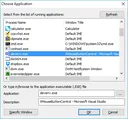
- 在主窗口先保留 Default 的基础左右键行为,使用 Add 选择一个常用应用。可从运行中的进程列表选择,也可指定其 EXE 路径;不要误选同一软件的启动器或更新程序。
- 仅对该应用修改一个不影响基础点击的按钮,应用设置后在目标窗口检查。确认映射和切换行为,再逐项添加滚轮、模拟键或其他层,保留可用配置。
官网说明安装后会配置为登录 Windows 时自动运行;如果不需要,可在 Windows 启动应用或任务管理器的启动项中核对。设置错误时,应先恢复有问题的单个映射,而不是继续叠加更多规则。
X-Mouse Button Control 2.20.5 更新日志:中止与重复输入
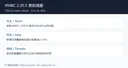
官方日志将 2.20.5 记为 2023 年 6 月 24 日。该版修复 WAIT、WAITMS、HOLD、HOLDMS 即使使用 flush 队列仍无法中止的问题;修复粘滞重复模拟按键被其他按钮释放或中止后不能正常工作的情况;修复音量减小 VOL- 失效而 VOL+ 仍可用的问题。另有一项是尝试解决重复计时线程与主鼠标钩子线程的死锁冲突,应保留“尝试修复”的范围,不能宣称彻底消除了所有卡死。
官网页面的页脚更新时间、版权年份与软件发布日期不同。本文以 Change Log 的具体版本为更新依据;下载入口通过 HEAD 元数据确认指向 2.20.5 文件,但没有下载或执行安装器。
X-Mouse Button Control 常见问题 FAQ:侧键、切换与重复
侧键没有反应,是映射规则没写好吗? 先在浏览器中检查第四、第五键是否能产生通常的后退、前进动作,并核对原厂驱动是否把按键改成了专有功能。官网说明 XMBC 依赖标准按钮消息,超过五键或未提供标准信号的按钮不能仅靠添加规则解决。
为什么鼠标移到别的区域后映射变了? 检查应用、窗口或区域匹配条件,以及当前层。官网说明默认会随鼠标移动激活匹配配置;若只想影响某个程序,应检查 EXE、窗口条件和全局配置,避免把动作设进 Default 后影响其他软件。
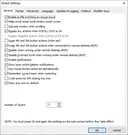
重复点击或模拟按键停不下来怎么办? 先检查是否用了 Repeat、Sticky、Button Held 或 Button Chording 等持续动作,查看当前中止方式和全局旁路设置。2.20.5 修复特定中止、重复状态问题,不代表所有重复动作都会自动在松手时结束;首次应只配置一个简单动作。
这是鼠标固件或厂商驱动吗? 不是。XMBC 通过 Windows 消息映射现有输入,不会因此增加鼠标硬件按钮数量,也不提供 macOS 或 Linux 安装版。原厂专有按键仍可能需要厂商自己的配置软件。
免费是否意味着开源,是否需要购买激活码? 官网说明任何人可以免费安装使用,并列出其引用的开源组件,但这不能推导完整 XMBC 应用采用开源许可证。正常官方安装不需购买激活码;本页也没有对程序做签名或安全扫描。
完成 X-Mouse Button Control 下载后,从单一应用、单个按钮开始,先保留基础点击,再检查匹配条件和层。这样更容易判断问题来自设备信号、应用配置还是持续输入规则。
English
X-Mouse Button Control download guide: remap Windows mouse buttons, set application profiles, review v2.20.5 fixes, and troubleshoot side buttons and repeats.
Before downloading X-Mouse Button Control: profiles and button signals
X-Mouse Button Control (XMBC) by Phillip Gibbons remaps mouse input on Windows and is not affiliated with a mouse or trackball manufacturer. Application or window profiles can assign buttons, wheel movement, or tilt input to simulated keys, clipboard commands, volume, and other actions. A profile can have up to ten mapping layers. By default, profile activation follows the mouse moving over a defined application, window, or region; foreground-application selection alone does not explain every switch.
XMBC depends on standard Windows mouse messages and handles up to five buttons, not every button on an arbitrary gaming mouse. If buttons four and five do not provide standard messages, installing XMBC may not make them recognizable. Check the device and its vendor configuration first.
How to install X-Mouse Button Control and start with one profile
- Open the official XMBC page and select Latest version for setup or Portable version for a ZIP. The current stable routes correspond to v2.20.5. A list of source components is not the complete application installer.
- The installer selects x64 or x86 automatically; follow its wizard. Fully extract a portable ZIP into a writable folder before starting it. Current support lists Windows 10, 11, and specified GUI Windows Server editions. Older systems are described as potentially working but unsupported.
- Keep basic left- and right-click behavior in Default. Use Add to select one application from running processes or specify its EXE path. Avoid selecting an updater or launcher instead of the actual target program.
- Change just one button that does not interfere with basic clicking, apply the setting, and check the target window. Add wheel actions, simulated keys, and extra layers only after confirming the mapping and switching behavior. Keep a working profile.
The publisher says setup configures XMBC to run at Windows logon. Review Windows Startup Apps or Task Manager's startup section if that is not wanted. When a setting behaves unexpectedly, restore the individual mapping before adding further rules.
X-Mouse Button Control 2.20.5 release notes: aborting and repeats
The official change log dates v2.20.5 to June 24, 2023. It fixes WAIT, WAITMS, HOLD, and HOLDMS being impossible to abort even with a flush queue; sticky repeated simulated keys failing after another button releases or aborts them; and volume-down VOL- stopping while VOL+ continues. It also attempts to fix a deadlock conflict between a repeat-timer thread and the main hook thread. That wording is narrower than a guarantee that every lockup is eliminated.
The site's page-update footer and copyright year are separate from the program release date. This guide uses the versioned Change Log. HEAD metadata confirmed that the official download routes resolve to v2.20.5 files; no installer body was downloaded or executed.
X-Mouse Button Control FAQ: side buttons, switching, and repeats
Why does a side button do nothing? Check whether buttons four and five produce the usual Back and Forward behavior in a browser, and whether the vendor driver assigned proprietary actions. XMBC relies on standard button messages. Extra buttons beyond five or a missing standard signal cannot necessarily be fixed by adding another mapping.
Why does an action change when I move the mouse elsewhere? Review application, window, or region matching and the current layer. The publisher describes default activation by mouse movement. Check the EXE, window condition, and global profile if an action should affect only one program; placing it in Default can affect other applications.
What should I check for repeated clicks or keys that keep running? Review Repeat, Sticky, Button Held, or Button Chording actions and their abort behavior, plus any global bypass settings. The v2.20.5 fixes address particular repeat and abort states; they do not mean every continuous action automatically ends when a button is released. Begin with one simple assignment.
Is XMBC firmware or a vendor mouse driver? No. It maps existing Windows input and does not add physical buttons or supply a macOS or Linux application. Proprietary vendor buttons may still require the manufacturer's configuration software.
Does free use mean the entire application is open source? The publisher allows anyone to install and use XMBC free of charge and lists open-source components. That does not establish an open-source license for the whole application. No paid activation code is needed for normal official setup; signatures and security scans were not checked for this guide.
After choosing an X-Mouse Button Control download, begin with one application and one button, preserving basic clicks before checking profile matching and layers. This makes device signals, application rules, and continuous-input settings easier to distinguish.