

Watt Toolkit
Windows v3.1.0macOS v3.1.0Linux v3.1.0GPL-3.0
Watt Toolkit(原 Steam++)是面向 Steam 相关任务的开源跨平台工具箱,包含网络、账号、库存和令牌功能。 / Formerly Steam++, Watt Toolkit is an open-source cross-platform toolbox for Steam-related network, account, library, and token tasks.
LinuxmacOSWindows
Aliasse: Steam++ (Watt Toolkit)、SteamTools、Steam++v3.0.0-rc.13、Steam++Win版本、steam++工具箱v2.8.6、Steam++3.0.1119.0、Steam++3.0.0、Steam++3.0.0-rc.11、Steam++3.0.919.0、Steam++ v2.6.7、Watt Toolkit加速器3.0.1019.0、Watt Toolkit加速器7.30.1300.0、Steam++v3.0.0-rc.14、Watt Toolkit3.0.808.0、Steam++v3.0.0-rc.16、Steam++旧版本、Watt Toolkit加速器7.30.1306.0
KI-gestützte Inhalte
Informationen
Erfahre mehr über die Software und ihre Quellen
Softwareübersicht
- Entwickler
- BeyondDimension
- Aktualisiert
- 19. Okt. 2026
- Unterstützte Sprachen
- Nicht angegeben
- Systemanforderungen
- Nicht angegeben
- Dateigröße
- Nicht angegeben
- Download-Link-Klicks
- 5
Lizenz
GPL-3.0
Quellen und Prüfung
- Ressourcentyp
- software
- Preis
- 未披露 / Not disclosed
- Datum der Informationsprüfung
- 19. Okt. 2026
- Datenschutzerklärung
- Nicht angegeben
Weitere SoftwareinformationenPaketnamen, Prüfsumme und SHA-256 anzeigen
- Paketname
- Nicht angegeben
- Prüfsumme
- Nicht angegeben
- SHA-256
- Nicht angegeben

Watt Toolkit(原 Steam++)是面向 Steam 相关任务的开源跨平台工具箱,包含网络、账号、库存和令牌功能。 / Formerly Steam++, Watt Toolkit is an open-source cross-platform toolbox for Steam-related network, account, library, and token tasks.
中文
Watt Toolkit(原名 Steam++)3.1.0 是跨平台的 Steam 工具箱,提供网络加速、账号切换、库存管理与本地令牌等功能。本文介绍 Windows、macOS 和 Linux 版本选择、官方安装包校验、更新要点及常见故障;网络效果因服务状态和线路而异,令牌数据应妥善保护,并附平台兼容核对。
功能与特点
官方 README 将 Watt Toolkit 称为原名 Steam++ 的开源跨平台游戏工具箱,并说明多数功能需要先安装 Steam。功能包括网络加速、已登录过的 Steam/Epic/Uplay 账号切换、库存与成就管理、云存档,以及本地令牌工具。网络加速使用本地反向代理等机制,结果受目标服务、地区和网络线路影响;账号与令牌数据属于敏感信息,应先了解功能并妥善保护。插件也可能需要单独启用。 官方仓库截图显示的是 v3.0.0-preview.3 界面,只作功能示例,不能当作 3.1.0 的当前界面。
安装方法
- 从 Watt Toolkit 官网或 BeyondDimension/SteamTools 的官方 v3.1.0 Release 选择对应系统的发行包。
- Windows 10 1809 及以上或 Windows 11 可选
win_x64.exe;若使用win_x64.7z,先解压到本地目录。Linux 下载 x64.tgz,macOS 下载.dmg,不要跨系统使用安装包。 - 下载后按文件名在官方 Release 校验对应 SHA-256:Windows
.exe为edac49338697ea4f3ebc0b5badc7ddaa91eb1bf0c97ed16f4cba37f8d543b911,.7z为74d0eb1fd67e8eb0914a9962244fc4251993061df77e6e6c0dfe8a4a899d5ae4。 - macOS、Linux 版本也应选择匹配的发行文件,并遵循系统的打开或解压流程;首次使用需要 Steam 的功能前,先安装 Steam 客户端。
- 若安装或启动失败,检查系统版本、架构、文件完整性和安全提示;不要为了消除警告而关闭系统防护或盲目添加白名单。
版本与更新
官方 GitHub 将 3.1.0 标为 Latest,发布日期为 2026-03-12。更新说明包括修复 Epic 账号切换失效、动图渲染、加速关机弹窗、启用加速脚本后 GitHub 页面无法打开,以及新版 Steam 成就数据造成的加载问题;升级 .NET 10 与 Avalonia 11.3.12,为库存编辑加入导入、导出和备份,并增加 Steam 挂卡黑名单。榜单里的 3.0.0-rc.13 是旧预发布版本,不应替代此稳定版记录。
常见问题 FAQ
Watt Toolkit 和 Steam++ 是两个软件吗? 不是。官方 README 明确写明 Watt Toolkit 是 Steam++ 的新名称;两种名称对应同一项目。
使用 Watt Toolkit 必须安装 Steam 吗? 官方说明多数功能需要 Steam 客户端。Watt Toolkit 本身不是 Steam 商店或游戏客户端,也不包含游戏文件。
网络加速能保证游戏下载更快吗? 不能保证。效果随目标服务、地区、线路和本机设置变化,遇到问题时可恢复原设置并逐项排查。
SHA-256 匹配能证明文件绝对安全吗? 不能。摘要用于核对文件字节是否与发布页一致,不等于恶意软件检测或独立安全审计。
如何减少账号风险? 仅启用需要的功能,保护令牌与备份,不在不可信设备上保存认证数据。
English
Watt Toolkit, formerly Steam++, is a cross-platform Steam toolbox. This guide covers v3.1.0 packages, setup and token safety for Windows, Linux and macOS.
Features
The official README identifies Watt Toolkit as the former Steam++ and describes it as an open-source cross-platform game toolbox; most features require Steam to be installed. Listed tools include network acceleration, switching among accounts already used on the PC, library and achievement management, cloud saves, and local-token features. Acceleration uses mechanisms such as a local reverse proxy, so results depend on the target service, region and route. Account and token data are sensitive, and some plugins may need to be enabled separately. The repository screenshot shows v3.0.0-preview.3 and is only a feature example, not a view of the current 3.1.0 interface.
Installation
- Choose the matching package from the Watt Toolkit website or the official BeyondDimension/SteamTools v3.1.0 release.
- For Windows 10 version 1809 or later and Windows 11, select
win_x64.exe; extractwin_x64.7zbefore using it. Linux uses the x64.tgz, and macOS uses the.dmg. Do not substitute files across operating systems. - Match the downloaded filename to its SHA-256 on the official release page. The Windows
.exedigest isedac49338697ea4f3ebc0b5badc7ddaa91eb1bf0c97ed16f4cba37f8d543b911; the.7zdigest is74d0eb1fd67e8eb0914a9962244fc4251993061df77e6e6c0dfe8a4a899d5ae4. - For macOS and Linux, use the package for that system and follow its normal opening or extraction flow. Install the Steam client before using features that depend on it.
- If setup or startup fails, check the OS version, architecture, file integrity and security notice. Do not disable endpoint protection or blindly whitelist a file to dismiss an alert.
Updates
The official GitHub page marks 3.1.0 as Latest, released on 2026-03-12. Its notes list fixes for Epic account switching, animated-image rendering, an acceleration-related shutdown dialog, GitHub pages failing when an acceleration script is enabled, and loading with the newer Steam achievement format. The release upgrades .NET to 10 and Avalonia to 11.3.12, adds import/export/backup to inventory editing, and adds a Steam card-farming blacklist. The ranking’s 3.0.0-rc.13 is an older pre-release, not the current stable release.
FAQ
Are Watt Toolkit and Steam++ separate apps? No. The official README says Watt Toolkit is the new name for Steam++; both names refer to the same project.
Do I need Steam installed? The publisher says most features require the Steam client. Watt Toolkit is not the Steam store or game client, and it does not include game files.
Will network acceleration guarantee faster downloads? No. Results vary with the service, region, route and local settings. Restore the previous setting and troubleshoot one change at a time.
Does a matching SHA-256 prove a file is completely safe? No. It checks whether file bytes match the digest on the release page; it is not a malware scan or independent security audit.
How can I reduce account risk? Enable only the features you need and protect tokens and backups. Avoid storing authentication data on an untrusted device.
Plattformen und Systemanforderungen
- Windows
- Systemanforderungen nicht angegeben
- macOS
- Systemanforderungen nicht angegeben
- Linux
- Systemanforderungen nicht angegeben
Quellen und Prüfung
Informationen geprüft am: 19. Okt. 2026
Erstmals veröffentlicht: 19. Okt. 2026· Redaktionelle Überarbeitung: 19. Okt. 2026
Ähnliche Ressourcen
TeamSpeak
TeamSpeak 是面向游戏、团队、商务和社群的语音通信平台,官方介绍包含消息交流与服务器管理。本条目对应官方列出的 Windows 64 位 TeamSpeak 3 3.6.2。

Snipaste
Snipaste 是适用于 Windows、macOS 和 Linux 的截图、标注与贴图工具。页面整理官方 2.11.3 版本、系统包型、F1/F3 使用步骤和授权区别。 / Snipaste captures, annotates, and pins images on Windows, macOS, and Linux. This guide covers official version 2.11.3, package types, F1/F3 workflow, and licensing.

Aerion
Aerion 是面向 Linux、macOS 与 Windows 的开源邮件客户端,通过 IMAP/SMTP 连接邮箱。查看 v0.3.5 官方下载、平台依赖、首次设置和功能限制。

Signal Desktop
Signal Desktop 是 Signal 的电脑端消息应用,可与 Android 或 iOS 手机端配对后在 Windows、macOS 和 Linux 上收发消息;首次使用前需先在手机安装 Signal。

Zed
Zed 是适用于 macOS、Windows 和 Linux 的代码编辑器,提供项目浏览、代码编辑、Git、调试、多人协作与可选 AI 功能。本文整理稳定版 v1.24.2、授权、价格和系统前提。

OneKeePass
OneKeePass 是支持 Windows、macOS 与 Linux 的 KeePass 兼容密码管理器,可管理 KDBX 4.x 数据库、密码、TOTP 与自定义条目;查看 v0.27.0 更新和官方安装来源。
Beliebt in dieser Kategorie
Alle ansehen
NatTypeTester
NatTypeTester 是用于检测 STUN NAT 映射与过滤行为的开源工具,10.0.10 提供 Android、Windows、macOS 和 Linux 发行包。 | NatTypeTester checks STUN NAT mapping and filtering, with 10.0.10 packages for Android, Windows, macOS and Linux.
Neat Download Manager
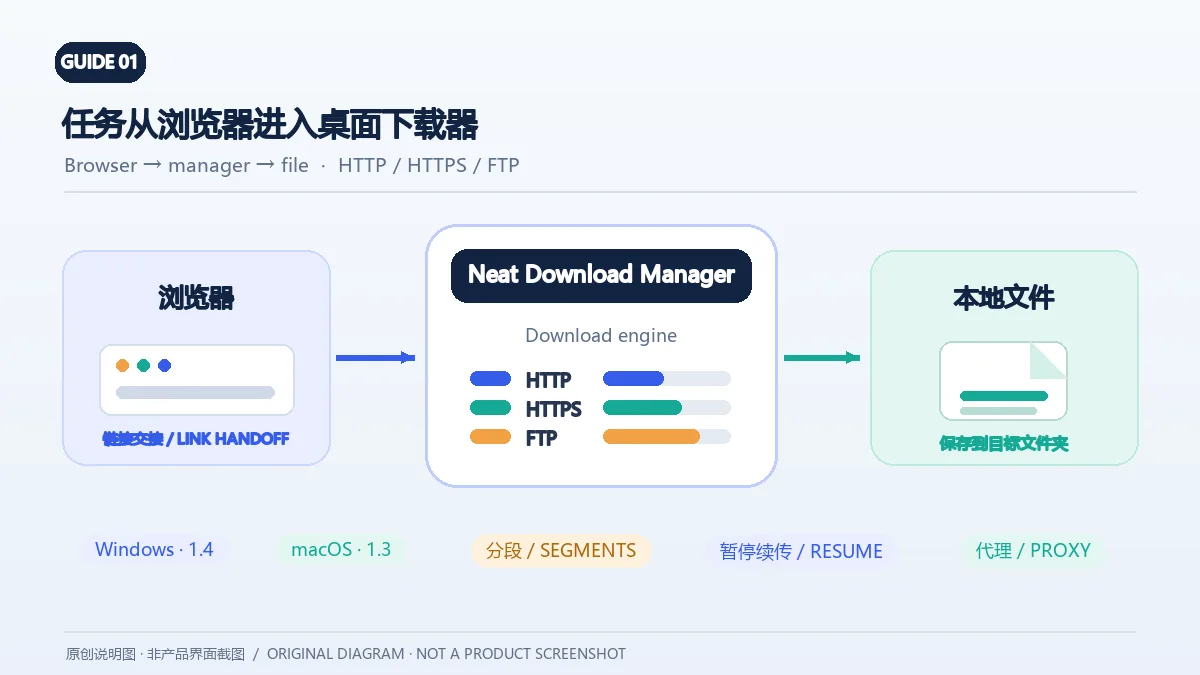
Neat Download Manager(NeatDM)是 Windows 与 macOS 桌面下载管理器,可管理链接任务、分段连接、代理、暂停续传和浏览器扩展。本文核对官网列出的 Windows 1.4 与 macOS 1.3,并说明版本日志、系统要求和安装包仍有哪些信息未公开。 / Neat Download Manager (NeatDM) is a Windows and macOS desktop download manager for browser handoff, segmented transfers, proxies, and pause/resume. This guide checks the publisher-listed versions and explains installation, compatibility, and missing desktop release notes.

qBittorrent
qBittorrent 是开源 BitTorrent 客户端,支持磁力链接、RSS、搜索和 Web UI。本页整理 Windows 10+ 稳定版 5.2.4、macOS/Linux 平台差异、安装核对与版权提醒。 / qBittorrent is an open-source BitTorrent client with magnet, RSS, search and Web UI features. Review stable v5.2.4, platform differences, setup checks and lawful use.
腾讯手游加速器
腾讯手游加速器由深圳市腾讯计算机系统有限公司开发和运营。应用宝详情介绍网络加速、游戏相关辅助信息、预约与战绩数据等功能;支持情况以当前应用详情为准。

奇游加速器 Qiyou
奇游 Windows 官方下载、安装步骤、区服选择与会员条件,保留7.3.0文件标识和官网页脚差异。 / Official Windows download, installation, route checks and membership terms with explicit version-evidence limits.

迅猛兔加速器
迅猛兔加速器 Android 来源、网络模式、安装、版本与FAQ。 / Xunmengtu Android source, network modes, installation, version record, and FAQs.
Falsche Angaben oder einen defekten Link gefunden?Hilf uns, die Website zu verbessern