
网络连不上时的 DNS 与连接诊断
从 DNS、hosts、网络配置和 NAT 类型等角度检查连接问题。收录Complete Internet Repair、DNS Jumper(DNS 切换工具)、NatTypeTester等站内已有工具,按实际用途选择适合自己的应用。

UsbEAm Hosts Editor 是 Dogfight360 提供的 Windows、macOS 与 Linux hosts 规则工具,支持节点检测、规则选择和 hosts 备份。本页核对 v5.0.1 官方安装包与更新记录,说明安装、恢复和常见连接问题。 / UsbEAm Hosts Editor is Dogfight360's Windows, macOS and Linux hosts utility for endpoint checks, rule selection and backup. Review v5.0.1 packages, setup, rollback and connection troubleshooting.
별칭: UsbEAm Hosts Editor [多平台hosts修改]、UsbEAm Hosts Editor V5.0.1
작성자: RJ.tools Editorial
AI 지원 콘텐츠
소프트웨어의 기본 정보와 출처를 확인하세요
The reviewed publisher page does not state a formal software license.
This guide did not download, run, signature-check or scan the packages. Hosts mappings can affect name resolution for other applications on the device; review each change and keep a restorable backup.
UsbEAm Hosts Editor 是 Dogfight360 提供的 Windows、macOS 与 Linux hosts 规则工具,支持节点检测、规则选择和 hosts 备份。本页核对 v5.0.1 官方安装包与更新记录,说明安装、恢复和常见连接问题。 / UsbEAm Hosts Editor is Dogfight360's Windows, macOS and Linux hosts utility for endpoint checks, rule selection and backup. Review v5.0.1 packages, setup, rollback and connection troubleshooting.
UsbEAm Hosts Editor V5.0.1 下载与安装:Windows、macOS、Linux hosts 规则、备份恢复、更新日志、连接排查与权限提示。 Official packages, setup, release notes and safe rollback guidance.
UsbEAm Hosts Editor 是 Dogfight360 发布的 hosts 规则工具,可在 Windows、macOS 与 Linux 上测试节点、应用选定映射并备份系统设置。本页核对 5.0.1 官方下载、更新内容、安装步骤和恢复建议,帮助你排查游戏与服务连接问题,并说明规则回滚与权限风险。
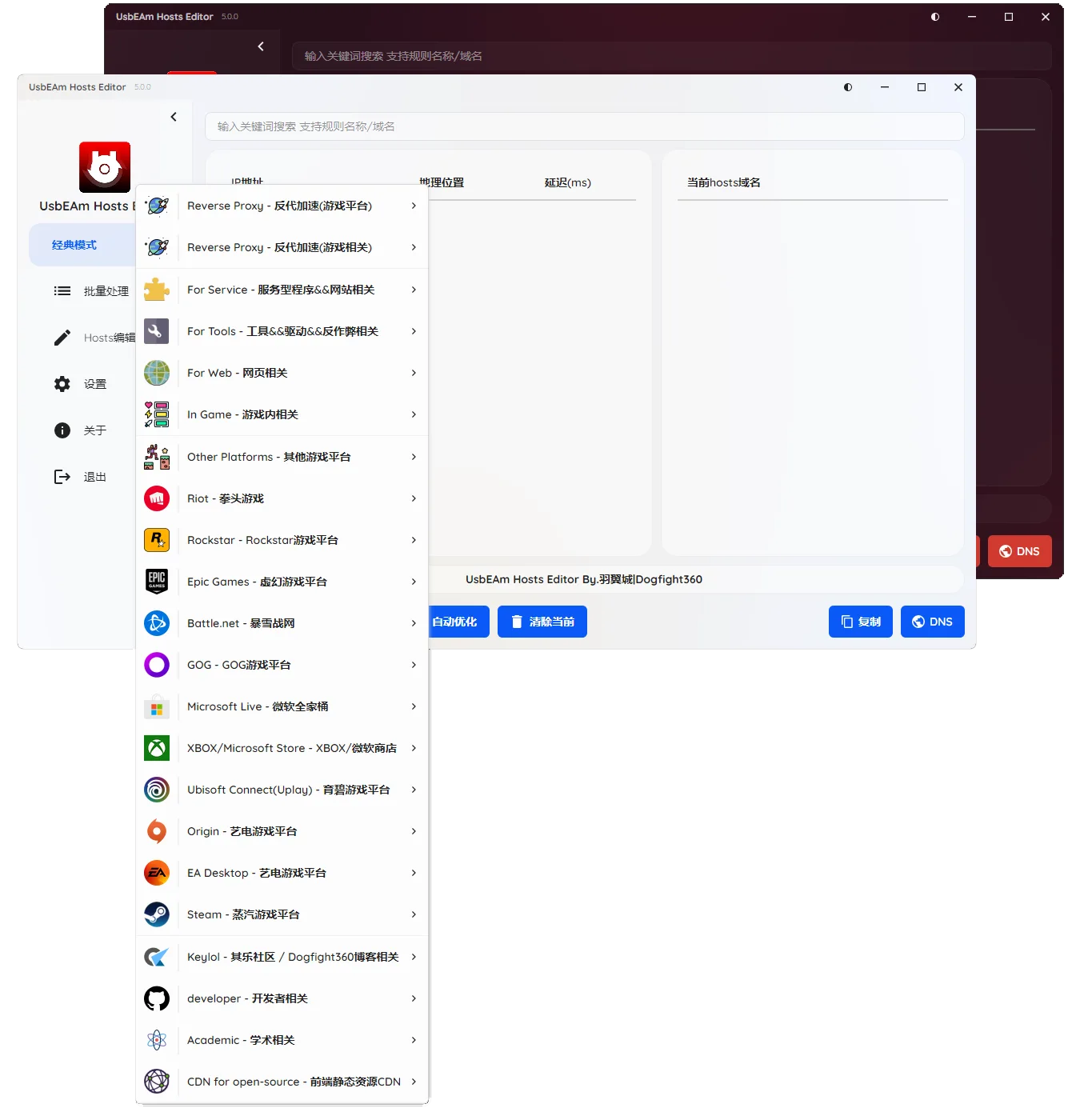
UsbEAm Hosts Editor 是 Dogfight360 作者羽翼城维护的 hosts 规则管理工具。它把服务规则、候选 IP 和延迟检查放在一个桌面界面中,用户可按需查看并把选定的域名映射写入系统 hosts 文件。官方支持列表覆盖 Steam、Origin、Ubisoft Connect、Epic、Microsoft Store 等平台和多款游戏服务;具体规则会随作者维护而变化,不能把某条旧规则视为当前服务的保证。
hosts 是本机名称解析配置:修改后可能影响这台设备上的多个应用,不会改变远端服务器,也不是 VPN 或网络加速器。延迟检测只能作为节点比较线索,实际登录、下载速度和稳定性还取决于服务端、线路、DNS 与本机网络。
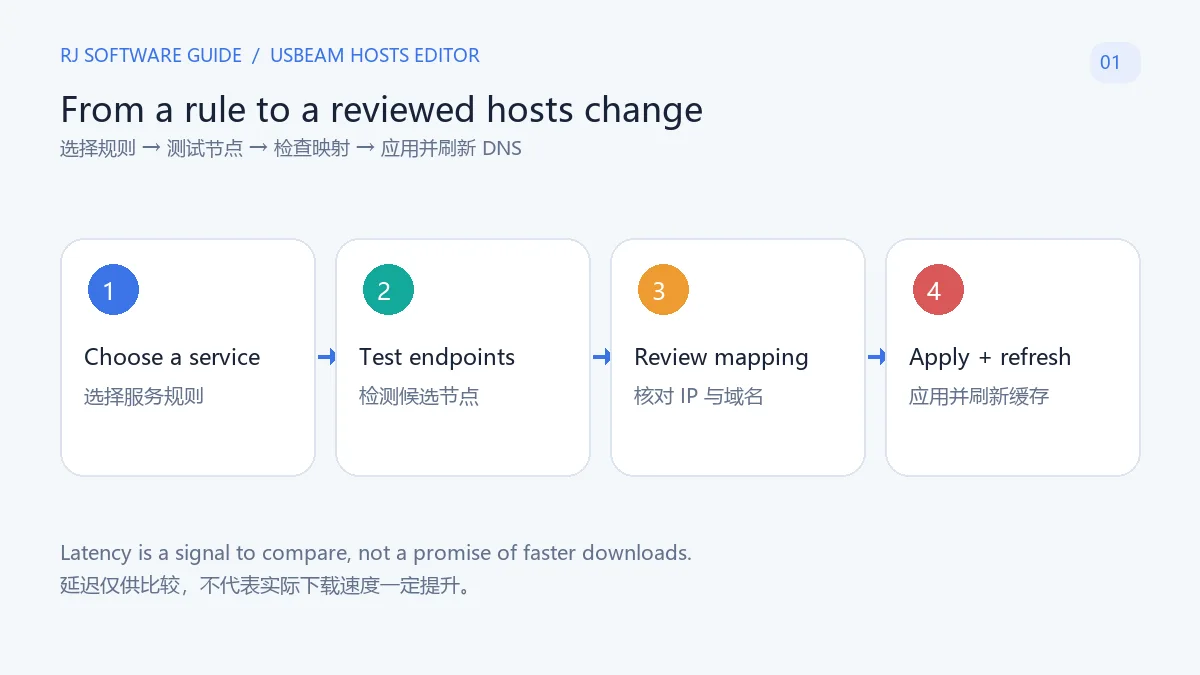
先按平台或服务找到对应规则,再查看候选节点的检测结果和要写入的域名/IP。延迟较低不等同于下载一定更快;同一规则也可能因地区、运营商或服务端调整而失效。建议一次只处理当前需要的规则,应用后立刻测试目标服务,并记录修改前后的现象,避免同时更改多组映射而难以定位原因。
V5.0.1 的官方更新说明提到,批量处理时 SSL 证书检测的 IP 数量由 10 提升为 20。这个变更描述的是检查范围,不代表每个候选 IP 都可用,也不是对目标站点证书或软件本身的独立安全认证。
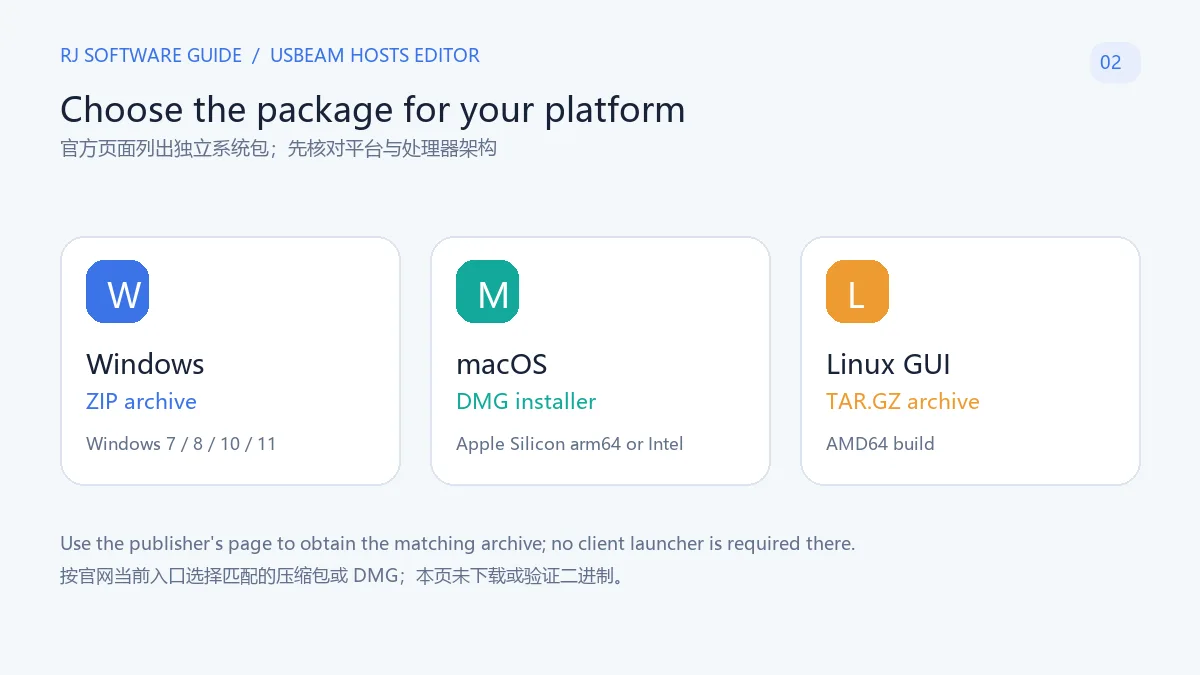
从 Dogfight360 官方产品页 选择与你的系统和处理器相符的包。页面当前列出 Windows 7/8/10/11 ZIP、macOS Apple Silicon arm64 与 Intel DMG,以及 Linux GUI AMD64 TAR.GZ;Windows XP 的 v3.63 是旧版本入口,不能与当前 v5.0.1 混为一谈。
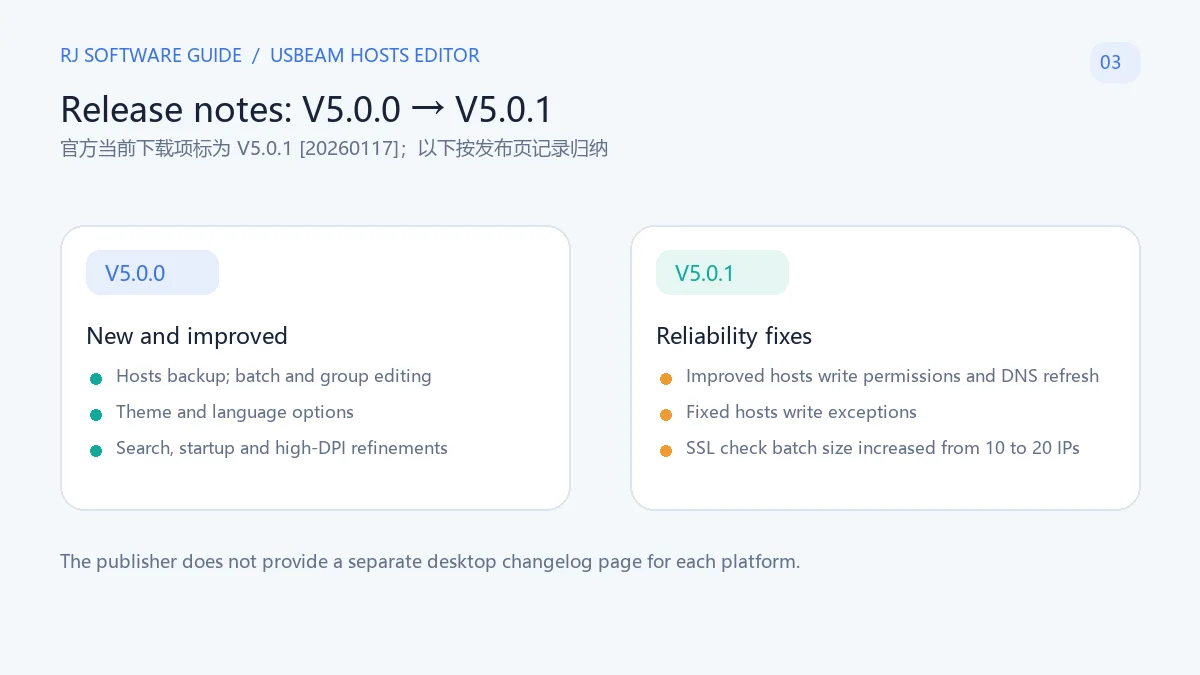
核对时,Dogfight360 产品页把当前下载项标为 V5.0.1,并在文件标签中附有“20260117”;页面未把这个标签说明为各平台统一发布日期,也没有单独的稳定版/测试版通道说明。V5.0.1 更新记录包括:批量 SSL 证书检测 IP 数由 10 增至 20、修正 hosts 写入权限、写入后刷新 DNS 缓存、修复 hosts 写入异常,以及公告滚动条修正。
同页还列出 V5.0.0 的较大改动:重画界面、加入批量处理和分组保存、hosts 备份、主题/语言切换、搜索体验与启动性能改进、高 DPI 图标适配,以及 DNS 解析卡顿和 macOS 复制问题修复。页面没有给出按 Windows/macOS/Linux 拆分的版本更新日志;不要把 V5.0.0 的功能误写成 V5.0.1 新增。
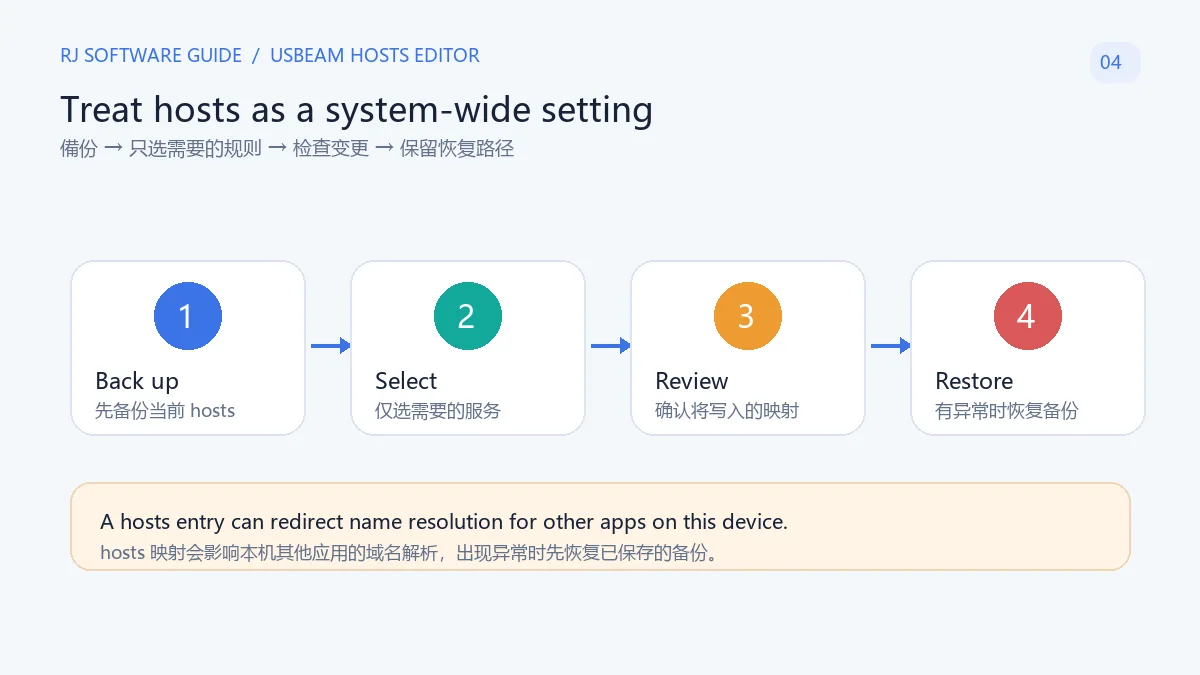
hosts 映射可能影响本机所有会访问相应域名的应用。应用规则前先使用软件的备份功能保存当前文件,确认将新增或替换的域名/IP;只启用需要的服务项,并在每次变更后测试。V5.0.0 更新记录明确列出新增 hosts 备份功能。
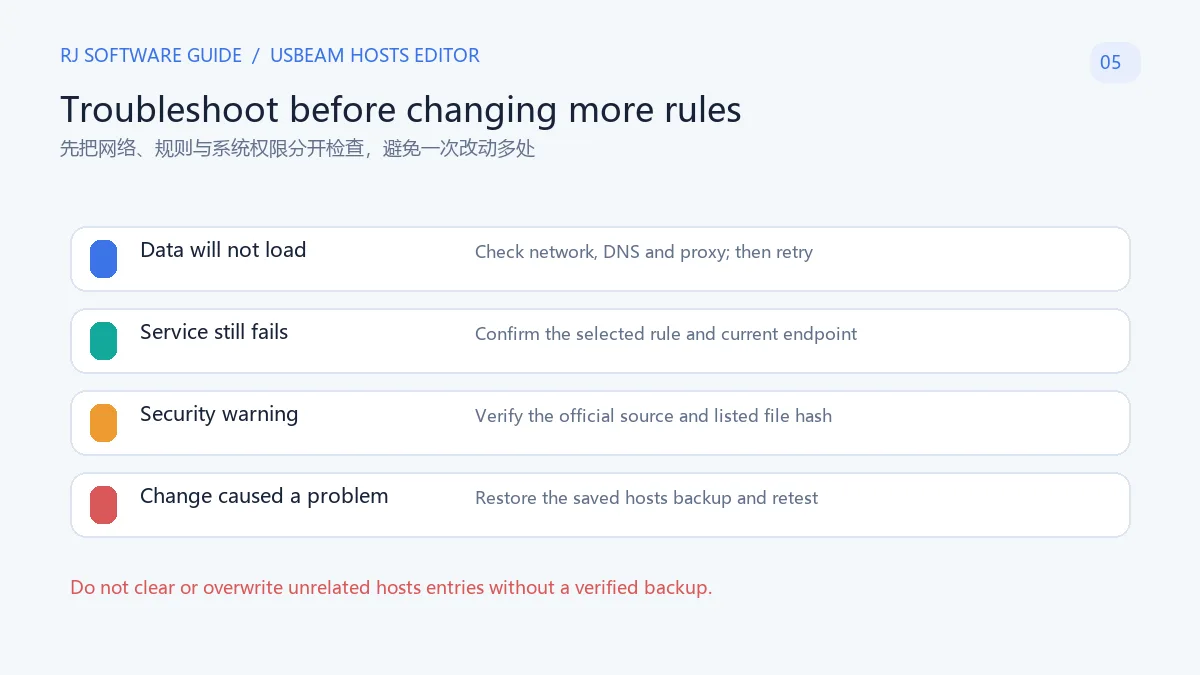
若网站、启动器或其他程序在修改后异常,先在软件中恢复刚才保存的 hosts,再清理应用缓存或重启相关程序进行对照。不要从论坛复制不明 IP,也不要在没有可验证备份时清空整份 hosts 文件;这可能覆盖用户或其他软件已有的配置。
UsbEAm Hosts Editor 能保证 Steam 或游戏下载变快吗? 不能。它提供规则与节点检查,hosts 映射只改变本机对特定域名的解析路径;服务端、网络路由和当前规则都会影响结果,延迟数值不能保证实际下载速度。
应该下载哪个版本? 官方产品页当前列出 V5.0.1:Windows 7/8/10/11 ZIP、macOS arm64 或 Intel DMG、Linux GUI AMD64 TAR.GZ。XP 对应的是页面另列的旧版 v3.63,请按实际系统选择。
修改后网络或应用打不开怎么办? 恢复你在操作前保存的 hosts 备份,再检查当前服务是否有对应规则、网络/DNS/代理是否正常。不要一次叠加多组规则,也不要直接删除不认识的系统条目。
安全软件报毒时可以直接加入白名单吗? 不建议仅凭作者说明就忽略告警。Dogfight360 FAQ 表示作者只处理 Microsoft Defender 的误报反馈,其他安全软件的告警需要用户自行判断;可先重新从官方页面获取文件并核对其公开 MD5。本站没有下载、运行、签名验证或扫描安装包。
软件是免费或开源的吗? 本次查看的官方产品页没有说明正式许可协议或价格,因此本页不作免费或开源承诺;请以作者发布页及随包条款为准。
如需 UsbEAm Hosts Editor 下载或排查 hosts 修改,优先从 Dogfight360 当前产品页选择匹配平台的文件;应用规则前保存原配置,并在修改后逐项验证目标服务。若效果异常,恢复备份比继续叠加映射更容易定位问题。
UsbEAm Hosts Editor tests endpoints and applies hosts rules on Windows, macOS and Linux. Review official v5.0.1 downloads, setup, updates and rollback.
UsbEAm Hosts Editor is maintained by Yu Wingcheng, who publishes under Dogfight360. Its desktop interface groups service rules, candidate IP addresses and latency checks, then lets you review selected domain mappings before writing them to the system hosts file. The publisher's list covers Steam, Origin, Ubisoft Connect, Epic, Microsoft Store and many game or service endpoints. Entries can change over time, so an old rule is not a guarantee that a service still works.
The hosts file is a local name-resolution setting. A change may affect several applications on the same device; it does not alter a remote server and is not a VPN. Latency is one comparison signal, while sign-in, download speed and reliability also depend on the service, route, DNS and local network.
Choose the entry for the service you need, then inspect the candidate results and the domain-to-IP mapping that would be applied. A lower latency value does not ensure a faster download; a rule can also stop working when a service, region or network changes. Apply only the relevant rule, test the target service, and note what changed before trying another mapping.
The V5.0.1 notes say that the number of IPs checked for SSL certificates during batch processing increased from 10 to 20. This describes a larger check set; it does not mean every candidate is available, nor is it an independent security certification for a website or the application.
Use the Dogfight360 product page to choose the package for your operating system and CPU. It currently lists a Windows 7/8/10/11 ZIP, separate macOS Apple Silicon arm64 and Intel DMGs, and a Linux GUI AMD64 TAR.GZ. The Windows XP v3.63 link is a legacy version and should not be confused with V5.0.1.
At the time of review, the Dogfight360 page labels the current download V5.0.1 and appends “20260117” to the file label. The page does not define that label as a shared release date across platforms and does not identify separate stable or beta channels. V5.0.1 notes list a batch SSL certificate check increase from 10 to 20 IPs, a hosts write-permission fix, DNS cache refresh after writing, a hosts write exception fix and an announcement scrollbar fix.
The same page lists broader V5.0.0 changes: a redesigned interface, batch processing and group saving, hosts backup, theme and language options, search and startup improvements, high-DPI icons, and fixes for DNS lookup stalls and macOS copying. The publisher does not give a per-platform desktop changelog. Do not describe V5.0.0 features as new V5.0.1 additions.
Hosts mappings can affect any application on the device that uses the matching domain. Before applying a rule, save the current file with the software's backup feature and review which domain/IP entries will change. Enable only the service you need and test it after each edit. The V5.0.0 notes explicitly list the addition of hosts backup.
If a site, launcher or another program behaves differently afterward, restore the backup you made before the change and compare again. Do not copy unverified IP lists from a forum or erase the entire hosts file without a verified backup; that could remove settings added by you or other software.
Can UsbEAm Hosts Editor guarantee faster Steam or game downloads? No. It checks rules and endpoints, while a hosts mapping changes local name resolution for selected domains. Server load, routing and rule freshness also matter; a latency figure cannot guarantee actual download speed.
Which package should I install? The publisher currently lists V5.0.1 for Windows 7/8/10/11, macOS arm64 or Intel, and Linux GUI AMD64. Windows XP has a separate legacy v3.63 link. Match the package to your system and CPU.
What if an app or site stops opening after a change? Restore the hosts backup you saved before editing, then check whether the service has a current rule and whether network, DNS or proxy settings are working. Avoid layering several rules or deleting system entries you do not recognize.
Should I whitelist a file flagged by security software? Do not dismiss an alert just because the publisher discusses false positives. Dogfight360's FAQ says it handles Microsoft Defender false-positive reports; alerts from other security products are left to the user's judgment. You can re-download from the official page and compare the published MD5. This page did not download, run, signature-check or scan an installer.
Is the software free or open source? The official product page reviewed here does not state a formal license or price, so this guide does not make a free or open-source claim. Check the publisher's page and package terms.
For a UsbEAm Hosts Editor download or hosts issue, use the current Dogfight360 product page and choose the package for your platform. Save the original configuration before applying a rule, test one change at a time, and restore the backup if the result is unexpected.
정보 검증일: 2026년 10월 18일
최초 게시: 2026년 10월 18일· 편집 수정: 2026년 10월 18일
不能。延迟检测和本机 hosts 映射不能保证服务端、线路或实际下载速度。 / No. Endpoint checks and local hosts mappings cannot guarantee server performance, routing quality or download speed.
官方列出 Windows ZIP、macOS arm64/Intel DMG 与 Linux GUI AMD64 TAR.GZ;Windows XP 对应单独的旧版 v3.63。 / The publisher lists a Windows ZIP, macOS arm64/Intel DMGs and a Linux GUI AMD64 TAR.GZ; Windows XP has a separate legacy v3.63 entry.
先恢复修改前保存的备份,再检查对应规则及网络、DNS 或代理;不要删除无关条目。 / Restore the backup saved before editing, then check the relevant rule and network, DNS or proxy; avoid deleting unrelated entries.
不要自动忽略告警。可重新从作者页面下载并比对其公布的 MD5,再自行判断;本站未独立扫描文件。 / Do not dismiss an alert automatically. Re-download from the publisher, compare its listed MD5 if useful, and make your own assessment; no independent scan was performed here.
已查看的官方页面没有说明正式许可或价格,因此本页不作免费或开源承诺。 / The reviewed publisher page does not state a formal license or price, so this page makes neither claim.

NatTypeTester 是用于检测 STUN NAT 映射与过滤行为的开源工具,10.0.10 提供 Android、Windows、macOS 和 Linux 发行包。 | NatTypeTester checks STUN NAT mapping and filtering, with 10.0.10 packages for Android, Windows, macOS and Linux.

Watt Toolkit(原 Steam++)是面向 Steam 相关任务的开源跨平台工具箱,包含网络、账号、库存和令牌功能。 / Formerly Steam++, Watt Toolkit is an open-source cross-platform toolbox for Steam-related network, account, library, and token tasks.
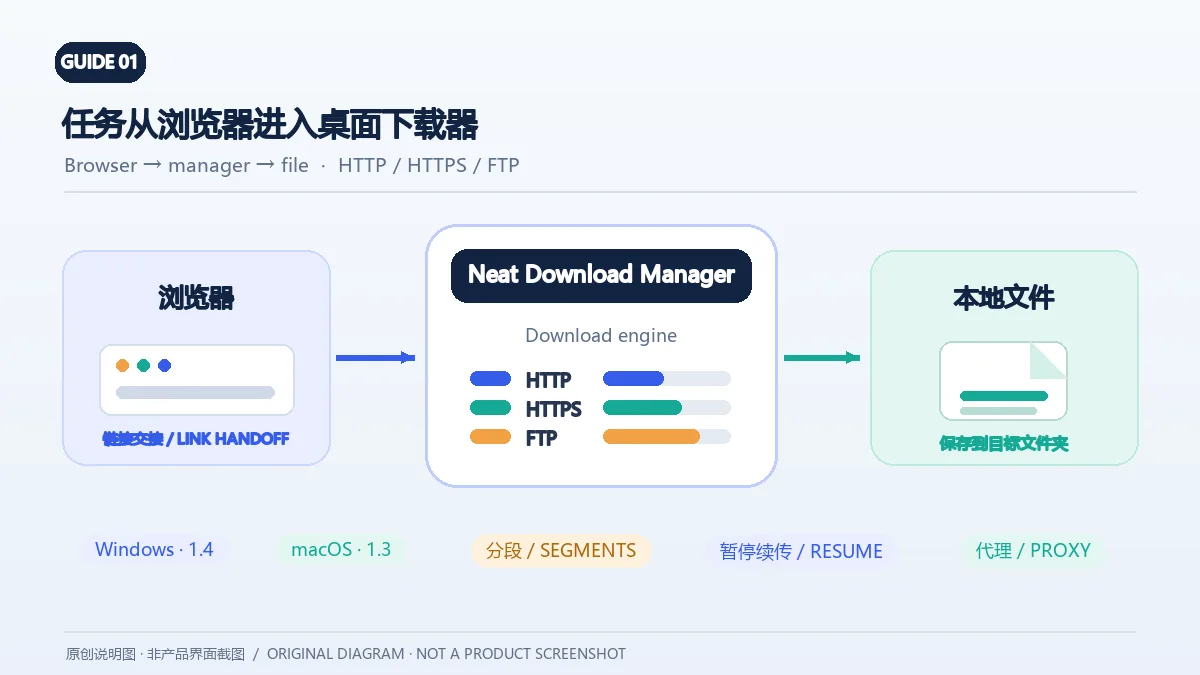
Neat Download Manager(NeatDM)是 Windows 与 macOS 桌面下载管理器,可管理链接任务、分段连接、代理、暂停续传和浏览器扩展。本文核对官网列出的 Windows 1.4 与 macOS 1.3,并说明版本日志、系统要求和安装包仍有哪些信息未公开。 / Neat Download Manager (NeatDM) is a Windows and macOS desktop download manager for browser handoff, segmented transfers, proxies, and pause/resume. This guide checks the publisher-listed versions and explains installation, compatibility, and missing desktop release notes.

qBittorrent 是开源 BitTorrent 客户端,支持磁力链接、RSS、搜索和 Web UI。本页整理 Windows 10+ 稳定版 5.2.4、macOS/Linux 平台差异、安装核对与版权提醒。 / qBittorrent is an open-source BitTorrent client with magnet, RSS, search and Web UI features. Review stable v5.2.4, platform differences, setup checks and lawful use.
腾讯手游加速器由深圳市腾讯计算机系统有限公司开发和运营。应用宝详情介绍网络加速、游戏相关辅助信息、预约与战绩数据等功能;支持情况以当前应用详情为准。

奇游 Windows 官方下载、安装步骤、区服选择与会员条件,保留7.3.0文件标识和官网页脚差异。 / Official Windows download, installation, route checks and membership terms with explicit version-evidence limits.
