
多设备聊天与消息集中管理
在电脑和手机之间保持日常通信,并按需集中管理多个消息服务。收录Element、Ferdium、Signal Desktop等站内已有工具,按实际用途选择适合自己的应用。

Signal Desktop 是 Signal 的电脑端消息应用,可与 Android 或 iOS 手机端配对后在 Windows、macOS 和 Linux 上收发消息;首次使用前需先在手机安装 Signal。
Découvrez les informations essentielles et les sources du logiciel
AGPL-3.0-only
TeamSpeak 是面向游戏、团队、商务和社群的语音通信平台,官方介绍包含消息交流与服务器管理。本条目对应官方列出的 Windows 64 位 TeamSpeak 3 3.6.2。

Snipaste 是适用于 Windows、macOS 和 Linux 的截图、标注与贴图工具。页面整理官方 2.11.3 版本、系统包型、F1/F3 使用步骤和授权区别。 / Snipaste captures, annotates, and pins images on Windows, macOS, and Linux. This guide covers official version 2.11.3, package types, F1/F3 workflow, and licensing.

Aerion 是面向 Linux、macOS 与 Windows 的开源邮件客户端,通过 IMAP/SMTP 连接邮箱。查看 v0.3.5 官方下载、平台依赖、首次设置和功能限制。

Watt Toolkit(原 Steam++)是面向 Steam 相关任务的开源跨平台工具箱,包含网络、账号、库存和令牌功能。 / Formerly Steam++, Watt Toolkit is an open-source cross-platform toolbox for Steam-related network, account, library, and token tasks.

Zed 是适用于 macOS、Windows 和 Linux 的代码编辑器,提供项目浏览、代码编辑、Git、调试、多人协作与可选 AI 功能。本文整理稳定版 v1.24.2、授权、价格和系统前提。

OneKeePass 是支持 Windows、macOS 与 Linux 的 KeePass 兼容密码管理器,可管理 KDBX 4.x 数据库、密码、TOTP 与自定义条目;查看 v0.27.0 更新和官方安装来源。

NatTypeTester 是用于检测 STUN NAT 映射与过滤行为的开源工具,10.0.10 提供 Android、Windows、macOS 和 Linux 发行包。 | NatTypeTester checks STUN NAT mapping and filtering, with 10.0.10 packages for Android, Windows, macOS and Linux.
Watt Toolkit(原 Steam++)是面向 Steam 相关任务的开源跨平台工具箱,包含网络、账号、库存和令牌功能。 / Formerly Steam++, Watt Toolkit is an open-source cross-platform toolbox for Steam-related network, account, library, and token tasks.
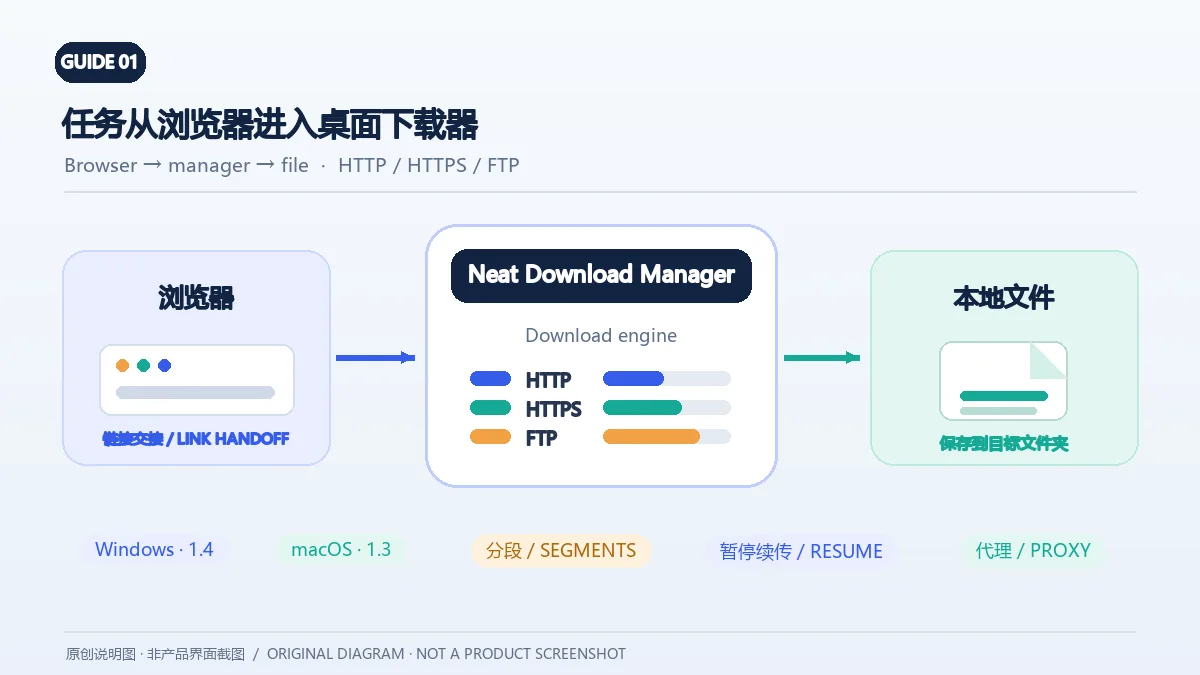
Neat Download Manager(NeatDM)是 Windows 与 macOS 桌面下载管理器,可管理链接任务、分段连接、代理、暂停续传和浏览器扩展。本文核对官网列出的 Windows 1.4 与 macOS 1.3,并说明版本日志、系统要求和安装包仍有哪些信息未公开。 / Neat Download Manager (NeatDM) is a Windows and macOS desktop download manager for browser handoff, segmented transfers, proxies, and pause/resume. This guide checks the publisher-listed versions and explains installation, compatibility, and missing desktop release notes.

qBittorrent 是开源 BitTorrent 客户端,支持磁力链接、RSS、搜索和 Web UI。本页整理 Windows 10+ 稳定版 5.2.4、macOS/Linux 平台差异、安装核对与版权提醒。 / qBittorrent is an open-source BitTorrent client with magnet, RSS, search and Web UI features. Review stable v5.2.4, platform differences, setup checks and lawful use.
腾讯手游加速器由深圳市腾讯计算机系统有限公司开发和运营。应用宝详情介绍网络加速、游戏相关辅助信息、预约与战绩数据等功能;支持情况以当前应用详情为准。

奇游 Windows 官方下载、安装步骤、区服选择与会员条件,保留7.3.0文件标识和官网页脚差异。 / Official Windows download, installation, route checks and membership terms with explicit version-evidence limits.