用于延续旧Flash内容的云端浏览器,提供触控板与虚拟手柄;整理10.6.1.98088更新、安装、付费与地区限制。 / Cloud-based browser for legacy Flash with trackpad and gamepad controls; includes 10.6.1.98088 notes, setup, subscriptions and regional limits.
中文
Puffin 安卓版当前以 Puffin Flash Browser 名称提供,面向需要延续旧 Flash 网页与游戏的用户。本文整理海鹦浏览器下载、安装步骤和10.6.1.98088更新说明,解释云端渲染、虚拟手柄、付费订阅及地区限制,提供连不上、网站定位异常和取消订阅的核对方法,帮助在安装前判断用途与可用条件。
Puffin 下载用途:延续 Flash 内容
旧榜单中的海鹦浏览器,对应 CloudMosa 的 Android 包名 com.cloudmosa.puffinFree;该包在当前 Google Play 使用名称 Puffin Flash Browser。官方现在把它定位为延续旧 Flash 内容的专用浏览器。商店说明,Flash 所依赖的 PPAPI 已从 Chromium 移除,因此这个保留 Flash 的产品不能把浏览器引擎升级到最新 Chromium,不宜据旧有印象把它当作通用日常浏览器。
官网描述的工作方式是由云端运行 Flash 内容并向设备传送结果。手机端提供桌面模式、Flash 剧院模式、虚拟触控板和手柄等入口,适合先判断某个旧游戏或旧网页是否还有使用价值。网页本身已经关闭、登录服务停止或游戏服务器下线时,支持 Flash 也不能让其重新运营。
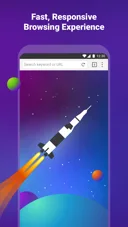 官方商店展示图,未注明对应版本;图中的速度宣传未由本站独立测试。
云端浏览与虚拟手柄怎样影响使用
官方说明使用美国与新加坡服务器。目标网站可能识别到服务器所在地区,从而显示不同语言、登录提醒或内容许可结果;官方支持页还说明会通过 X-Forwarded-For 传递用户 IP,但并非所有网站都采用这一信息。因此,出现地区提示并不一定是手机定位损坏,重新安装也不一定解决问题。
虚拟手柄和触控板可以把触屏操作映射到旧网页交互。进入 Flash 游戏后,可先查看页面是否正常载入,再调整按键位置和控制方式;若游戏需要已经停服的外部账户或服务,调整手柄不能修复服务端问题。云端渲染仍依赖网络、服务可用状态和目标网站,不应把官方功能说明理解为所有 Flash 游戏都能运行。输入个人信息前,应阅读 CloudMosa 隐私政策与目标网站条款。
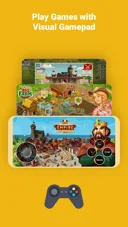 官方宣传图,展示虚拟手柄用途;画面不构成对其中游戏现时可用性的保证。
Puffin 安卓版安装步骤与使用前检查
- 打开官方 Google Play 详情页,核对 Puffin Flash Browser、开发者 CloudMosa Inc,以及包名
com.cloudmosa.puffinFree。
- 查看当前设备、账户与地区是否允许安装。本次公开资料未确立这一版本的最低 Android 要求,以商店当前兼容性为准。
- 使用商店按钮安装,首次启动阅读订阅与数据处理说明,再按实际需要给予权限。
- 在付费前核对所在地的服务可用条件、当前套餐、续费方式和取消入口;如提供可用的试用或检查入口,以实际页面为准。先用无需敏感信息的网页确认连接状态。
免费下载安装不等于免费使用。 正式商店日志明确,使用需要付费订阅。商店页面同时列有地区限制,包括中国、沙特阿拉伯和阿联酋等地区,以及部分学校网络;能够打开商店详情或完成安装,不能证明云端服务在当地可用。本页提供官方商店入口,不是 APK 直链。
 RJ 原创说明图,依据正式渠道资料整理,非产品界面。
10.6.1.98088 更新日志与价格说明
核对时,Google Play 显示 10.6.1.98088,更新日期为 2026 年 9 月 15 日。该版本日志重申需要付费订阅,并说明修复了若干已报告的问题。开发者没有在这段日志中列出具体故障或性能指标,本文因此不补写“修复闪退”“提升速度”等未经说明的变化。
商店介绍与支持页列有按月订阅及短期预付选项,但实际价格会受税费、汇率和地区定价影响,购买前以自己的结账页为准。试用说明存在差异:核对时商店描述写有月订阅七天试用,官方费用 FAQ 则写不再提供试用或免费额度。不要据这两个文字页面预设一定有免费试用;确认实际购买提示后再决定。
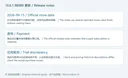 RJ 原创摘要图,区分正式简略日志与购买时需要确认的条件,非产品界面。
常见问题:连不上、地区提示与取消订阅
Puffin 下载后为什么仍要求付费? 当前 Flash 产品为订阅服务,免费的是下载安装入口。具体套餐、价格、试用和续费条件以实际购买页面为准,不能把旧版本名称中的 Free 当作当前使用承诺。
为什么提示地区不支持或无法连接? 先查看官方列出的地区及网络限制,再核对一般网络连接和订阅状态。官方 Android 排查页建议重启设备及 Wi-Fi 或移动数据连接;持续失败时可按支持页提供的方式向 CloudMosa 提交连接日志。购买前先评估服务条件,反复重装不能保证解决区域或服务端限制。
为什么网站识别到的地区与本人所在地不同? 云端浏览可能让网站看到 Puffin 服务器 IP。官方支持页解释了美国、新加坡服务器和 X-Forwarded-For 机制;目标网站如何采用这些信息由其自身决定。应遵循目标网站许可和地区规则。
怎样取消从 Google Play 购买的订阅? 官方指引为:Google Play 头像进入“付款和订阅”,选择“订阅”,找到 Puffin 后按“取消订阅”并完成屏幕提示。其他渠道的订单应到原购买渠道处理。不要把卸载应用视为已经核对完毕的取消结果。进行 Puffin 安卓版下载前,明确 Flash 用途、地区条件和费用,能更准确判断它是否适合自己。
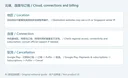 RJ 原创排查说明图,非产品界面;未运行应用或验证具体网页兼容性。
English
Puffin Flash Browser supports legacy Flash on Android. Find official downloads, setup, 10.6.1.98088 notes, subscription details, region limits, and FAQs.
Puffin download: a browser for legacy Flash content
The ranked Android entry corresponds to CloudMosa's package com.cloudmosa.puffinFree, now listed as Puffin Flash Browser on Google Play. The publisher positions it as a specialist product for extending the life of Flash content. Its description explains that the Chromium engine cannot move to the latest version while retaining the Flash dependency on PPAPI, which Chromium removed. This makes its present purpose important when considering an installation.
The official website describes running Flash content in the cloud and streaming the result to the device. Android features include desktop modes, Flash theater mode, a virtual trackpad and a gamepad. These may help with an existing legacy page, but Flash support cannot reopen a closed game server, restore a discontinued login system or recreate a website that has disappeared.
Publisher promotional image with unspecified app version; performance wording in the artwork was not independently tested here.
Cloud browsing, location and touch controls
The publisher identifies servers in the United States and Singapore. A website may see a server's location and respond with a different language, login alert or content availability decision. The support page says Puffin passes the user's IP through X-Forwarded-For, but sites that do not use that information may detect the server's region. A location mismatch therefore does not by itself establish a broken phone setting.
The virtual gamepad and trackpad provide touch controls for older web interactions. Check that a page loads before adjusting buttons or input modes. A game that depends on an unavailable external service will not be repaired by changing the on-screen controls. Cloud rendering still depends on connectivity, service availability and the destination website; support for Flash does not guarantee every Flash game works. Review the CloudMosa privacy policy and destination site's terms before entering personal information.
Official illustration of the control feature; the games shown are not independently confirmed available today.
Install Puffin Flash Browser on Android
- Open Google Play and check Puffin Flash Browser, CloudMosa Inc and package ID
com.cloudmosa.puffinFree.
- Review installation availability for your current device, account and region. The reviewed material did not establish a minimum Android version for this release; use the store's compatibility decision.
- Install through the store, read subscription and data-processing details, and grant permissions according to the task.
- Before paying, check regional service access, the actual plan, renewal terms and cancellation route. Use any available access-check or trial option only under the terms actually displayed, and start with a page containing no sensitive information.
Free installation does not mean free use. The release notes explicitly require a paid subscription. The listing states that Puffin is blocked in regions including China, Saudi Arabia and the United Arab Emirates, and in some educational institutions. Opening the listing or completing installation does not establish that its cloud service works locally. This page links to an official store listing, not a direct APK.
Original RJ editorial guide based on official sources; not product UI.
Version 10.6.1.98088 release notes and payment conditions
At review, Google Play showed 10.6.1.98088, updated September 15, 2026. Its release note reiterates the paid-subscription requirement and says several reported issues were fixed. It gives no specific defect list or measured performance improvement, so no crash fixes or speed gains have been inferred.
The store description and support page describe monthly and short prepaid options. Taxes, exchange rates and country pricing can affect the actual charge; review your checkout screen. Trial descriptions differ: the store text mentions a seven-day monthly-subscription trial, while the official pricing FAQ says trials and free usage quotas are no longer available. Neither text should be treated as a guaranteed trial offer. Confirm the terms shown to your account before purchasing.
Original RJ summary distinguishing the short release note from purchase conditions; not product UI.
FAQ: connections, location and subscription cancellation
Why does Puffin ask for payment after a free download? Its current Flash service requires a subscription. The package name's historical “Free” label is not a current promise of free service. Check the actual plan, price, trial and renewal terms.
What should I check when it cannot connect? Review the stated region and network restrictions, general connectivity and subscription status. The official Android support page recommends restarting the device and its Wi-Fi or mobile connection; persistent failures can be reported to CloudMosa using its connection-log instructions. Reinstallation does not guarantee a solution to regional or server-side conditions.
Why does a site detect a different location? Cloud browsing may expose the Puffin server's IP to the site. Official guidance explains the US/Singapore servers and X-Forwarded-For behavior. The destination decides how to use this information; its availability and licensing conditions still apply.
How do I cancel a Google Play subscription? The publisher directs users to Google Play's profile menu, then Payments & subscriptions, Subscriptions, the Puffin entry and Cancel subscription. Complete the displayed prompts and check the resulting status. Orders from other channels need their original purchase channel. Before a Puffin Android download, confirm its Flash purpose, regional conditions and ongoing cost.
Original RJ editorial guide; not product UI. The application and individual website compatibility were not tested.