未来之役(NEW STATE Mobile)是 KRAFTON 推出的 Android 大逃杀游戏。Check version 0.9.98.804, system requirements, Google Play installation, and update notes.
未来之役下载指南:核对 NEW STATE Mobile 0.9.98.804 更新、Android 配置与 Google Play 安装步骤。 Check device compatibility, store availability, update notes, and setup FAQs.
中文
未来之役(NEW STATE Mobile)是 KRAFTON 推出的 Android 大逃杀射击游戏,玩家搜集装备、驾驶载具并在缩小的战区争取生存。本页整理官方版本、最低配置、Google Play 安装步骤与最近更新,帮助核对未来之役下载来源和设备兼容性,并说明更新内容及安装故障的排查方法与常见问题。
未来之役的玩法与战斗循环
Google Play 将 NEW STATE Mobile 描述为 PUBG 系列背景下的移动端大逃杀游戏。其公开介绍把一局比赛概括为:进入战场后搜集武器、载具和消耗品,在安全区域持续缩小的过程中调整位置、与对手交战,并努力成为最后的幸存者。玩法的实际节奏取决于地图、队伍协作、物资获取和当局缩圈情况;它不是固定关卡流程,也不能保证每局时长相同。
商店长描述还列出枪械配件、无人机呼叫、支援请求和闪避等移动端机制。初次游玩时可先在训练或匹配环境中调整触控布局、镜头灵敏度和拾取设置,再逐步提高操作速度。若遇到界面设置名称或选项与本文不同,应以当前客户端和地区版本为准。
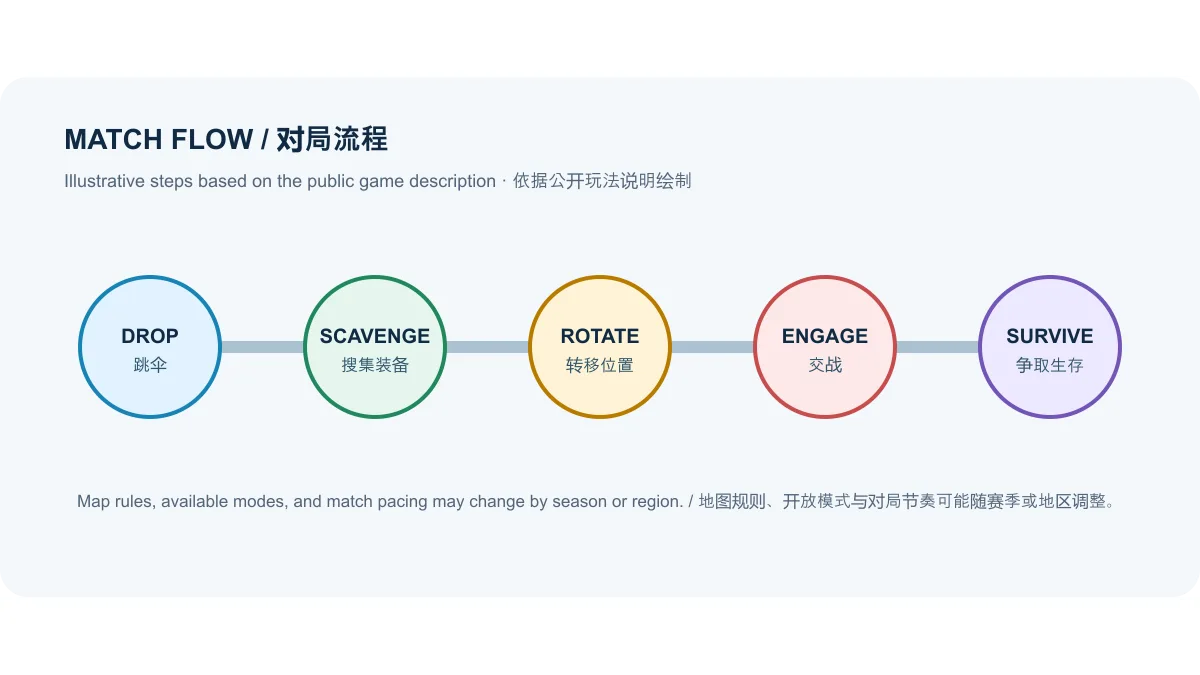
图 1|依据官方商店公开的玩法要素绘制的对局流程示意,不是游戏截图,也不表示固定战术。
地图、队伍模式与赛季变化
Google Play 当前展示的功能说明提到 LAGNA 沙漠地图、AKINTA 快节奏大逃杀,以及采用七局制的 4 对 4 Round Deathmatch。介绍还提到 8×8 开放区域、地图中的武器和载具,以及 PUBG 枪械配件系统。这些是商店页面列出的产品要素;地图轮换、活动模式、玩家匹配情况和赛季内容可能变化,页面未承诺它们在每个地区、每个时段都开放。
如果搜索“未来之役地图有哪些”或“NEW STATE Mobile 模式”,建议先查看游戏客户端当季的模式列表,再决定是否组队或下载额外资源。Google Play 的最新动态也包含赛季、Survivor Pass 与服装更新,因此某次更新后可见的菜单、奖励条件和赛季任务并不一定与旧攻略一致。
图 2|模式名称来自官方商店页面;可用地图与规则应在当前版本中复核。
Android 最低要求与兼容性检查
Google Play 详情页列出的最低配置为 Android 6.0 或更高版本、64 位 CPU(ABI arm64 或更高)、至少 2 GB 内存,以及 OpenGL 3.1 或更高版本或 Vulkan 1.1 或更高版本。达到这些最低条件不等于每台手机都能安装或流畅运行:商店还会根据设备型号、GPU、地区和系统状态判断兼容性,较高画质或帧率选项也可能因设备而异。
该商店页未提供固定的安装包大小或本页可核验的额外资源总量,因此安装前应以 Google Play 在目标设备显示的下载空间提示为准。若设备空间不足,可先清理不需要的文件;不要为了节省空间删除游戏数据,除非已确认账号进度已绑定且可以恢复。
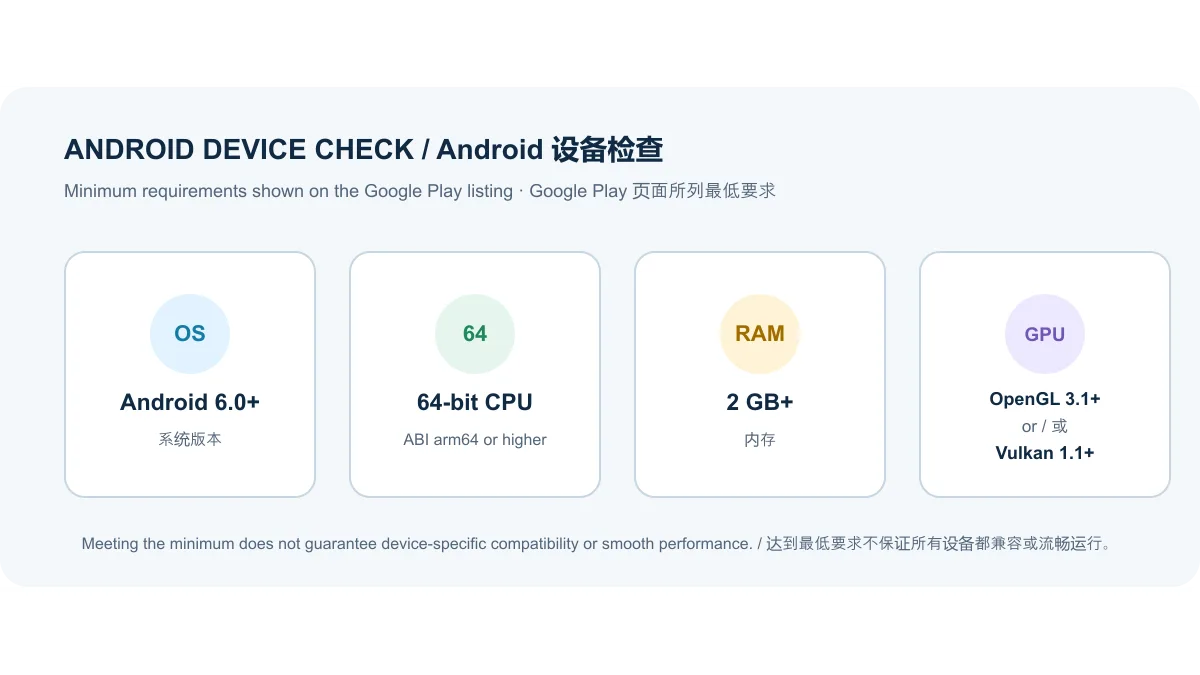
图 3|最低配置抄自 Google Play 描述;满足门槛不构成特定机型的兼容或性能保证。
从 Google Play 下载和安装未来之役
推荐从 Google Play 官方游戏页安装和更新。打开页面后先核对应用包名对应的条目名称、开发者 KRAFTON, Inc. 和设备兼容提示;商店详情页的标题显示为 “NEW STATE : NEW ERA OF BR”,页面说明使用 NEW STATE Mobile 名称。确认无误后按以下步骤操作:
- 在 Android 手机上打开官方 Google Play 页面,并核对开发者为 KRAFTON, Inc.,包名为
com.pubg.newstate。
- 查看商店是否允许当前设备安装;如果显示不兼容或该地区不可用,不要从名称相似的页面猜测替代版本。
- 点击“安装”,保持网络连接并等待商店完成安装;如商店提示需要更多空间,按设备实际提示处理。
- 首次启动后若客户端提示下载游戏资源,按应用内提示等待完成;后续更新也通过 Google Play 检查。
榜单原始记录中的 ourplay URL 是第三方 CPS 下载跳转,不能证明它是发行方的官方安装文件或当前版本来源。本页不把该链接用作下载入口,也没有下载或检验 APK。不要仅凭“最新版”“高速下载”等按钮文字判断包名、签名、版本或安全性。
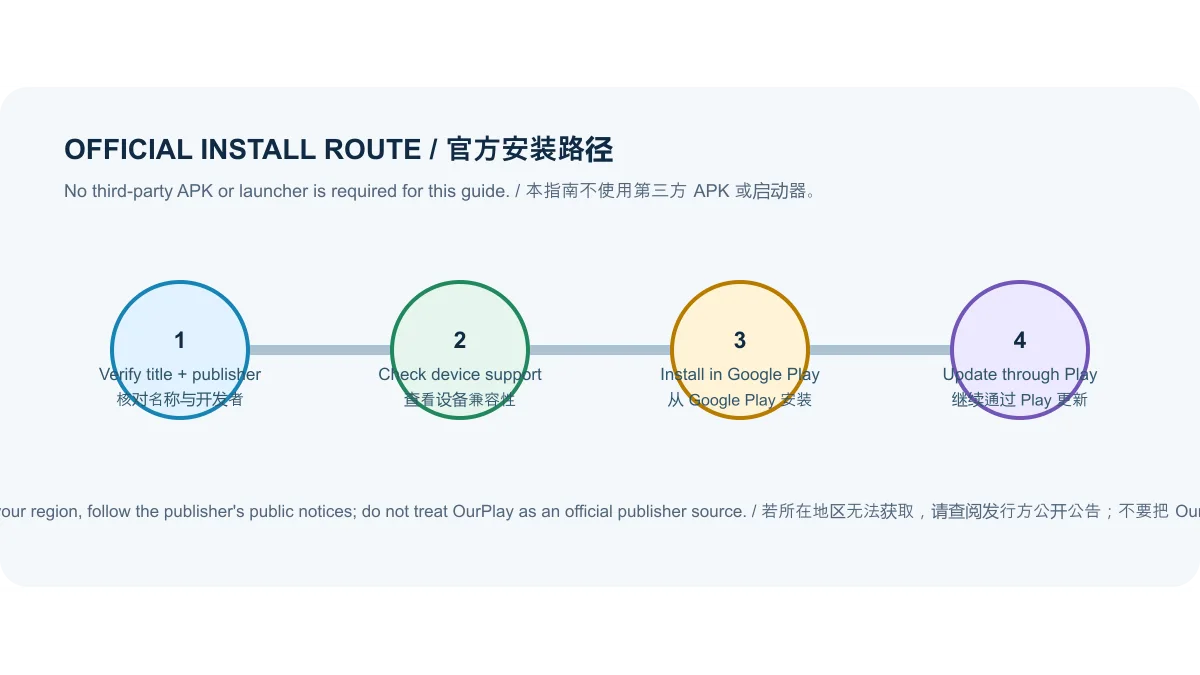
图 4|此图只解释官方商店安装路径,不复刻 Play 页面,不是安装包安全检测结果。
版本 0.9.98.804 与最近一次商店更新
截至 2026 年 10 月 18 日,Google Play 英文详情页列出的版本是 0.9.98.804,更新时间为 2026 年 9 月 22 日。同页“最新动态”写有:新赛季、新 Survivor Pass、新服装、错误修复、征服者维护奖励调整、战斗等级上限由 70 提升至 100 且奖励调整,以及新增 90 和 120 FPS 选项。
商店没有说明具体修复了哪些错误,也没有说所有设备都支持 90/120 FPS;因此这里仅转述页面明确列出的更新项,不推测修复内容、实际帧率表现或适用机型。开发者官网中文页的新闻区域在本次查看时显示的是 2025 年文章,版本日期和更新清单以 Google Play 当前公开记录为准。若你的商店稍后显示更高版本,应以目标地区商店页面的版本号和更新说明为准。
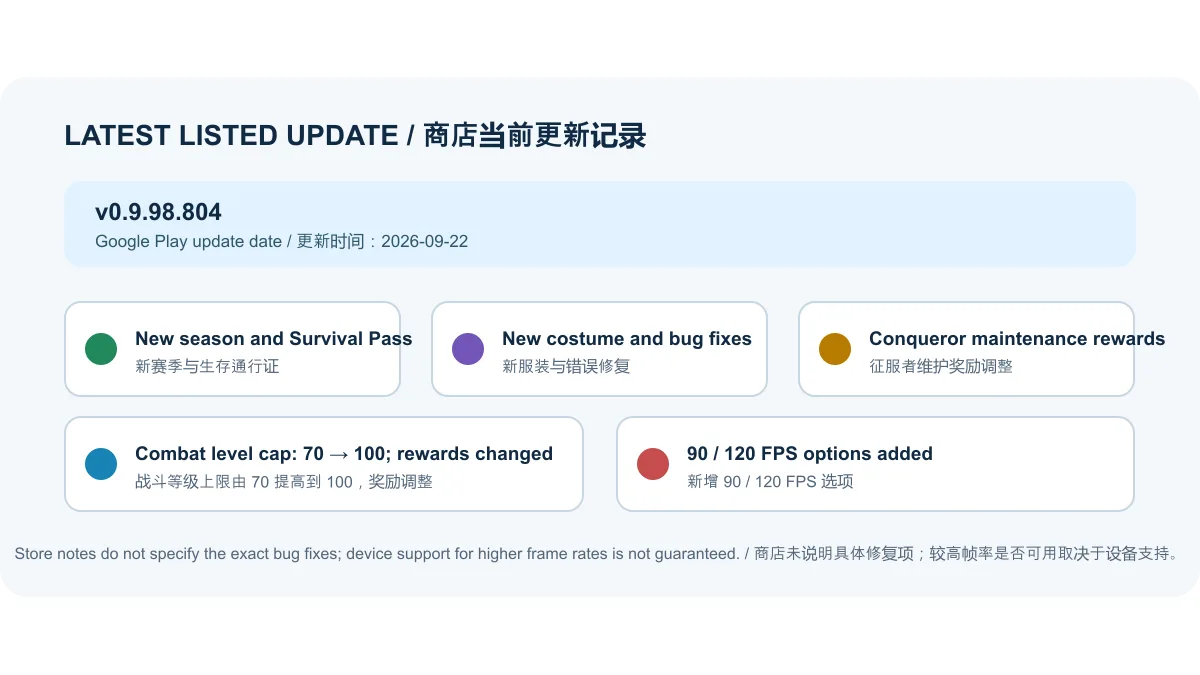
图 5|更新日期和条目来自 Google Play;具体错误修复内容未公开。
内购、内容分级与数据说明
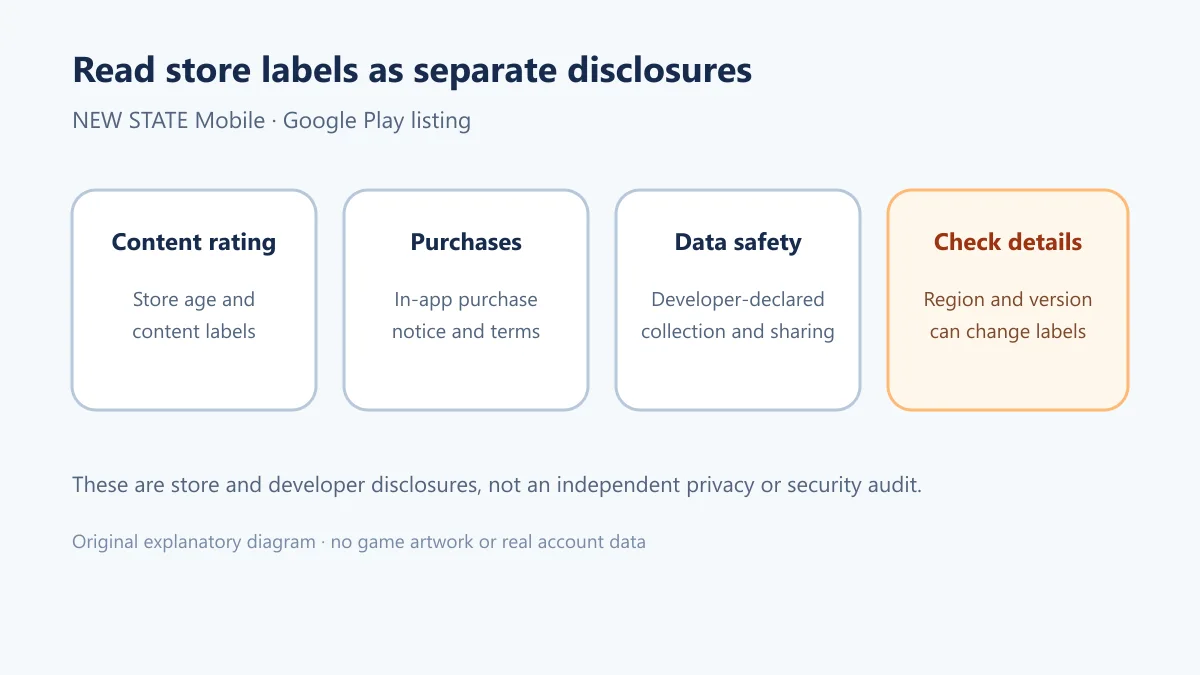
Google Play 页面标注应用内购买,并在当前显示的商店地区列出按项购买价格;价格币种和购买项目可能因地区变化。该页面显示 15+、暴力、随机箱、用户互动和应用内购买等内容标签,家长或未成年玩家应结合本地商店分级与实际游戏内容判断适用性。
Google Play 的“数据安全”信息由开发者提供,当前页显示不与第三方共享数据,同时可能收集位置、个人信息等类别,传输中加密,并提供删除数据请求选项。Google 明确说明此类申报可能因地区、年龄和后续版本而异;它不是独立安全审计。本页也没有检查安装包、运行代码或验证服务端行为。
中文常见问题(FAQ)
未来之役怎么下载安装?
通过上文的 Google Play 官方链接打开游戏页,确认 KRAFTON, Inc. 和设备兼容情况后点击安装。榜单原始 OurPlay 跳转链接未被核验为官方安装包来源。
未来之役支持哪些 Android 手机?
商店公开的最低条件是 Android 6.0+、arm64 或更高的 64 位 CPU、2 GB RAM,以及 OpenGL 3.1+ 或 Vulkan 1.1+。具体手机能否安装仍由 Google Play 对该设备的兼容结果决定。
未来之役下载或更新失败怎么办?
先检查 Play 商店是否显示设备或地区限制、网络是否稳定、设备剩余空间是否符合商店提示,并确认系统满足最低要求。之后重开 Google Play 检查更新;不要通过未知 APK 镜像规避兼容性提示。如果仍失败,保存错误提示并通过游戏内支持渠道联系开发者。
游戏打不开、闪退或卡在启动界面怎么办?
确认安装来源和版本仍是 Google Play 中的 com.pubg.newstate,重启设备后再试,并检查网络与系统更新。若问题持续,记录机型、Android 版本和错误信息,通过游戏内支持提交。清除数据或重装前先确认账号进度是否已绑定,避免误删本地数据。
90 或 120 FPS 是否每台设备都能使用?
Google Play 的更新记录只说明新增了这些 FPS 选项,没有列出全部支持机型。实际选项会受到设备硬件、系统和游戏内设置影响;页面不能据此保证特定手机可达到对应帧率。
English
NEW STATE Mobile is KRAFTON’s Android battle royale shooter. This guide covers its version, requirements, Google Play installation, update notes and FAQs.
How NEW STATE Mobile plays
Google Play describes NEW STATE Mobile as a mobile battle royale set in the PUBG universe. Players enter a battleground, scavenge weapons, vehicles and consumables, reposition as the play area shrinks, and try to be the last survivor. Match length and pacing depend on the map, squad coordination, available supplies and zone movement; the listing does not define a fixed campaign or a guaranteed match duration.
The store description also names weapon attachments, drone calls, support requests and dodging among its mobile mechanics. New players can first adjust touch controls, camera sensitivity and pickup settings in a low-pressure mode, then refine them through play. Menu labels and available settings can differ by current client version or region, so check the installed game for the controls actually offered.
Figure 1. An original explanatory match-flow diagram based on the public listing, not game artwork or a prescribed tactic.
Maps, team modes and seasonal changes
The current Google Play feature description references the LAGNA desert map, fast-paced AKINTA battle royale matches, and a best-of-seven 4-vs-4 Round Deathmatch. It also mentions an 8×8 open area, weapons and vehicles, and the PUBG weapon-attachment system. These are features named in the store description; the page does not guarantee that every map or mode is available in every region or playlist at all times.
For searches such as “NEW STATE Mobile maps” or “which modes are available,” check the in-game mode list for the current season before forming a squad or downloading optional resources. The latest store notes also refer to a season, Survivor Pass and costume, so menus, reward requirements and missions may differ from older guides after an update.
Figure 2. Mode names come from the public store description; verify the active playlist in the current client.
Android requirements and compatibility
Google Play lists Android 6.0 or newer, a 64-bit CPU (ABI arm64 or higher), at least 2 GB of RAM, and OpenGL 3.1 or higher or Vulkan 1.1 or higher as minimum requirements. Meeting the minimum does not guarantee installation or smooth performance on every phone. Store compatibility can also depend on the model, GPU, region and system state; higher graphics or frame-rate options may vary by device.
The checked listing does not provide a fixed installation size or a verifiable total for additional game resources. Use the space estimate shown by Google Play on the target device. If storage is low, remove files you no longer need; do not delete game data unless you have confirmed that account progress is linked and recoverable.
Figure 3. Minimum specifications are transcribed from Google Play; they are not a model-specific compatibility or performance guarantee.
Official Google Play installation steps
Use the official Google Play listing to install and update the game. First confirm the developer is KRAFTON, Inc. and check the compatibility message for your device. The store title is “NEW STATE : NEW ERA OF BR,” while the listing description uses the NEW STATE Mobile name. Then follow these steps:
- Open the official Google Play page on your Android phone and verify KRAFTON, Inc. and package name
com.pubg.newstate.
- Check whether the store offers installation for your device. If it reports incompatibility or regional unavailability, do not guess at a substitute build from a similar-looking result.
- Tap Install, keep the connection available, and wait for Google Play to complete installation. Follow the device's storage prompt if more space is needed.
- If the game requests additional resources after launch, let the client finish them; check for future updates in Google Play.
The ranking spreadsheet's original ourplay URL is a third-party CPS redirect. It does not establish an official publisher installer or a current verified build, so it is not used as a download link here. No APK was downloaded or checked. Button labels such as “latest version” or “fast download” alone do not verify a package name, signature, version or safety.
Figure 4. This illustration explains the official-store route; it does not reproduce the Play interface or certify an APK.
Version 0.9.98.804 and latest listed update
As checked on October 18, 2026, the English Google Play page lists version 0.9.98.804, updated September 22, 2026. Its visible “What’s new” notes list a new season, a new Survivor Pass, a new costume, bug fixes, changes to Conqueror maintenance rewards, combat-level progression increased from 70 to 100 with changed rewards, and 90/120 FPS options.
The store does not identify the individual bug fixes or promise that every device supports 90/120 FPS. This summary reports only the visible notes and does not infer what was fixed, real-world frame rates, or eligible phone models. The publisher website's Chinese news section showed 2025 posts when checked; the version and notes here follow the newer public Google Play record. If your local listing later shows a higher build, use that region's displayed version and notes.
Figure 5. Version date and bullet points come from Google Play; detailed bug-fix notes are not published there.
Purchases, content rating and data disclosures
Google Play marks the game as containing in-app purchases and shows item prices for the storefront currently displayed; currency and available items can vary by region. The checked page shows a 15+ rating with violence, random-box, user-interaction and in-app-purchase labels. Parents and younger players should check the rating used by their local storefront and consider the actual game content.
The Play “Data safety” section is developer-provided. The checked listing says no data is shared with third parties, while location, personal information and other categories may be collected; it also reports encryption in transit and an option to request data deletion. Google notes that these declarations can vary by region, age and later updates. They are not an independent security audit, and this page has not inspected the application binary, code or service behavior.
English FAQ
How do I download and install NEW STATE Mobile?
Open the official Google Play link above, verify KRAFTON, Inc. and the compatibility message, then select Install. The ranking entry's OurPlay redirect has not been verified as an official package source.
Which Android phones meet the listed requirements?
The public minimum is Android 6.0+, a 64-bit arm64-or-higher CPU, 2 GB of RAM, and OpenGL 3.1+ or Vulkan 1.1+. Google Play's device-specific compatibility result still determines whether a particular phone can install it.
Why is the download or update failing?
Check whether Play reports a device or region restriction, verify your connection and available storage, and confirm the Android version meets the listed minimum. Reopen Google Play and check for the current version. Do not use an unknown APK mirror to work around a compatibility message. If the issue remains, record the error and contact the developer through the in-game support route.
What should I do if the game crashes or will not open?
Confirm that the installed entry is com.pubg.newstate from Google Play, restart the device, and check the network and system updates. If it still fails, collect the phone model, Android version and error details for in-game support. Before clearing data or reinstalling, confirm that your progress is linked to an account so local data is not lost.
Can every phone use 90 or 120 FPS?
The update notes say those FPS options were added but do not list every supported model. Actual availability depends on the device, system and in-game settings, so the store note cannot guarantee a particular frame rate on your phone.
For a current NEW STATE Mobile download, use the Google Play page to check the publisher, version and device result. This guide keeps the OurPlay ranking URL separate from the verified publisher/store facts and does not claim that an APK has been independently checked.