NetAssist 5.15 Windows 网络调试助手:TCP Server、TCP Client、UDP 与 MQTT Client、IPv4/IPv6、免安装步骤及排查指南。 / Portable Windows network tester with official release notes and setup guidance.
NetAssist 下载与使用指南:了解 Windows 网络调试助手 5.15 的 TCP、UDP、MQTT 和 IPv6 功能,查看免安装启动步骤、2025 年更新日志与连接失败排查;通过野人家园官网核对文件来源,结合 ASCII 与 HEX 编码、端口和日志设置检查设备通信,适合程序开发、硬件联调及协议学习。
中文
NetAssist 网络调试助手能做什么:先区分连接角色
NetAssist 是野人家园发布的 Windows 网络通信调试工具,提供 TCP Server、TCP Client、UDP 和 MQTT Client 四种模式,并支持 IPv4、IPv6。它适合让电脑与自己开发的设备或程序互发数据,观察连接、报文和应答是否符合预期。TCP Client 需要连接一个正在监听的服务端;TCP Server 则等待客户端接入。UDP 没有 TCP 的连接过程,不能只凭界面没有“已连接”字样判断失败;MQTT 功能是客户端,不能拿它代替消息代理服务。
使用时建议先用一条固定的短指令建立基线,再加入循环发送、校验位或自动应答,避免同时改变多个条件后无法判断故障来源。官网列出了快捷指令、批量发送、日志、Modbus 和 JT/T808 辅助功能,具体协议参数仍需以目标设备文档为准。
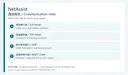
NetAssist 下载与免安装启动步骤
- 打开野人家园官方产品页,确认名称为 NetAssist 网络调试助手,核对当前显示的 5.15 与 2025-07-30 更新记录,再使用该页的下载入口。本页渠道链接指向官方资源页面,不是 EXE 或 ZIP 直链。
- 将取得的文件保存在可写的独立文件夹;若下载的是压缩包,先完整解压再运行。官网称软件为单执行文件的绿色工具,无需另行安装,也不要求 Microsoft .NET Framework;本页未下载或运行安装包。
- 首次启动先选择与对端一致的工作模式、地址族和端口。先在本机回环或经授权的测试设备之间发送一条可识别的测试数据,再接入实际联调环境。
- 如系统拦截文件,先核对来源、文件属性及检测详情,暂停运行并向维护方反馈。不要仅凭“误报”说明关闭实时防护。若 Windows 询问防火墙权限,应按测试网络范围评估,避免为一次本地联调开放所有网络。
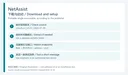
NetAssist 5.15 更新日志:2025 年 7 月 30 日
官网当前标注的版本是 5.15,日期为 2025-07-30;这里的“当前”仅指本次核对时官网列出的发行版。更新记录新增 GPS 调试、整数转换、HEX 与 BIN 转换工具,以及通过黑白名单控制客户端接入的 TCP Server 防火墙。修复项包括脚本含死循环时无法停止发送、快捷指令或批量数据超过 256 字节可能截断、JT808 鉴权超时、MQTT 超时断线后不重连,并提到 YModem 相关问题及其他优化。
更新记录中的 YModem 条目不代表当前 NetAssist 一定提供该串口传输功能:同页维护方在 2025-11-27 的答复说明,YModem 已从网络调试助手移除,保留在串口调试助手中。下载前应按当前功能核对,不能只凭历史日志选择工具。官网还保留旧版 4.3.25 的两项修复:任务栏重建后托盘图标丢失,以及收发计数器溢出显示负数。

NetAssist 连不上、乱码或收不到数据怎么办
连接排查应按层次进行:先确认对端程序正在监听、地址和端口写对,再确认双方角色以及 IPv4/IPv6 一致;TCP 服务端如果启用了 5.15 的黑白名单,也要检查客户端是否被规则拒绝。不要一开始就停用防火墙,应先检查当前网络配置和相应程序的授权范围。UDP 收不到应答时,同时核对发送目标和接收端口,不能套用 TCP 的连接判断方法。
如果能收到数据但显示异常,先对照协议确认是 ASCII 文本还是 HEX 字节。官网支持 ANSI 与 UTF-8,发送端和接收端的编码、换行符以及校验位配置需要对应。短报文正常而批量报文异常时,再检查长度、间隔、结束符和版本;5.15 日志已经修复了一项超过 256 字节的截断问题。保存日志有助于比较两次测试,但记录账号、设备标识或生产报文前应先评估内容是否适合保存和分享。

NetAssist 常见问题 FAQ
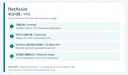
NetAssist 是免费软件吗? 官网资源信息标注“免费软件”,历史记录也提到专业版支持。这里不据此推断所有高级功能免费,具体功能和授权以当前程序及维护方说明为准。
需要安装 .NET Framework 吗? 官方介绍称 NetAssist 单执行文件无需安装、不依赖 .NET Framework;页面仅写 Windows,没有细分最低版本或逐一确认 Windows 11 构建。遇到启动问题应记录系统版本并询问维护方。
NetAssist 能充当 MQTT 服务器吗? 官网列出的是 MQTT Client;同页维护方明确答复只有客户端。测试前需要准备你有权访问的 MQTT broker,并核对它要求的连接参数。
哪里有使用说明? 官方用户手册页面列出基本操作、配置、脚本和自动应答等章节。文档页面日期为 2024-02-23,部分细节可能早于 5.15,遇到差异应结合当前界面和更新记录判断。
为什么下方示例图写着 4.3.25? 这张图片来自官网仍在提供的历史产品缩略图,说明旧版界面和产品身份,不代表本次运行结果,也不是 5.15 截图。正文其他配图均是原创说明图。
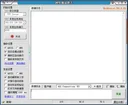
NetAssist 下载后先核对官方版本,再用短报文逐项确认模式、端口、编码和应答;保留可复现的日志,能让 NetAssist 网络调试与后续故障反馈更有效。
English
NetAssist download guide for Windows: explore TCP, UDP, MQTT and IPv6 testing, portable setup, v5.15 release notes, connection checks, and official sources.
NetAssist features: choose the communication role first
NetAssist is a Windows network-testing tool published by 野人家园 (CMSoft). It offers TCP Server, TCP Client, UDP, and MQTT Client modes with IPv4 and IPv6. It can exchange data with a program or device you are developing so that you can inspect messages and replies. A TCP client needs a listening server; a TCP server waits for clients. UDP does not use TCP's connection process, so the absence of a connected status does not by itself prove a fault. The MQTT feature is a client, not a broker.
Start with one short, fixed message before adding timed transmission, checksums, or automatic replies. This keeps changes small enough to explain. The publisher lists saved commands, batch transmission, logging, Modbus, and JT/T808 helpers; the device's protocol documentation still determines the correct values.
NetAssist download and portable setup steps
- Open the official NetAssist resource page. Check the product name, listed version 5.15, and July 30, 2025 update before using its download control. This page's channel leads to that resource page, not directly to an EXE or ZIP.
- Save the obtained files in a separate writable folder. If an archive is supplied, extract it fully before launching the program. The publisher describes a single-executable portable tool with no Microsoft .NET Framework requirement. No software package was downloaded or run for this article.
- Select the matching role, address family, and ports. Send one recognizable message through a local loopback test or between devices you are authorized to test before moving to the real integration environment.
- If Windows blocks the file, check its source, properties, and detection details before running it and contact the maintainer if needed. Do not disable real-time protection merely because a page calls a detection a false positive. Evaluate any firewall prompt against the network scope needed for the test.
NetAssist 5.15 release notes: July 30, 2025
The official page lists 5.15 dated July 30, 2025 as its current release at the time checked. Its notes add GPS debugging, integer conversion, HEX/BIN conversion, and a TCP Server firewall with client allowlists and blocklists. They also describe fixes for stopping transmission when a script loops indefinitely, possible truncation of saved or batch messages longer than 256 bytes, JT808 authentication timeouts, and MQTT failing to reconnect after a timeout. YModem issues and other optimizations are mentioned as well.
The historical YModem entry does not establish that the current network tool includes this serial-transfer feature. A November 27, 2025 maintainer reply on the same page says YModem was removed from NetAssist and retained in the serial assistant. Check the current feature set when choosing a tool. The same history includes version 4.3.25, with fixes for a missing tray icon after taskbar recovery and a transfer counter displaying negative values after overflow.
Fixing connection failures and unexpected data
Check endpoints before changing broad system settings: confirm that the other application is listening, verify addresses and ports, then match roles and IPv4/IPv6. If a 5.15 server uses an allowlist or blocklist, inspect that rule too. Review the application's intended firewall scope rather than turning the firewall off. For UDP, inspect both the destination and the receiving port; a TCP-style connection check is insufficient.
If data arrives but looks wrong, determine whether the protocol expects ASCII text or HEX bytes. The publisher lists ANSI and UTF-8 support, so both ends need compatible encoding, line endings, and checksum settings. When short messages work but batches fail, compare length, timing, terminators, and version; 5.15 fixes a documented truncation case above 256 bytes. Logs can make comparisons reproducible. Review their contents before storing or sharing production messages, account data, or device identifiers.
NetAssist FAQ
Is NetAssist free? The resource page labels it free software, while its history also refers to professional-edition support. This does not establish that every advanced feature is free; check the current program and publisher's terms.
Does it need .NET Framework? The publisher says it is a portable single executable without that dependency. The page identifies Windows but gives no precise minimum version or build-by-build Windows 11 compatibility table. Include the OS version when reporting a launch problem.
Can it run an MQTT server? The documented mode is MQTT Client, and the maintainer explicitly says only the client is available. Use a broker you are authorized to access and check its connection requirements.
Where is the manual? The official manual page lists setup, basic operations, scripts, and automatic-reply chapters. Its February 23, 2024 date predates 5.15, so compare older instructions with the current interface and release notes.
Why does the sample image say 4.3.25? It is a historical product thumbnail still served by the publisher. It documents the earlier interface and product identity, not a v5.15 interface or a test performed for this page. The other images are original explanatory diagrams.
After a NetAssist download, check the official version and establish a short-message baseline before varying ports, encoding, or automated replies; reproducible logs make NetAssist troubleshooting more useful.