Neat Download Manager 1.4 (Windows)
The publisher page lists Windows 1.4 but gives no desktop release date or itemized change log for this build. No changes are inferred.
· レコードの更新:2026年10月19日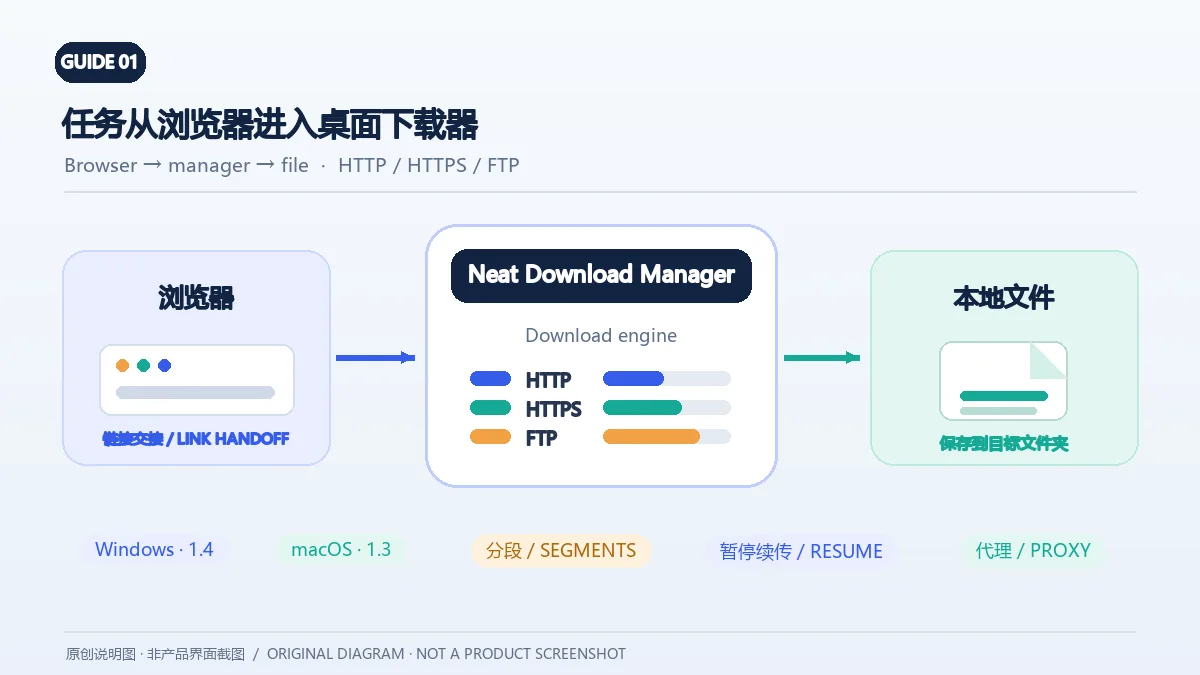
Neat Download Manager(NeatDM)是 Windows 与 macOS 桌面下载管理器,可管理链接任务、分段连接、代理、暂停续传和浏览器扩展。本文核对官网列出的 Windows 1.4 与 macOS 1.3,并说明版本日志、系统要求和安装包仍有哪些信息未公开。 / Neat Download Manager (NeatDM) is a Windows and macOS desktop download manager for browser handoff, segmented transfers, proxies, and pause/resume. This guide checks the publisher-listed versions and explains installation, compatibility, and missing desktop release notes.
別名:NeatDM、NeatDownloadManager
作者:RJ.tools Editorial
AI支援コンテンツ
ソフトウェアの基本情報と提供元を確認できます
The reviewed publisher pages do not provide formal desktop license text; check the terms distributed with the application before commercial use or redistribution.
The installer files were not downloaded, run, signature-checked, or scanned. This page does not make an independent safety claim.
確認元: No installer analysis performed; references are publisher pages and Mozilla Add-ons records.
Neat Download Manager(NeatDM)是 Windows 与 macOS 桌面下载管理器,可管理链接任务、分段连接、代理、暂停续传和浏览器扩展。本文核对官网列出的 Windows 1.4 与 macOS 1.3,并说明版本日志、系统要求和安装包仍有哪些信息未公开。 / Neat Download Manager (NeatDM) is a Windows and macOS desktop download manager for browser handoff, segmented transfers, proxies, and pause/resume. This guide checks the publisher-listed versions and explains installation, compatibility, and missing desktop release notes.
NeatDM 下载与安装:对照 Windows 1.4、macOS 1.3,查看浏览器扩展、分段续传、代理设置与常见故障;官网未列桌面更新日志。 NeatDM download guide: Windows 1.4, macOS 1.3, setup, extensions, resume and FAQ.
Neat Download Manager(NeatDM)是 Windows 与 macOS 下载管理器,支持 HTTP、HTTPS、FTP、代理、分段连接及暂停续传。本文整理 Windows 1.4、macOS 1.3、NeatDM 下载与安装、浏览器扩展和常见故障,说明官网未公开的更新日志,提醒安装前核对系统要求。
Neat Download Manager 是一款面向 Windows 和 macOS 的桌面下载管理器。开发者将它描述为轻量图形界面与 C++ 下载引擎的组合;官网列出的用途包括接收浏览器下载链接、管理任务、暂停或继续下载,以及控制带宽和连接数。任务还可按完成状态和文件类型整理,便于从大量文件中找到未完成项目。
如果你经常通过浏览器下载大型公开文件,或希望把任务集中管理,NeatDM 下载管理器值得比较。分段连接可能改善支持多连接的服务器上的传输效率,但最终速度仍受网络、服务器限制、代理和磁盘写入影响;它不是绕过权限、限速或付费页面的工具。
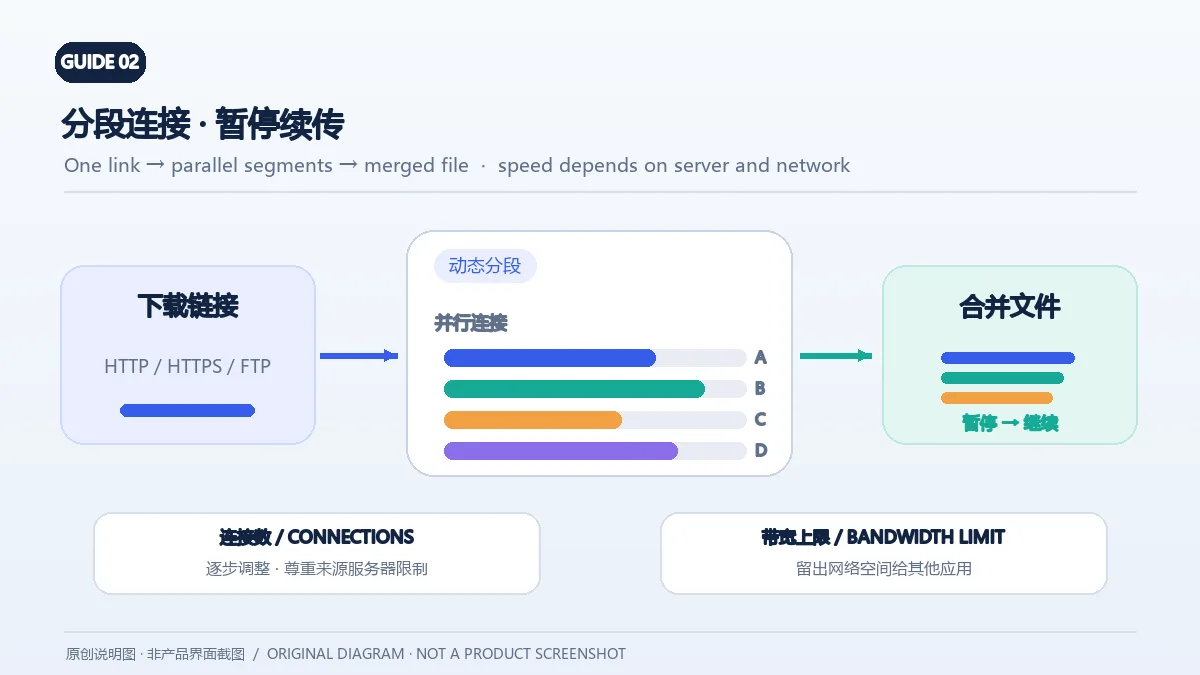
官网称 NeatDM 使用动态分段算法,可设置最大连接数,并在下载进行时调整带宽上限。你可以从较低的连接数开始,观察文件来源是否稳定,再逐步调整;连接越多并不必然越快,部分服务器会限制并发请求,或因此重置连接。
遇到中断时,先在任务列表确认文件仍标为未完成,再使用暂停/继续功能测试续传。断点续传依赖文件服务器是否允许继续读取同一资源;如果链接已过期、文件被替换或服务器不支持续传,应从原发布者获取新链接并重新开始。完成后检查文件大小和实际打开情况,不要把“任务显示完成”当作内容可信或无损的证明。
官网还列出对 HLS 视频 .ts 分段文件的下载与合并功能,结果会合并为单个 .ts 文件;这不是 MP4 转码承诺。使用前仍要确认源站允许访问,并遵守内容版权和平台规则。
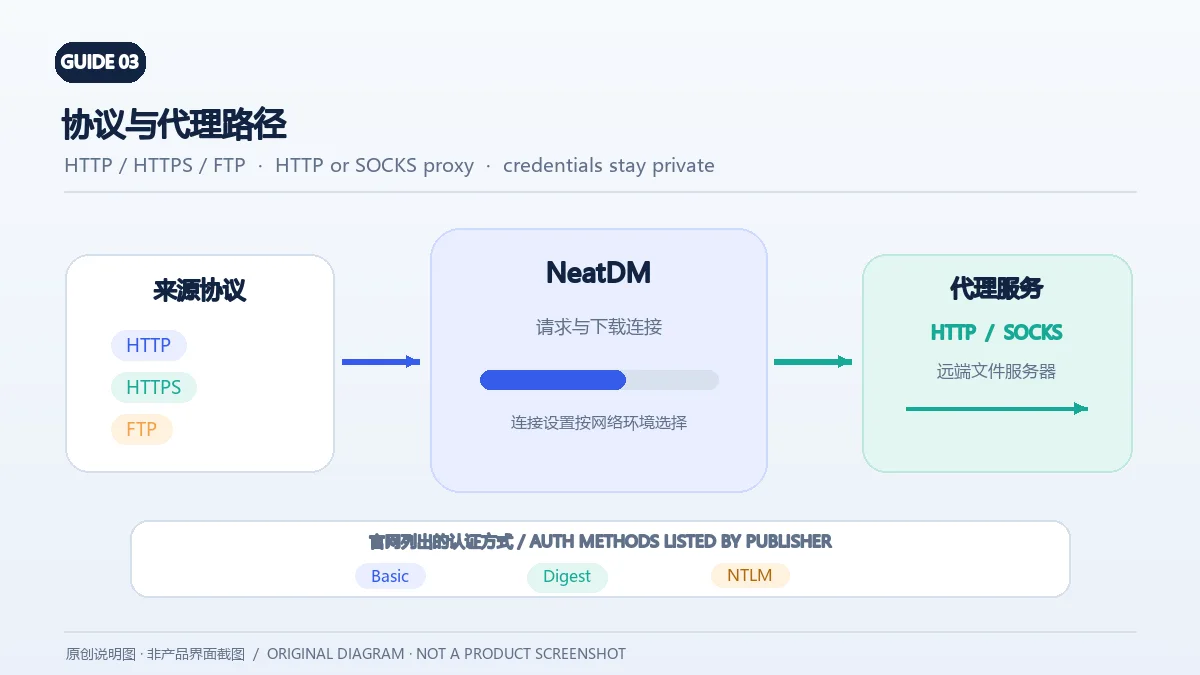
开发者列出 HTTP、HTTPS 和 FTP 协议,并说明可使用 HTTP 或 SOCKS 代理。官网还列出 HTTP 与代理认证的 Basic、Digest、NTLM 方式;这并不表示每种代理服务器都会同时支持这些认证机制。连接失败时,先确认地址、端口、协议和账号由网络管理员或服务提供方给出,再核对 NeatDM 对应连接是否需要代理。
仅在可信网络中输入代理凭据,避免把带密码的代理地址贴到截图、工单或公开帖子。若开启代理后任务停滞,可先检查认证状态与代理可达性;按组织规定排障,不要尝试规避访问控制或下载授权。
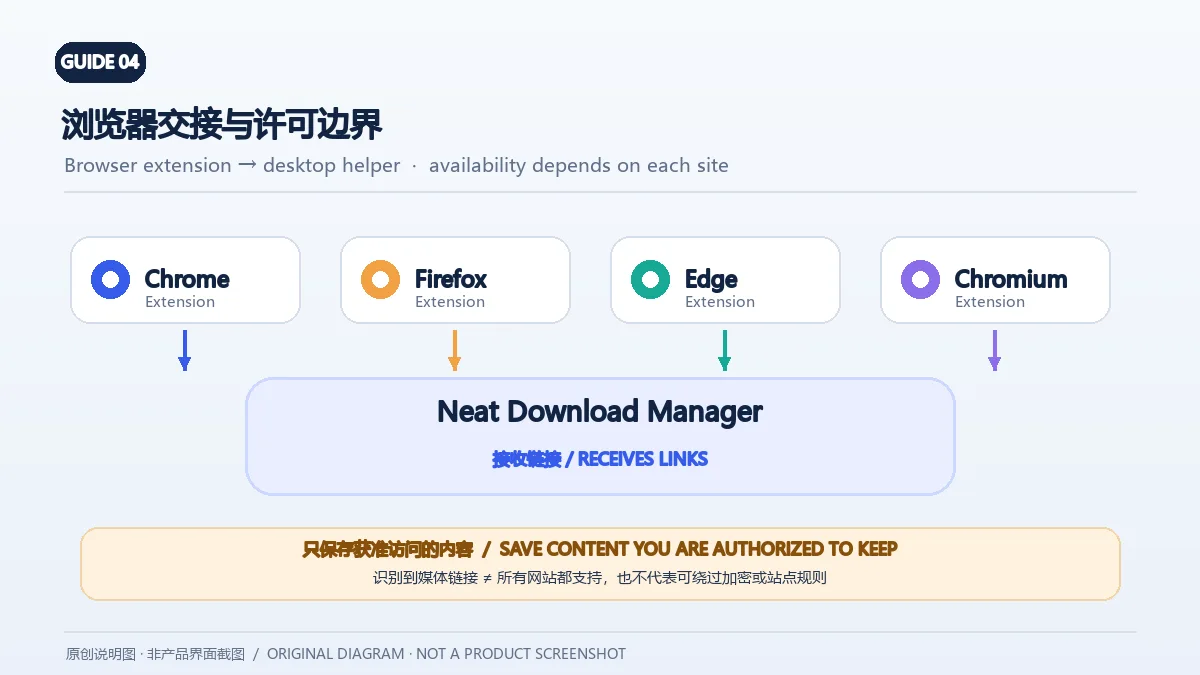
NeatDM 官网说明其浏览器扩展可与 Firefox、Chrome、Microsoft Edge,以及 Opera、Brave、Vivaldi 等 Chromium 系浏览器配合,用于把下载链接交给桌面程序;About 页面也描述了网站音频或视频链接检测。扩展必须连接到已安装的 Neat Download Manager 主程序,因此只安装扩展不一定能独立管理下载。
Firefox 扩展在 Mozilla Add-ons 中以 NeatDownloadManager Extension 发布,作者显示为 J.Motallebi,并将 neatdownloadmanager.com 列为主页和支持站点。官网没有在本次核查的页面中列出所有浏览器商店链接;安装时应在目标浏览器的官方扩展商店核对作者和名称。网页能识别媒体链接不代表所有网站都可用,也不代表可以绕过登录、加密或网站规则;只处理你有权保存的内容。
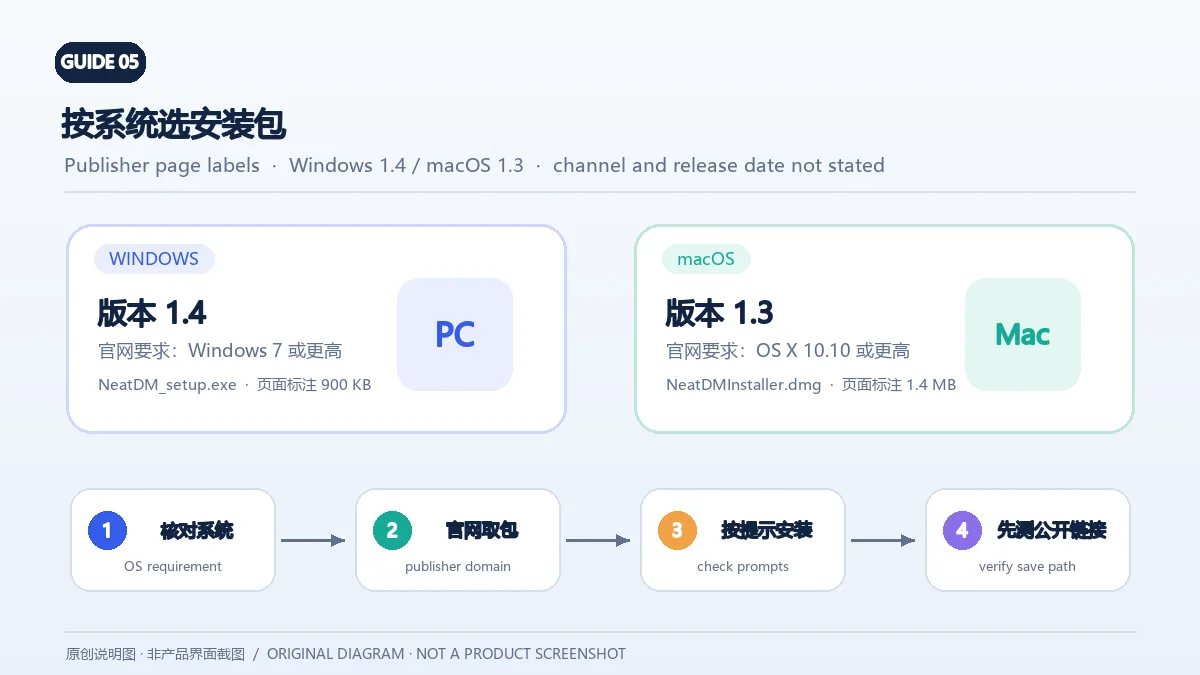
开发者页面目前分别显示 Windows 安装程序 1.4(页面标注约 900 KB)和 macOS DMG 1.3(页面标注约 1.4 MB)。同页列出的最低系统要求是 Windows 7 或更高版本,以及 OS X 10.10 或更高版本。页面没有说明处理器架构,也没有标注稳定版/测试版通道;较早的最低系统要求不能单独证明软件已针对较新的系统版本测试。
Windows 安装步骤
neatdownloadmanager.com,文件名为 NeatDM_setup.exe。macOS 安装步骤
NeatDMInstaller.dmg 和页面标注的 1.3 版本。版本更新记录: 官网当前下载区显示 Windows 1.4、macOS 1.3,但未提供这两个桌面版本的发布日期或逐项更新日志,因此不能据此编造“修复项”。独立的 Firefox 扩展页面目前列出 1.9.9,发布日期为 2023-01-30,更新说明只有 “Minor bugs fixed”;这条记录仅属于浏览器扩展,不是 Windows/macOS 桌面程序的更新说明。
Neat Download Manager 是免费软件吗? 官网称它为 free Internet Download Manager,但本次查看的页面没有列出正式许可文本或收费功能说明。需要商用或再分发时,请先查看随软件提供的许可条款。
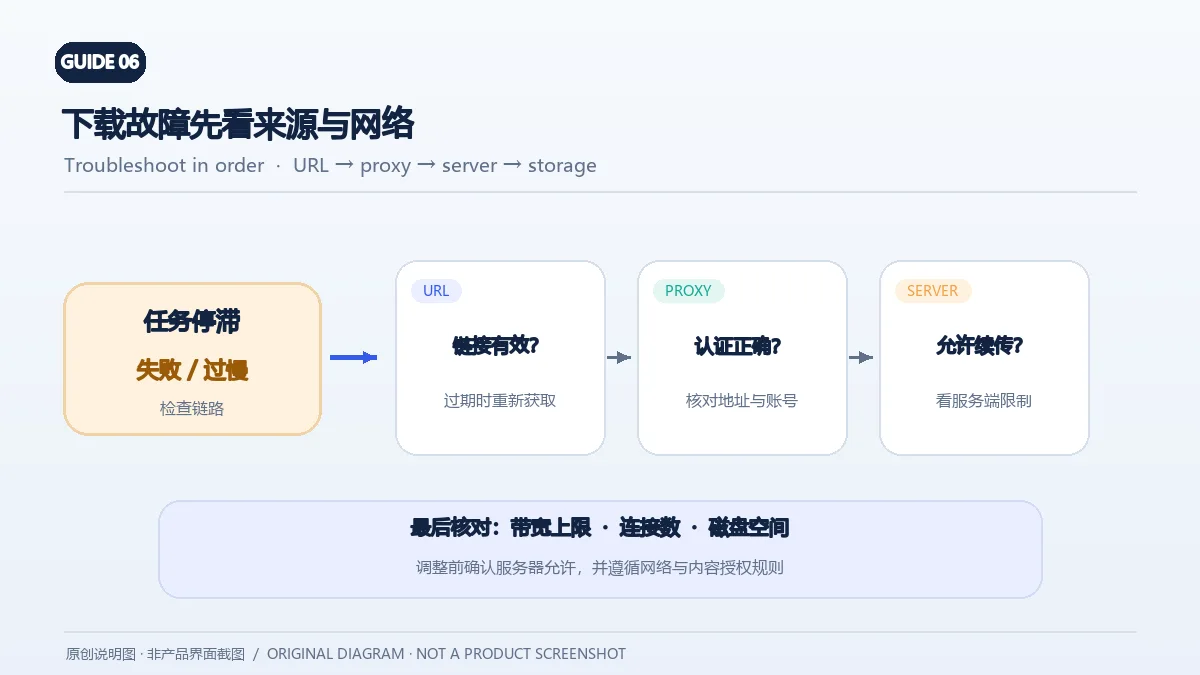
为什么 NeatDM 下载速度没有提高? 服务器可能限制并发连接,代理也会增加延迟;检查系统带宽限制、最大连接数、网络状况和磁盘空间。只在服务器允许时逐步调整连接数,避免把更多连接当成保证提速的方法。
下载中断后打不开或无法续传怎么办? 确认链接仍有效、目标磁盘有足够空间、代理认证正确。若服务器不支持续传或原链接已过期,重新从内容发布者获取链接;NeatDM 官网说明支持尝试续订过期下载,但站点端规则仍可能要求重新授权。
NeatDM 能下载每个网站的视频吗? 不能这样保证。官网介绍扩展会检测许多网站的音频/视频链接,Mozilla 扩展页也说明无法下载加密媒体文件。网站协议、登录状态、加密方式与版权规则都会影响结果;不要试图绕过这些限制。
Windows 与 macOS 应该下载哪个版本? 按使用的电脑选择官网分别列出的安装入口:Windows 1.4 或 macOS 1.3。NeatDM 官网没有列出 Android 或 iOS 版本。
准备 Neat Download Manager 下载时,请从开发者官网选择与操作系统相符的文件,并把页面列出的版本、未公开的更新记录和实际安装兼容性分别核对。遇到问题时,先检查原始下载链接、服务器续传支持、代理设置和目标磁盘,再判断是否需要重新取得文件。
NeatDM is a Windows and macOS download manager with HTTP, HTTPS, FTP, pause/resume, proxies and browser extensions. Compare versions, setup and common fixes.
Neat Download Manager is a desktop download manager for Windows and macOS. Its publisher describes a lightweight graphical interface around a C++ download engine. The product page lists browser link handoff, task management, pause and resume, bandwidth and connection controls, and sorting by completion status or file type.
Neat Download Manager may suit people who manage frequent downloads of public files and want a separate task list. Segmented transfers can help when a server permits parallel range requests, but actual speed still depends on the network, server policy, proxy, and disk writes. The application does not grant access to restricted, paid, or permission-protected content.
The publisher says NeatDM uses dynamic segmentation and lets users change the maximum connection count and bandwidth limit while a download is running. Start with a modest connection count and observe the source. More connections do not always mean faster downloads: some servers cap parallel requests or reset them.
After an interruption, check that the task remains incomplete, then try the pause/resume control. Resume depends on the file server continuing to serve the same resource. If the URL expired, the file changed, or the server does not support resuming, obtain a fresh authorized link from the publisher and restart. Check the resulting file size and whether it opens; a completed status is not proof that the file is trustworthy or intact.
The publisher also lists downloading all .ts segments from an HLS video and merging them into one .ts file. This is not a promise to transcode the result to MP4. Confirm that the source permits access and follow copyright and platform rules.
The publisher lists HTTP, HTTPS, and FTP, plus HTTP and SOCKS proxy support. It also lists Basic, Digest, and NTLM authentication for HTTP and proxy authentication. This does not mean every proxy server supports every mechanism. When a connection fails, confirm the address, port, protocol, and account details with the network administrator or service provider before changing settings.
Enter proxy credentials only in a trusted network setup. Do not expose password-bearing proxy URLs in screenshots, support tickets, or public posts. If a task stalls through a proxy, check authentication and reachability in line with your network policy; do not try to evade access controls or download authorization.
NeatDM's website says its extension can work with Firefox, Chrome, Microsoft Edge, and Chromium-based browsers such as Opera, Brave, and Vivaldi. It can send download links to the desktop application, and the About page describes detecting audio or video links on websites. The extension depends on the Neat Download Manager desktop application; installing an extension alone may not provide a working download manager.
Mozilla Add-ons lists NeatDownloadManager Extension by J.Motallebi and identifies neatdownloadmanager.com as its homepage and support site. The publisher pages reviewed here do not link every browser store. When installing an extension, verify its author and name in the browser's official store. Media-link detection does not guarantee every site will work or permit bypassing login, encryption, or site rules; only save content you are authorized to keep.
The publisher currently lists Windows setup 1.4 (page label about 900 KB) and a macOS DMG 1.3 (page label about 1.4 MB). The same page states Windows 7 or later and OS X 10.10 or later. It does not specify CPU architecture or mark a stable/beta channel; an older minimum OS requirement alone does not prove testing on newer releases.
Windows setup
neatdownloadmanager.com and the filename is NeatDM_setup.exe.macOS setup
NeatDMInstaller.dmg and the page-listed version 1.3.Version notes: The publisher's download area lists Windows 1.4 and macOS 1.3 but gives no release dates or itemized desktop change logs. Do not infer fixes from those version labels. The separate Firefox extension listing shows version 1.9.9, released on 2023-01-30, with the note “Minor bugs fixed.” That entry describes the browser extension, not the Windows or macOS application.
Is Neat Download Manager free? The publisher calls it a free Internet Download Manager, but the reviewed pages do not provide formal license text or explain paid features. Check the license supplied with the software before commercial use or redistribution.
Why is my NeatDM download not faster? The server may limit parallel connections, and a proxy can add latency. Check bandwidth limits, maximum connections, network conditions, and free disk space. Adjust connections gradually where the server permits; additional connections do not guarantee higher speed.
Why did a download stop or fail to resume? Check that the URL is still valid, the destination has space, and proxy authentication is correct. If the server does not support resuming or the original link expired, get a fresh link from the content publisher. NeatDM says it can try to renew expired downloads, but the site may still require fresh authorization.
Can NeatDM download video from every website? No such guarantee is published. The publisher says the extension detects audio/video links on many websites, and the Mozilla listing says encrypted media files cannot be downloaded. Site rules, login state, encryption, and copyright restrictions affect availability; do not bypass them.
Which version should I install on Windows or macOS? Choose the publisher's entry for your computer: Windows 1.4 or macOS 1.3 as currently displayed. The NeatDM website reviewed here does not list an Android or iOS edition.
For a Neat Download Manager download, choose the publisher's file for your operating system and check the listed version, missing release notes, and actual system compatibility separately. If a transfer fails, inspect the source URL, server resume support, proxy settings, and destination disk before obtaining another file.
情報確認日:2026年10月18日
初回公開:2026年10月19日· 編集部による更新:2026年10月19日
官网称桌面应用免费,但本次核对页面没有正式许可文本;商用或再分发前请阅读随软件提供的许可条款。
官网当前列出 Windows 1.4 与 macOS 1.3。页面未标记稳定/测试通道,也未给出桌面版发布日期。
续传依赖服务器继续提供同一文件。检查链接是否有效、代理认证和磁盘空间;链接失效时从授权发布者重新获取。
The publisher describes the desktop app as free, but the reviewed pages did not include formal license text. Check the bundled terms before commercial use or redistribution.
The publisher currently lists Windows 1.4 and macOS 1.3. The reviewed page does not label a stable/beta channel or give desktop release dates.
Resume depends on the server continuing to provide the same file. Check the URL, proxy authentication, and disk space; obtain a fresh authorized link if it expired.

NatTypeTester 是用于检测 STUN NAT 映射与过滤行为的开源工具,10.0.10 提供 Android、Windows、macOS 和 Linux 发行包。 | NatTypeTester checks STUN NAT mapping and filtering, with 10.0.10 packages for Android, Windows, macOS and Linux.

Watt Toolkit(原 Steam++)是面向 Steam 相关任务的开源跨平台工具箱,包含网络、账号、库存和令牌功能。 / Formerly Steam++, Watt Toolkit is an open-source cross-platform toolbox for Steam-related network, account, library, and token tasks.

qBittorrent 是开源 BitTorrent 客户端,支持磁力链接、RSS、搜索和 Web UI。本页整理 Windows 10+ 稳定版 5.2.4、macOS/Linux 平台差异、安装核对与版权提醒。 / qBittorrent is an open-source BitTorrent client with magnet, RSS, search and Web UI features. Review stable v5.2.4, platform differences, setup checks and lawful use.
腾讯手游加速器由深圳市腾讯计算机系统有限公司开发和运营。应用宝详情介绍网络加速、游戏相关辅助信息、预约与战绩数据等功能;支持情况以当前应用详情为准。

奇游 Windows 官方下载、安装步骤、区服选择与会员条件,保留7.3.0文件标识和官网页脚差异。 / Official Windows download, installation, route checks and membership terms with explicit version-evidence limits.

迅猛兔加速器 Android 来源、网络模式、安装、版本与FAQ。 / Xunmengtu Android source, network modes, installation, version record, and FAQs.