
装机后检查:硬件信息与基础诊断
在装机、升级或排查问题时核对硬件型号、传感器与基础健康信息。收录AIDA64 Extreme、CrystalDiskInfo、GPU-Z等站内已有工具,按实际用途选择适合自己的应用。
HCI Design MemTest 是 Windows RAM 检测工具。本页介绍官网 7.0、免费版解压安装、内存分配、覆盖率及故障排查,并区分 Pro 更新范围。 A bilingual guide to official setup, coverage and practical RAM-error diagnosis.
별칭: MemTest、HCI MemTest、HCI Design MemTest
작성자: RJ.tools Editorial
AI 지원 콘텐츠
소프트웨어의 기본 정보와 출처를 확인하세요
The manual permits normal-edition home or non-commercial use for free. Pro is separately paid; no open-source or redistribution permission was established.
HCI Design MemTest 是 Windows RAM 检测工具。本页介绍官网 7.0、免费版解压安装、内存分配、覆盖率及故障排查,并区分 Pro 更新范围。 A bilingual guide to official setup, coverage and practical RAM-error diagnosis.
MemTest 下载与内存检测指南:核对 HCI Design 7.0,了解免费版 ZIP 安装、内存分配、覆盖率及报错排查。 MemTest download guide with official setup, RAM allocation, coverage and troubleshooting notes.
MemTest 下载前,先确认这里介绍的是 HCI Design 的 Windows 内存检测工具。本文结合官网 7.0 说明,介绍免费版解压安装、可用内存分配、覆盖率含义和报错排查,帮助你检查新内存或配置调整后的稳定性。阅读后可从官方入口获取程序,根据实际负载安排检测时间,避免把一次无报错当成长期稳定保证。
HCI Design 将 MemTest 定位为在 Windows 中反复写入和读取数据、检查 RAM 可靠性的工具。新装内存后、电脑出现偶发不稳定时,或调整内存配置后,它可以提供一项可重复的检查记录。电脑能开机只说明启动过程完成,不能代替较长时间的数据读写检查。
先确认产品身份:本页对应 HCI Design 的 Windows 程序;选下载渠道时核对开发者和官网,不要仅凭 MemTest 这个名称判断文件。官网列出 Win9x、XP、7、8、10、11,未在所查页面分别公开当前安装包的架构、最低 CPU 或内存要求;这些列表也不代表旧 Windows 仍有系统安全支持。基础版供家庭或非商业用途免费使用,商业使用和 Pro 的授权条件以发行方为准。
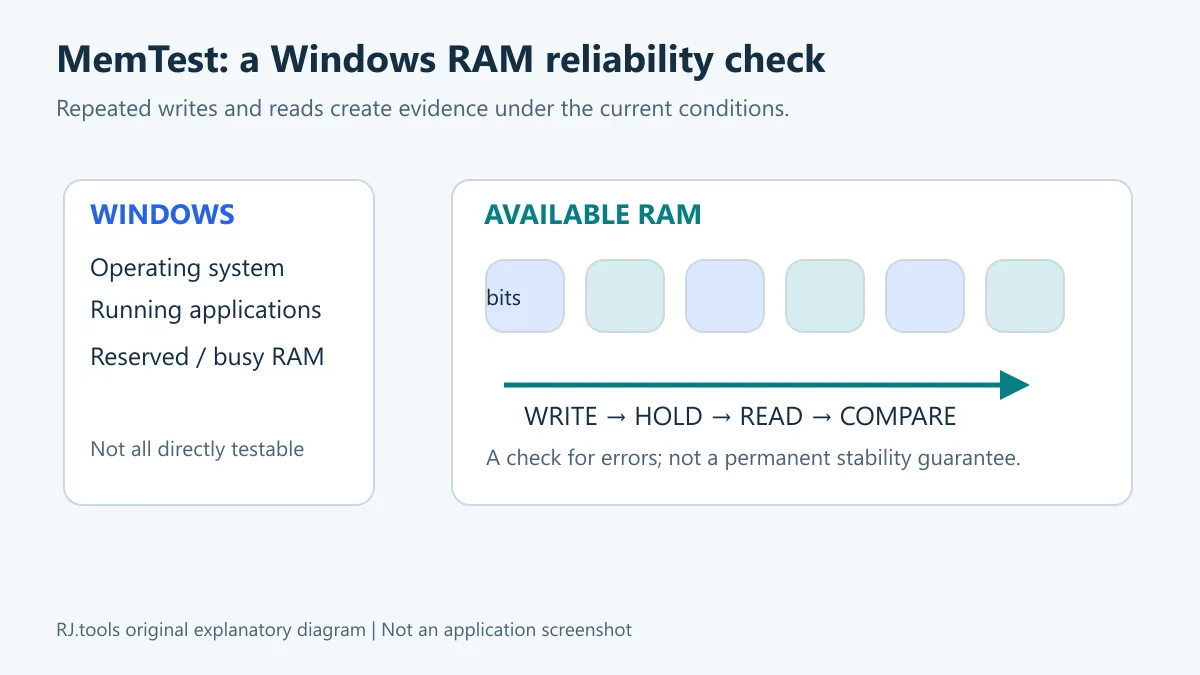
图示说明程序检查的是可分配的内存区域;它不是完整物理内存地址图,也不是运行结果。
MemTest.zip 免费版链接,将归档保存到你准备使用的文件夹。本站未下载该归档,也未核验包内版本、大小、哈希或签名。官网称程序保留在自身目录且不使用注册表;这是发行方说明,不能替代对下载文件的本地核验。若出现系统拦截,先核对下载来源、文件属性与厂商说明,不建议为启动未知文件直接关闭系统防护。
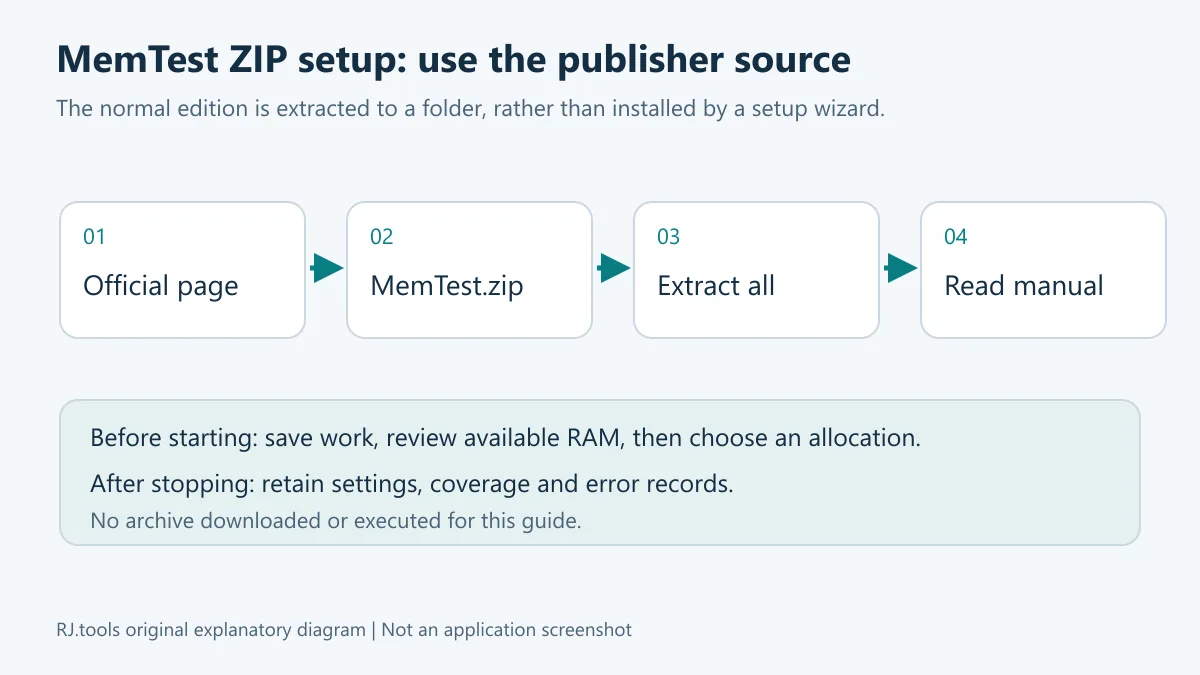
这张安装流程图说明公开文档中的步骤,不表示本站已下载或执行软件。
官方手册强调只检查未被使用的 RAM,而不是把物理内存总容量全部填进去。Windows 和正在运行的应用需要保留空间;如果检测申请超过可用量,系统可能频繁交换到磁盘,出现运行很久、覆盖率只增加一点的现象。先查看任务管理器,再降低检测量,通常比继续堆高数值更有意义。
多核电脑可按手册使用多个实例,并把计划检测的总量分摊到各实例;实例数量、单实例容量要与实际可用内存一起考虑。免费版操作方式与 Pro 7.0 集中控制线程的界面不同,不应照抄付费版设置项。Windows 程序不能直接检查操作系统正在占用的每一个字节,这是检测范围的限制。
覆盖率是检测工作量指标,不是“电脑通过的安全百分比”。手册将 100% 作为一次较充分检查的参考,并建议对偶发问题延长到约 400% 或更久;具体时间取决于容量与电脑状态。即使本次没有错误,也只能记录为本次条件下未发现问题,不能作永久稳定或硬件无故障的保证。
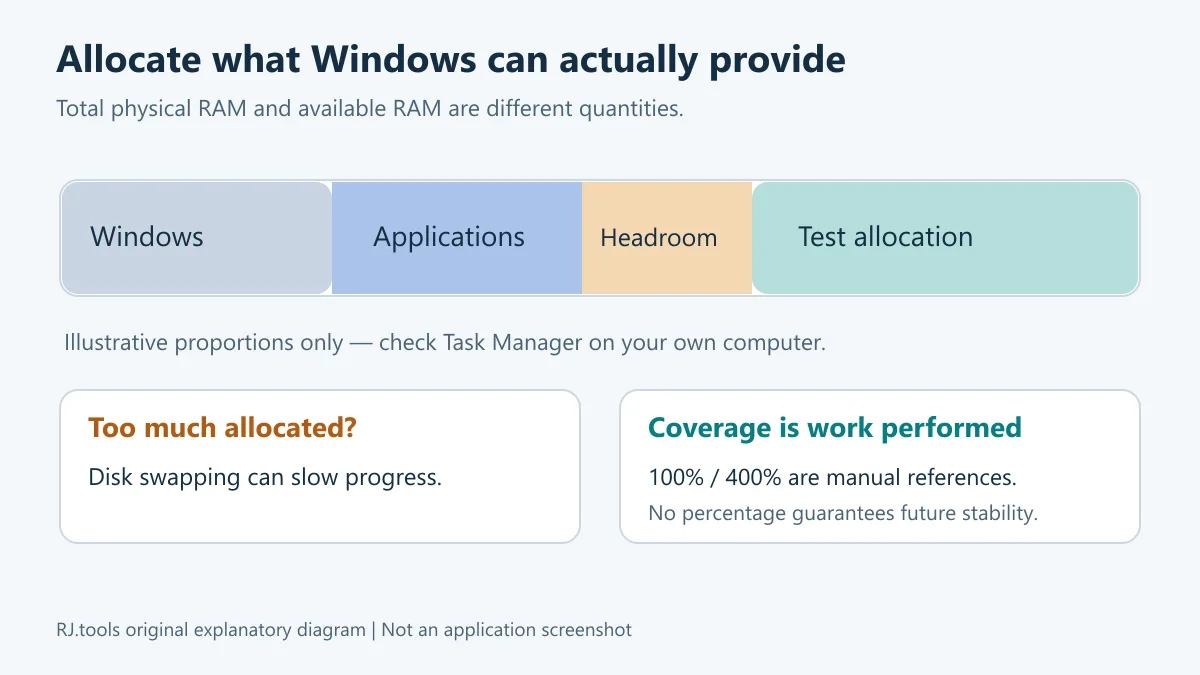
分配示意没有给出通用固定容量;应以你电脑当时的可用内存为准。
本次核对的官方产品页和手册均标记 7.0,但没有给出该版本的发布日期。官网 7.0 更新条目写明:新的 MemTest Pro 界面可直接控制线程数量与每线程内存量,汇总多个线程的结果,并显示总内存检测吞吐量。这些改动明确指向 Pro,不应宣传为免费版新增了相同界面或完整日志功能。
历史说明中,6.4 改进命令行自动化支持;6.3 改进 Pro 的可用内存自动分配以及无分页文件电脑的处理;6.2 涉及日志修复、命令行参数和界面响应。它们是官网保留的历史变更,不是此次 7.0 新增功能。所查页面没有单列 7.0 免费版的逐项改动,也没有提供新的发行日期,因此这两项不补写。
下载页提供免费版,并列出 Pro 价格为 5 美元;手册说明基础版适用于家庭或非商业用途。购买页、结算币种、税费和未来价格可能变化,是否需要付费功能应先查看发行方当前授权说明。免费获得程序不等于开源,也不等于拥有再分发许可。
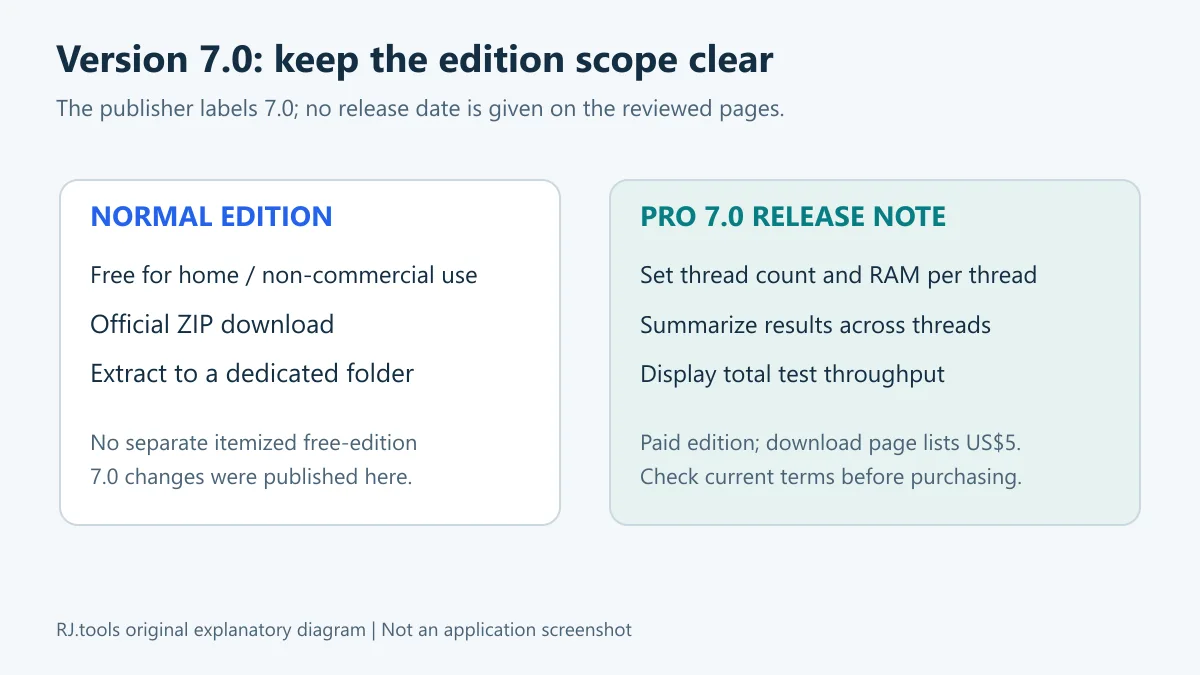
本图仅归纳已读版本说明,不是 Pro 界面截图或功能实测。
发现错误时:记录报错和当前配置,停止把这次检查当作通过。官方 FAQ 建议先检查是否使用了激进的超频或内存时序;恢复厂商推荐的保守设置后复查,有助于区分设置与硬件因素。不要根据单次报错直接判定某根内存条损坏:主板、插槽、温度和兼容性也可能参与问题,需要结合设备文档逐步定位。
长时间几乎没有进度时:优先检查内存是否分配过量。若磁盘持续忙碌且可用内存很低,降低检测量、关闭不必要程序后再观察。继续扩大检测容量反而可能让检查主要等待磁盘交换。
重启或异常发热时:先停止负载,检查散热和系统错误记录。官方 FAQ 提到高负载过热及 ECC 错误相关重启等可能性;这些只是排查方向,不是对你的电脑作出的诊断。拆装内存或改变 BIOS 前阅读设备说明,并在断电及防静电条件合适时操作;不熟悉硬件时可交由维修人员处理。
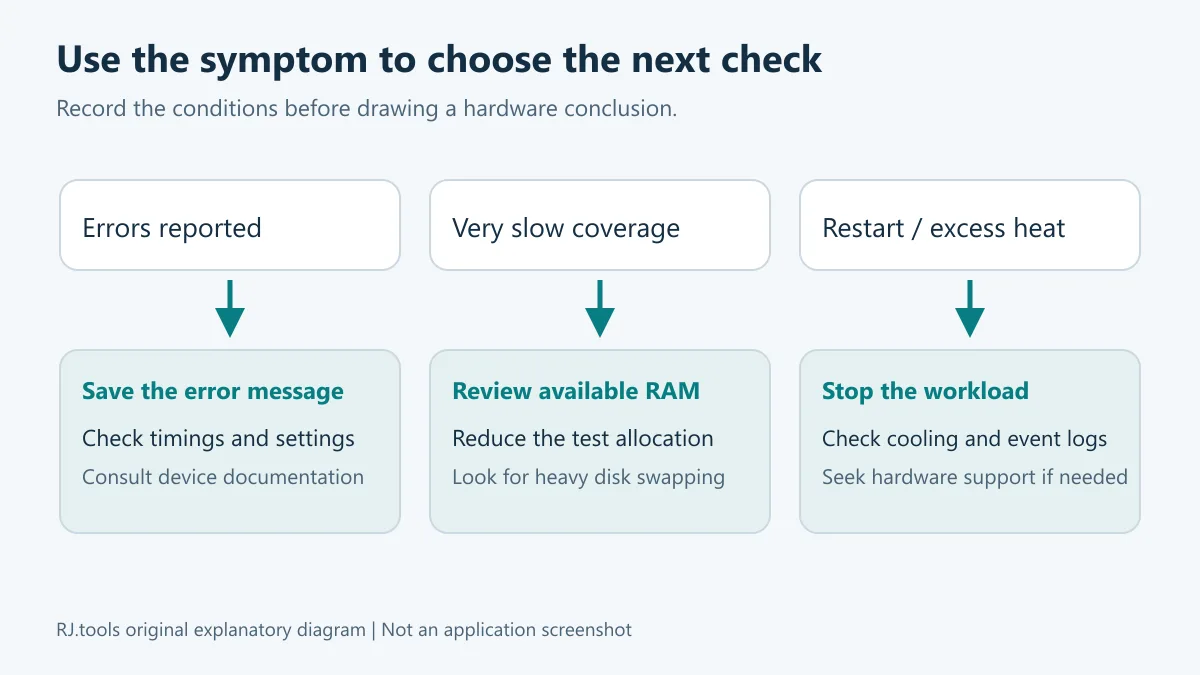
图中的分支用于安排检查顺序;软件无法仅凭错误计数可靠指出物理故障芯片。
MemTest 下载是免费的吗? 免费版供家庭或非商业使用;Pro 为单独付费版本。以 官方手册 和下载页当前条款为准。
这个文件已经由本站验证安全吗? 没有。本页核对了官网文字和公开下载链接,没有下载、运行或扫描归档,也没有进行本地签名及哈希比较;使用前应核对发行方和系统安全提示。
为什么看不到全部物理内存都被检测? Windows 和其他应用已占用的区域不能全部直接交给普通 Windows 程序检查。官方手册明确说明该范围限制;不要通过挤占全部可用内存来弥补它。
400% 没报错就能认定内存没有问题吗? 可以保留为一次较长检查中未发现错误的记录,但不同温度、负载和配置下仍可能有偶发问题。测试条件与结果应一起保存。
打不开时应该先做什么? 确认 ZIP 已完整解压、文件来自官方入口、系统条件与厂商说明相符,再查阅 官方 FAQ。不要把旧榜单的文件名当作当前版的真实性依据。
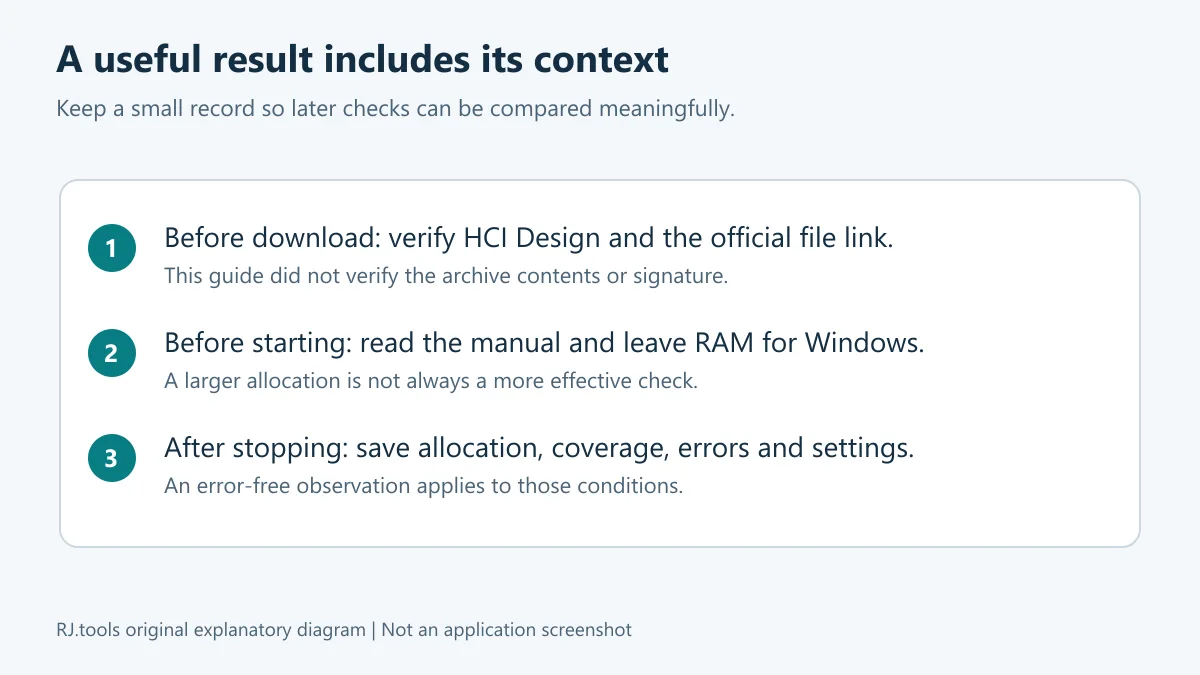
选择 MemTest 下载时,先核对 HCI Design 官网,再按可用内存安排检查、记录条件和错误。把检测结果作为排查证据,能更清楚地决定下一步是调整配置、检查散热还是寻求硬件支持。
MemTest download guide for HCI Design's Windows RAM tester: check version 7.0, ZIP setup, memory allocation, coverage, Pro features and error diagnosis.
HCI Design describes MemTest as a Windows tool that repeatedly writes and reads data to examine RAM reliability. It can help create a repeatable check after adding memory or changing a configuration, and contribute evidence when investigating intermittent instability. A successful boot alone does not exercise memory in the same way as an extended read and write workload.
Confirm the publisher before choosing a file: this listing concerns HCI Design's Windows program. Its pages list Win9x, XP, 7, 8, 10 and 11, but do not separately publish the current archive's architecture or minimum CPU and RAM requirements. The historical Windows list also does not imply that those operating systems still receive security support. The manual allows the normal version for home or non-commercial use; check the publisher's terms for other use and paid editions.
The illustration explains a scope limit; it is neither a physical address map nor an observed test result.
MemTest.zip link and save the archive to a suitable folder. This listing did not download the archive or verify its internal version, size, hash or signature.The publisher says the program stays within its own directory and does not use the registry. That statement does not replace verification of the particular file you obtain. If Windows blocks a file, check its origin, properties and the publisher's guidance before deciding how to proceed.
This installation illustration summarizes published instructions; it does not show a local installation or execution.
The manual says to test unused RAM rather than enter the total physical capacity. Windows and running applications need memory too. Allocating more than Windows can supply may force heavy disk swapping, producing very slow coverage growth. Review Task Manager and reduce the allocation before assuming that a nearly stationary percentage means a faulty module.
For multi-core systems, the manual describes running multiple copies and dividing the intended total allocation between them. Consider both instance count and memory per instance. The free version's workflow differs from the centralized thread controls described for Pro 7.0. A Windows application cannot directly inspect every byte currently occupied by the operating system, so increasing allocation to exhaust available RAM does not remove that limitation.
Coverage measures testing work; it is not a percentage probability that the computer is safe. The manual uses 100% as a thorough-check reference and suggests around 400% or longer when looking for intermittent errors. Duration depends on the machine and allocation. A run without errors records what happened under those conditions and cannot guarantee indefinite stability.
The diagram intentionally avoids a fixed allocation that would be unsuitable for some computers.
The official product page and manual reviewed here both label the product 7.0. They do not give a release date. The 7.0 note specifically describes a new MemTest Pro interface: direct control of thread count and RAM per thread, results summarized across threads, and a total memory-test throughput display. It does not establish that the free edition gained the same interface or reporting facilities.
The site retains older notes: 6.4 improves command-line automation support; 6.3 improves Pro's automatic available-memory allocation and handling of systems without a page file; 6.2 mentions logging fixes, command-line argument handling and UI responsiveness. These are historical changes rather than new 7.0 features. No separate itemized free-edition 7.0 changes or release date were found in the reviewed pages, so neither is invented here.
The download page offers the free version and lists Pro at US$5. The manual limits normal free use to home or non-commercial purposes. Check current publisher terms and checkout details for currency, taxes and paid use. A free download is not evidence of an open-source or redistribution license.
The illustration summarizes the written notes; it is not a Pro screenshot or a hands-on feature assessment.
If errors appear: save the message and configuration, and do not record the run as passed. The official FAQ suggests examining aggressive overclocking or memory timings first. Retesting with manufacturer-recommended conservative settings can help separate configuration factors from hardware factors. A single result does not identify a particular faulty DIMM: motherboard, slot, heat and compatibility factors may require further investigation.
If coverage barely advances: check whether the allocation is too large. Sustained disk activity combined with little available RAM can indicate swapping. Reduce the requested amount, close unnecessary applications and observe again. Assigning still more RAM can make the workload wait on storage instead of improving RAM coverage.
If the computer restarts or overheats: stop the workload and check cooling and system error records. The publisher mentions heat under load and ECC-related restart settings as possible leads, not a diagnosis of your machine. Follow device documentation before handling modules or changing firmware settings, and seek qualified help if hardware work is unfamiliar.
Software error counts alone cannot reliably locate the physical memory chip at fault.
Is the MemTest download free? The normal version is free for home or non-commercial use. Pro is sold separately; consult the official manual and current download page for the terms.
Has this archive been verified safe by RJ.tools? No archive was downloaded, executed or scanned for this listing. The publisher text and public file link were checked, without a local signature or hash comparison. Verify the origin of the file you obtain and review operating-system security messages.
Why is some physical RAM unavailable for checking? Windows and other applications occupy memory that an ordinary Windows program cannot all inspect directly. The manual states this limitation; allocating every available byte does not resolve it.
Does an error-free 400% run prove that RAM is faultless? It provides a useful longer-run observation, but intermittent faults can depend on temperature, load and settings. Retain the conditions together with the result.
What should I check if MemTest will not open? Confirm complete ZIP extraction, official origin and the publisher's system guidance, then consult the official FAQ. A legacy spreadsheet filename is not evidence that a current file is authentic.
For a MemTest download, confirm HCI Design's official source, allocate only suitable available RAM and keep a clear record. Those observations can guide the next step toward configuration review, cooling checks or hardware support.
정보 검증일: 2026년 10월 18일
최초 게시: 2026년 10월 18일· 편집 수정: 2026년 10월 18일
官方手册说明基础版供家庭或非商业用途免费使用,Pro 为单独付费版本;以当前发行方条款为准。
The publisher describes Pro-specific thread controls, aggregated results and total test throughput. It provides no release date or separate itemized free-edition changes on the reviewed pages.
先核对可用内存,降低检测分配量并关闭不必要程序。过量申请可能造成磁盘交换。
No. Save the settings, workload and result; intermittent failures may depend on other conditions.
No archive was downloaded, run or scanned. The official public file link was observed without internal version, signature or hash verification.
TeamSpeak 是面向游戏、团队、商务和社群的语音通信平台,官方介绍包含消息交流与服务器管理。本条目对应官方列出的 Windows 64 位 TeamSpeak 3 3.6.2。
微软官方 Windows 10 下载页提供媒体创建工具入口和安装介质制作说明,页面将 22H2 标示为最终版本。Windows 10 Home 和 Pro 支持已于 2025 年 10 月 14 日结束;LTSC 版本按各自生命周期执行。

LX Music 洛雪音乐助手桌面版:官方Windows安装包、2.12.6更新、列表备份与播放排查。 / Official desktop packages, release notes, playlist preservation and playback troubleshooting.

EA app(原 EADesktop)Windows游戏客户端:官方安装、EA账号与游戏库、自动更新和故障帮助。 / EA client setup, game library, account checks, automatic updates and troubleshooting.

R2V 是 Able Software 的 Windows 地图与工程图栅格转矢量工具。查看官方 7.5 试用版、安装要求、GIS/CAD 输出与数据检查建议。 R2V converts scanned maps and drawings into GIS/CAD vectors; includes official trial and setup guidance.

Windows磁盘空间分析,解释MFT扫描、实际占用、重复候选限制、4.33更新与个人/商业许可。 / Windows disk space analysis with MFT scanning, allocated space, duplicate limits, v4.33 notes and licensing.

XMBC 鼠标映射:Windows安装、应用配置与层、2.20.5修复、五键限制和重复输入排查。 / XMBC setup, application profiles and layers, v2.20.5 fixes, five-button limits and repeat troubleshooting.

Armoury Crate 设备管理与 Aura Sync 下载指南:核对华硕机型、Windows 安装要求、应用6.4.7及不同安装包版本。 ASUS device controls, lighting, official setup and version checks.

DS4Windows 是 Windows 手柄映射与虚拟控制器工具。本页整理 DS4Windows 3.5 社区延续版、DualShock/DualSense 配置、安装依赖和双输入排查。 / DS4Windows maps gamepad input and creates virtual controllers on Windows. This guide covers the v3.5 community continuation, setup, profiles, and duplicate-input troubleshooting.
JoyToKey 手柄映射工具:Windows 安装与 ZIP 设置、7.4 命令输入、配置迁移和共享软件许可说明。 / Windows controller mapping guide covering setup, version 7.4 commands, profile migration and shareware licensing.

FurMark 显卡压力测试与基准工具指南,介绍官方下载和平台选择、安装准备、测试条件记录、版本更新,以及打不开、画面异常和分数差异的排查思路。 FurMark GPU stress test guide with official setup, version notes, controlled comparisons and practical FAQs.
SysCeo 驱动总裁 Windows 在线版本 2.21.0.0,官方页面日期为 2026-09-15,列出桌面与 PE 驱动安装、在线和离线驱动库及 Boot Camp 匹配。本页整理页面更新说明、安装前硬件核对、系统还原准备和 MD5 的用途;下载入口只链接官方产品页,不提供站外文件直链。 / SysCeo lists Windows 2.21.0.0, desktop and PE use, online/offline libraries and Boot Camp matching. This guide explains release notes and cautious setup; the download entry links only to official product information.