
键鼠外设、灯效与设备配置
管理兼容品牌外设的按键、灯效和设备相关设置。收录Armoury Crate、Logitech G HUB、Razer Synapse 4等站内已有工具,按实际用途选择适合自己的应用。
罗技 G HUB 配置兼容的 Logitech G 外设并管理游戏库。This guide covers downloads, requirements, updates, setup, and device checks.
Aliases: G HUB、罗技 G HUB
Author: RJ.tools Editorial
Learn about the software and its sources
The checked Logitech G product and release-notes pages do not specify a license category; review the publisher's applicable terms.
罗技 G HUB 配置兼容的 Logitech G 外设并管理游戏库。This guide covers downloads, requirements, updates, setup, and device checks.
Logitech G HUB 下载指南:核对罗技外设、Windows 与 macOS 要求,了解安装步骤及 2026.6.974819 更新。 Learn how to set up G HUB, check device support, and troubleshoot missing peripherals.
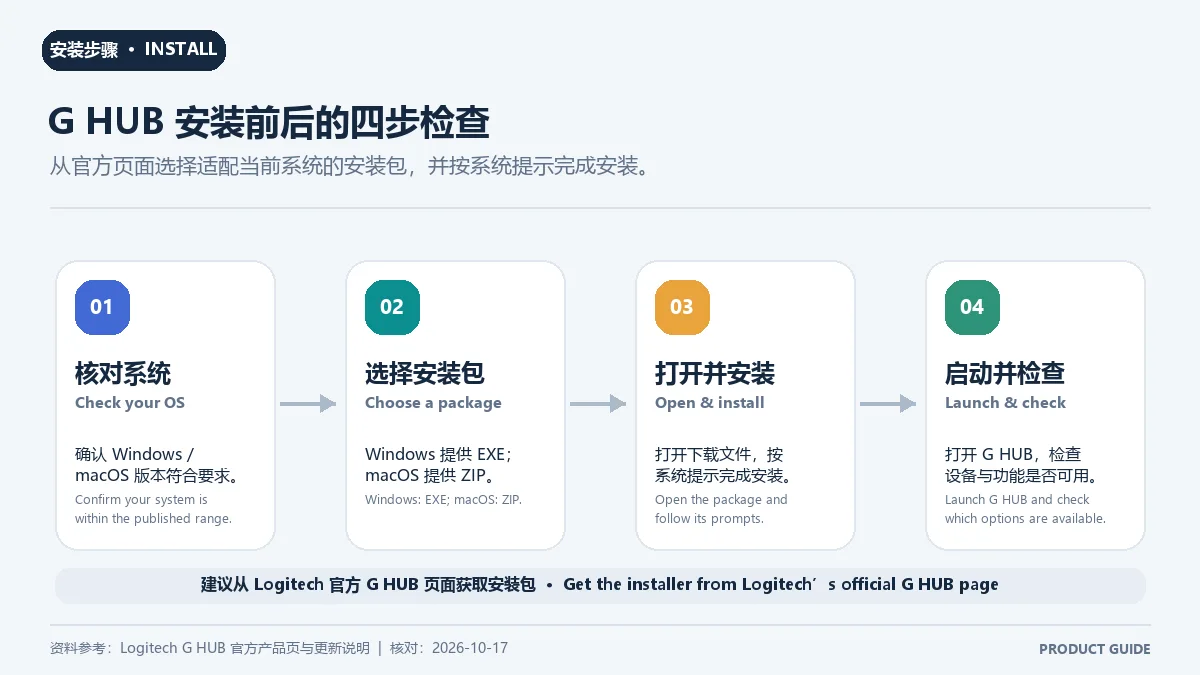
Logitech G HUB 是罗技 G 游戏设备的配置软件,可管理游戏库并个性化外设设置。本文整理 G HUB 下载、Windows 与 macOS 兼容要求、2026.6.974819 更新重点及安装排错建议,方便按设备型号核对支持情况。安装前请确认外设型号和操作系统版本符合官网兼容要求后再进行安装。
Logitech G HUB 是罗技 G 系列外设的配置工具,官网介绍了设备个性化设置和 G HUB Games 游戏库功能,并展示 HITS 体验标签。是否支持某款鼠标、键盘、耳机或方向盘,应按官网设备兼容列表逐型号确认;不要把它描述成适用于所有品牌设备的通用驱动更新器。

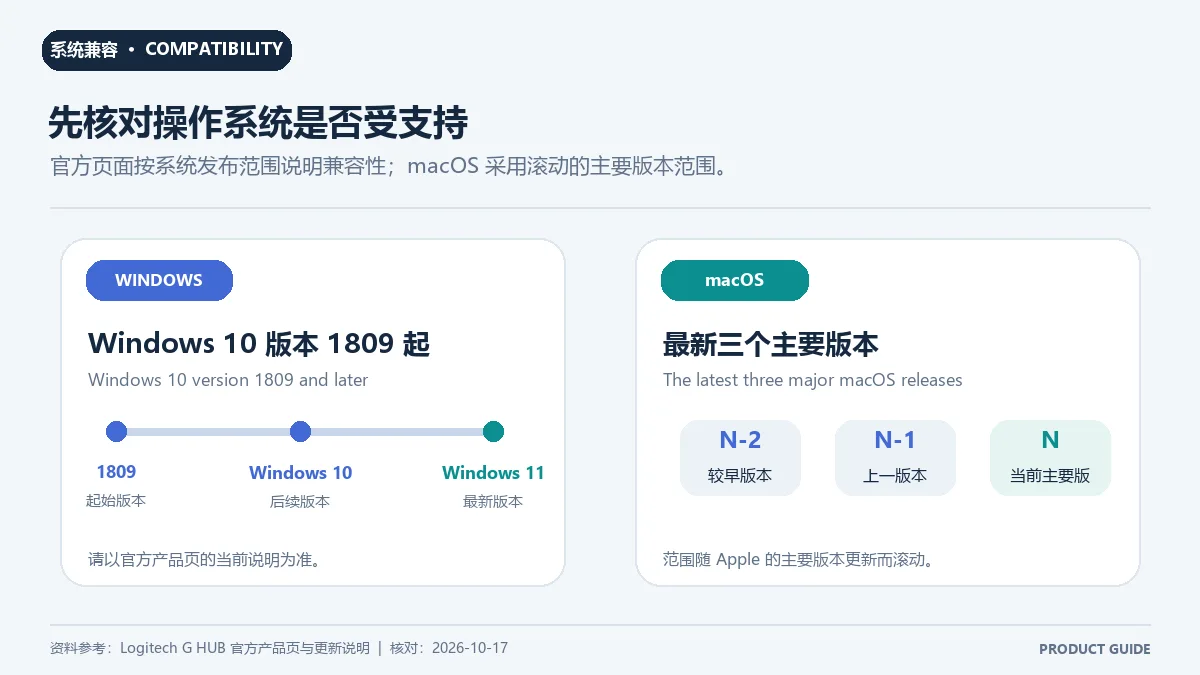
官网列出的 Windows 范围为 Windows 10 1809 至最新 Windows 11;macOS 为最近三个主要版本。系统要求会随官方支持范围变化,尤其不要把动态 macOS 范围写成长期固定版本。若设备没有被识别,先核对型号是否在 G HUB 兼容清单中,再检查系统版本和连接状态。
官方支持页在 2026-10-17 核验时将 2026.6.974819 列为当前首条版本记录,发布日期为 2026-09-21。更新涉及界面和后台加载提速、OS 专用快捷键修复、Windows 主题切换时的托盘崩溃与缩略图显示修复、更新器内存泄漏修复、更新器与 agent 连接安全强化、G29/G920 输入问题修复,并增加 10 款游戏支持。若官网后来发布新版本,应以官方更新日志页面替换此段版本记录。

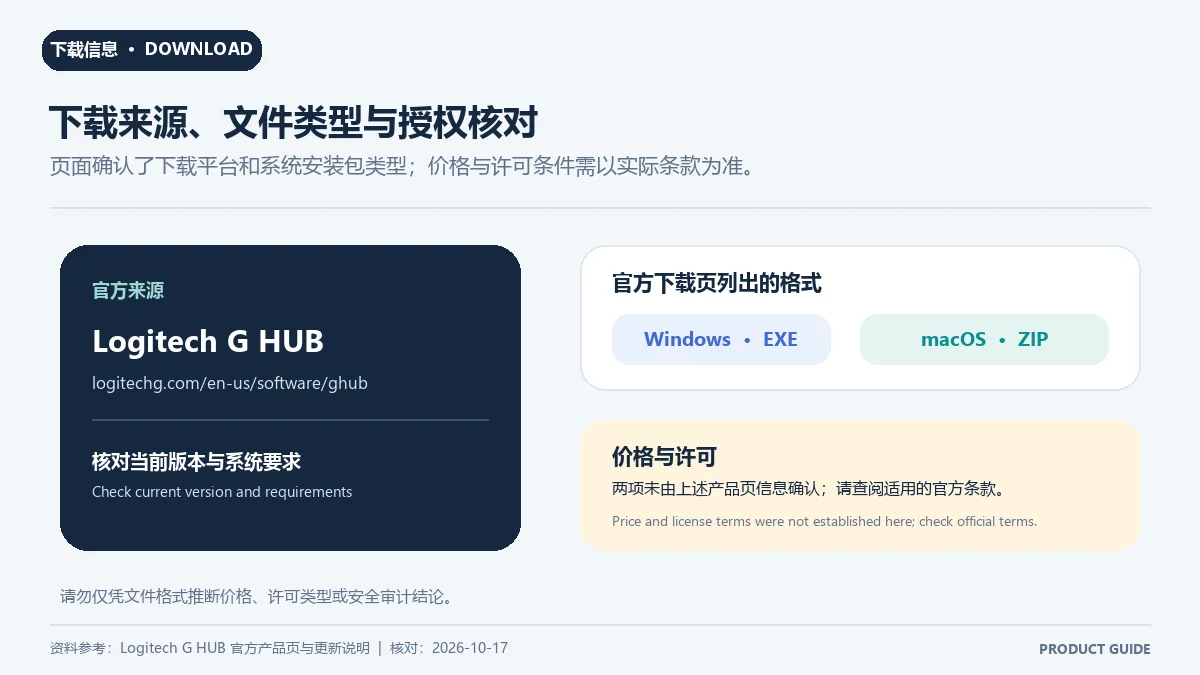
Logitech G 官网提供公开的 Windows 和 macOS 安装入口,但本次核验的产品页和更新日志没有明确标示价格或许可证类型。因此,本页不把 G HUB 称为开源软件,也不对个人、商业或地区授权作推断;安装前请阅读安装流程中显示的许可条款。下载入口不证明安装包已经经过本地校验。
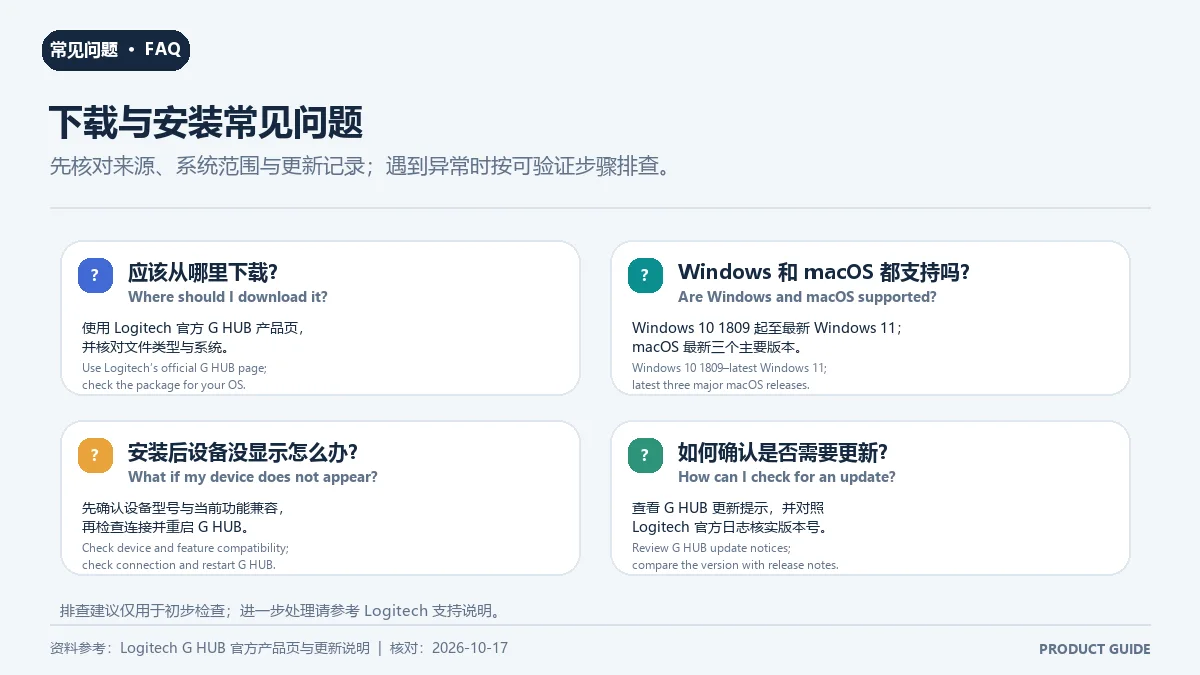
G HUB 是不是所有罗技设备都能用? 不能这样概括。请按设备型号查 Logitech G 官方兼容清单;不同型号和平台的功能可能不同。
Logitech G HUB 支持 Windows 10 吗? 官网列出 Windows 10 1809 起至最新 Windows 11。低于 1809 的系统不在该页面标注范围内。
G HUB 支持哪些 macOS 版本? 官网写明支持最近三个主要版本;版本列表可能变化,下载前应查看当前产品页。
G HUB 无法识别设备怎么办? 先确认设备型号受支持、连接正常且系统版本符合要求,再重启应用或重新连接设备;仍无法识别时使用 Logitech 官方支持入口,不要从第三方网站替换驱动文件。
G HUB 最新版本更新了什么? 本次核验的官方日志首条为 2026.6.974819(2026-09-21),包含 UI/加载、快捷键、更新器安全与内存、缩略图、G29/G920 输入和 10 款游戏支持更新。
结尾:下载 Logitech G HUB 时请使用 Logitech G 官方页面,并先确认外设型号与 Windows/macOS 兼容范围。G HUB 最新版本、安装步骤和更新日志应以 Logitech 支持页为准。
Logitech G HUB configures supported gaming gear. Find its official download, Windows and macOS requirements, version 2026.6.974819 notes, and setup tips.
Logitech G HUB is a configuration utility for Logitech G gaming peripherals. Logitech describes device personalization and the G HUB Games library, and shows an HITS experience label on its product page. Check the official compatibility list for each model; do not treat G HUB as a universal driver updater for every brand or device.
The product page lists Windows 10 version 1809 through the latest Windows 11 release, plus the latest three major macOS releases. The macOS range changes over time, so check the live Logitech page instead of relying on a fixed list. If a device is not detected, confirm that its exact model appears in G HUB’s compatibility list and check the OS and connection.
On October 17, 2026, Logitech’s support release-notes page listed 2026.6.974819 at the top, dated September 21, 2026. The release improves interface and background loading, fixes OS-specific shortcuts, a Windows tray crash during light/dark theme switching, thumbnail display, updater memory leaks, updater-agent connection security, and G29/G920 input issues; it also adds support for 10 games. Replace this section if Logitech publishes a newer release.
Logitech G’s page offers public Windows and macOS installers, but the product and release-notes pages checked here do not state a price or license category. This page therefore does not call G HUB open source or make claims about personal, commercial, or regional licensing. Review the license terms shown during setup. A public download link does not mean the package has been locally verified.
Does G HUB work with every Logitech device? Do not assume so. Check the official compatibility list by exact model; supported features can differ between devices and operating systems.
Does Logitech G HUB support Windows 10? The product page lists Windows 10 version 1809 through the latest Windows 11 release. It does not list earlier Windows 10 builds.
Which macOS versions are supported? Logitech says the latest three major macOS releases. Check the current product page because that range changes over time.
What can I do if G HUB does not detect a device? Confirm the model is supported, reconnect it, and check the OS requirement. If it remains missing, use Logitech Support instead of replacing driver files from a third-party site.
What changed in the latest G HUB release? The release-notes page checked here lists 2026.6.974819, dated September 21, 2026. Its notes cover loading and UI fixes, updater security and memory, thumbnails, G29/G920 input, and support for 10 games.
Conclusion: For a Logitech G HUB download, use Logitech G’s official page and verify your device and Windows or macOS version first. Confirm the latest G HUB release notes on Logitech Support before installing.
Information verified: Oct 18, 2026
First published: Oct 18, 2026· Editorial revision: Oct 18, 2026
Check Logitech G's compatibility page by exact model; features vary across devices and operating systems.
官网列出 Windows 10 1809 起至最新 Windows 11;下载前核对当前页面。
The release-notes page checked on 2026-10-18 listed 2026.6.974819, dated 2026-09-21.
先核对型号、系统版本和连接,再使用 Logitech 官方支持入口。
TeamSpeak 是面向游戏、团队、商务和社群的语音通信平台,官方介绍包含消息交流与服务器管理。本条目对应官方列出的 Windows 64 位 TeamSpeak 3 3.6.2。

Snipaste 是适用于 Windows、macOS 和 Linux 的截图、标注与贴图工具。页面整理官方 2.11.3 版本、系统包型、F1/F3 使用步骤和授权区别。 / Snipaste captures, annotates, and pins images on Windows, macOS, and Linux. This guide covers official version 2.11.3, package types, F1/F3 workflow, and licensing.

Sideloadly 是 Windows/macOS 桌面 IPA 侧载工具,可将兼容 IPA 安装到 iPhone、iPad、Apple Silicon Mac 和 Apple TV;官网列出 Wi-Fi 侧载与自动刷新。 | Sideloadly is a Windows/macOS IPA sideloading utility for iPhone, iPad, Apple Silicon Mac and Apple TV, with Wi-Fi sideloading and automatic refresh features listed by the publisher.

Aerion 是面向 Linux、macOS 与 Windows 的开源邮件客户端,通过 IMAP/SMTP 连接邮箱。查看 v0.3.5 官方下载、平台依赖、首次设置和功能限制。

Watt Toolkit(原 Steam++)是面向 Steam 相关任务的开源跨平台工具箱,包含网络、账号、库存和令牌功能。 / Formerly Steam++, Watt Toolkit is an open-source cross-platform toolbox for Steam-related network, account, library, and token tasks.

Signal Desktop 是 Signal 的电脑端消息应用,可与 Android 或 iOS 手机端配对后在 Windows、macOS 和 Linux 上收发消息;首次使用前需先在手机安装 Signal。

XMBC 鼠标映射:Windows安装、应用配置与层、2.20.5修复、五键限制和重复输入排查。 / XMBC setup, application profiles and layers, v2.20.5 fixes, five-button limits and repeat troubleshooting.

Armoury Crate 设备管理与 Aura Sync 下载指南:核对华硕机型、Windows 安装要求、应用6.4.7及不同安装包版本。 ASUS device controls, lighting, official setup and version checks.

DS4Windows 是 Windows 手柄映射与虚拟控制器工具。本页整理 DS4Windows 3.5 社区延续版、DualShock/DualSense 配置、安装依赖和双输入排查。 / DS4Windows maps gamepad input and creates virtual controllers on Windows. This guide covers the v3.5 community continuation, setup, profiles, and duplicate-input troubleshooting.
JoyToKey 手柄映射工具:Windows 安装与 ZIP 设置、7.4 命令输入、配置迁移和共享软件许可说明。 / Windows controller mapping guide covering setup, version 7.4 commands, profile migration and shareware licensing.

FurMark 显卡压力测试与基准工具指南,介绍官方下载和平台选择、安装准备、测试条件记录、版本更新,以及打不开、画面异常和分数差异的排查思路。 FurMark GPU stress test guide with official setup, version notes, controlled comparisons and practical FAQs.

SysCeo 驱动总裁 Windows 在线版本 2.21.0.0,官方页面日期为 2026-09-15,列出桌面与 PE 驱动安装、在线和离线驱动库及 Boot Camp 匹配。本页整理页面更新说明、安装前硬件核对、系统还原准备和 MD5 的用途;下载入口只链接官方产品页,不提供站外文件直链。 / SysCeo lists Windows 2.21.0.0, desktop and PE use, online/offline libraries and Boot Camp matching. This guide explains release notes and cautious setup; the download entry links only to official product information.