读取DPC、ISR与硬缺页定位音频中断线索,区分7.31修复、家庭版许可与当前Windows驱动阻止限制。 / Interpret DPC, ISR and pagefault reports with v7.31 notes, Home Edition licensing and current Windows driver-policy limits.
中文
LatencyMon 是 Windows 音频延迟诊断工具,可查看驱动的 DPC、ISR 执行时间与进程硬缺页。本文提供 LatencyMon 下载、安装与报告阅读方法,说明 7.31 更新修复、家庭版授权范围,以及 Windows 驱动策略造成的启动限制,帮助你结合爆音场景排查问题,避免凭单次红色结论直接删除驱动。
LatencyMon 下载前:用报告定位音频中断线索
LatencyMon 由 Resplendence Software Projects 提供,用于分析 Windows 处理实时音频等任务的条件。它记录中断到进程的延迟、驱动 DPC 与 ISR 执行时间、进程硬缺页等数据。对于播放爆音、录音掉音、软件乐器偶发停顿,应把发生时间、音频缓冲设置和报告一起看。它不负责自动更新驱动,也没有保证消除延迟的一键修复功能。
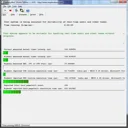
报告结论是排查入口。官方使用指南也说明分类阈值是人为选定的;低缓冲的实时演奏与普通音乐播放不能用同一条界限判断体验。先记录能复现的操作,再对比有声问题发生前后,比分别截取两台电脑的最高值更有意义。
LatencyMon 安装步骤:先核对驱动策略与授权
- 从 官方下载页 选择 LatencyMon Home Edition,当前列出 7.31。下载页写明安装器为 3.62 MB,此为页面标示,并非本页实测文件大小。
- 运行安装器并按向导完成。官网支持列表包括 Windows 11、Windows 10/8.1/8/7 的所列版本及部分 Windows Server;系统在列表中不代表每个新安全策略都已兼容。
- **先核对当前限制:**官网 2026 年 6 月 18 日公告称,Windows 对旧交叉签名驱动的信任策略变化会阻止部分系统运行该产品。遇到驱动被阻止或界面未出现时,记录 Windows 版本、错误信息并查看厂商公告,等待兼容更新或联系支持。不要把关闭驱动安全校验当作普通安装步骤。
- 能正常启动时,按 Start 开始,复现一段平时会爆音的工作负载,再按 Stop,保存报告及测试条件。改变设备或驱动后以同样条件重新比较。

免费 Home Edition 与 Professional 不同。官网将商业环境使用许可、界面缩放与外观设置、额外的 In-Depth Latency Test 列为 Professional 内容;企业排障或收费服务应先核对合适许可,不把家庭版写成无限制商用。
LatencyMon 7.31 更新日志:修复驱动与进程零读数
官方新闻将 7.31 发布日期记为 2023 年 7 月 31 日。该版修复 7.30 引入的问题:Drivers 与 Processes 标签页总是显示零值。若原先用 7.30 记录的数据全为零,应在能够正常加载驱动的环境中重新采样,不能把旧报告的零值直接当作没有延迟。

支持部分 Windows 11 Insider 构建、修复超过 64 个逻辑处理器报错、恢复启动时自动分析、添加菜单监控快捷键属于 7.30 的日志。网页更新时间为 2026 年也不表示已有 7.32。页面仍列 7.31 为当前版本,后续系统政策限制应另行阅读。
LatencyMon 常见问题 FAQ:红色结论、驱动名与硬缺页
报告变红,就能确定是声卡损坏吗? 不能。它说明采样中出现了不利于特定实时任务的时间数据。音频缓冲、网络活动、驱动和内存压力都可能有关;先对应实际可听见的掉音,并保留同场景报告。
Drivers 里排名第一的系统驱动可以删除吗? 不应凭排序删除。系统模块可能只是设备活动经过的层。先核对设备、驱动厂商和版本,在可恢复的前提下一次改变一个非关键条件,再比较报告。
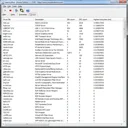
硬缺页是不是内存条硬件故障? 不是这个含义。这里是进程需要访问当前不在物理内存中的页面,可能涉及磁盘读取。官方建议确认硬缺页发生在音频进程且与掉音同时出现;单纯计数不证明内存损坏,也不必因此直接关闭分页文件。
安装后打不开,是下载错了吗? 先核对来源、系统版本及官方 2026 驱动策略公告。旧版还有 Windows 11 24H2 的单独已知问题;不同原因不应都归结为安装文件损坏。未经确认不要反复换第三方重打包版本。
完成 LatencyMon 下载后,先确认当前 Windows 能否加载所需驱动,再把报告与真实音频问题对应。保留采样条件,一次改变一个因素,才能让前后对比帮助排障。
English
LatencyMon download guide: inspect Windows audio latency, read DPC and ISR reports, install v7.31, and understand current driver-policy and Home Edition limits.
Before downloading LatencyMon: connect reports with audible events
LatencyMon by Resplendence Software Projects examines Windows suitability for real-time audio and other tasks. It records interrupt-to-process latency, DPC and ISR execution times, and process hard pagefaults. For clicks, dropouts, or pauses while playing software instruments, keep the audio buffer setting, workload, and report together. It is a diagnostic tool rather than an automatic driver updater or a guaranteed latency repair.
The report is a starting point. The official usage guide states that its classification thresholds are chosen arbitrarily. Low-buffer live performance and ordinary playback have different demands. Reproduce a known problem and compare controlled runs rather than comparing unrelated maximum values from different computers.
How to install LatencyMon: check driver policy and edition first
- Choose LatencyMon Home Edition on the publisher download page, currently listing v7.31. The page states 3.62 MB; this is publisher metadata rather than a locally measured installer size.
- Run setup and follow its wizard. The support list includes Windows 11, listed Windows 10/8.1/8/7 editions, and certain Windows Server versions. An OS appearing in that list does not establish compatibility with every later security policy.
- Check the current limitation. A June 18, 2026 publisher notice explains that changed Windows trust for legacy cross-signed drivers blocks the product on some systems. If a driver is blocked or the window does not appear, record the Windows version and error, review the notice, and seek a compatible update or publisher support. Disabling driver protection is not a normal installation step in this guide.
- If the application loads normally, choose Start, reproduce a representative audio workload, then Stop and save the report with its conditions. Repeat the same scenario after changing a device or driver.
The free Home Edition differs from Professional. The publisher lists a commercial-environment license, interface scaling and visual options, and the additional In-Depth Latency Test under Professional. Check the appropriate license for business diagnostics or paid services rather than assuming unrestricted commercial use of Home Edition.
LatencyMon v7.31 release notes: zeroed driver and process values
The official news archive dates v7.31 to July 31, 2023. It fixes a problem introduced in v7.30 that always displayed zeroed values in the Drivers and Processes tabs. If a v7.30 report contains only zeros, repeat sampling in an environment where its driver loads correctly; the old zeros do not establish absence of latency.
Support fixes for certain Windows 11 Insider builds and systems with more than 64 logical processors, automatic analysis at startup, and menu monitoring shortcuts belong to v7.30. A website update in 2026 does not indicate a v7.32 release. The product page still lists v7.31, and later Windows policy restrictions must be read separately.
LatencyMon FAQ: red reports, system drivers, and hard pagefaults
Does a red report prove my sound card is defective? No. It indicates timing data unfavorable for some real-time workloads during the sample. Buffer configuration, networking, drivers, and memory pressure may matter. First connect the report with audible events in a reproducible workload.
Should I delete the highest-ranked system driver? No. A system module may be a layer through which device activity passes. Identify the device, publisher, and driver version first. Change one nonessential, reversible condition at a time and compare another controlled run.
Does a hard pagefault mean defective RAM? No. Here it means a process requests a page not currently resident in physical memory, potentially requiring disk access. The publisher recommends checking that faults occur in the audio process while it produces the audible interruptions. A count alone does not prove hardware failure or justify disabling the pagefile.
Why does the installed application not open? Verify the source, Windows build, and the publisher's 2026 driver-policy notice. A separate older Windows 11 24H2 issue is also documented. Different causes should not all be treated as a corrupt download; avoid repeatedly substituting third-party repacks.
After a LatencyMon download, confirm the required driver can load on your current Windows configuration and connect reports with the actual audio problem. Preserve sampling conditions and change one factor at a time to make comparisons useful.