
KeymouseGo Windows 5.2.1
KeymouseGo 5.2.1(2025-04-19)修复:按键字符为热键字符串的一部分时,该按键无法被录制。 / Fixes a key not being recorded when its character is part of the hotkey string.
公開日:2025年4月19日· レコードの更新:2026年10月20日
KeymouseGo 开源鼠标键盘录制工具:Windows 5.2.1 发行文件、有限次数重放、更新说明与脚本兼容排查。 / Open-source input recorder with packaged Windows setup, finite replay counts, release notes and script compatibility guidance.
別名:KeymouseGo鼠标键盘录制、KeymouseGo自动化工具
ソフトウェアの基本情報と提供元を確認できます
GPL-2.0
只核实官方公开文档、发行元数据和项目图片;未下载、执行或扫描程序。 / Public docs, release metadata and project images only; no executable downloaded, run or scanned.
KeymouseGo 开源鼠标键盘录制工具:Windows 5.2.1 发行文件、有限次数重放、更新说明与脚本兼容排查。 / Open-source input recorder with packaged Windows setup, finite replay counts, release notes and script compatibility guidance.
KeymouseGo 是开源鼠标键盘录制工具,可保存点击与按键操作,并按指定次数重放,适合处理重复桌面任务。本文整理 KeymouseGo 下载与免安装步骤、5.2.1 更新日志、脚本与插件兼容区别,以及录制失败和点击位置偏移的排查方法,帮助你先确认终止热键、选择 Windows 发行文件,再在相同窗口布局中检查脚本。
KeymouseGo 是陶佳元(taojy123)发起的开源工具,项目说明其用途是记录鼠标键盘操作,并在触发后自动重放。它适合输入内容、点击位置和窗口顺序相对固定的重复工作。录制一次并不意味着脚本能理解页面;窗口移动、显示缩放、弹窗或任务执行时间变化,都可能让后续点击落到不同位置。建议先在空白文档或可撤销的操作中录制短片段,并把执行次数设为 1,确认终止热键后再扩展流程。
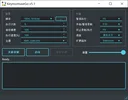
官方示例明确写着 v5.1。5.2 的说明已移除原有“执行速度”控件,因此不要按旧图寻找该选项,也不要把图中的示例次数当作默认值。
KeymouseGo_v5_2_1-win.exe;Linux、Linux ARM64 和 macOS 文件属于其他平台,GitHub 自动生成的 Source code 归档是源码。
项目说明每次录制会在 scripts 目录生成新脚本。若程序或安全软件提示异常,应核对来源和检测详情;本页没有下载、扫描或执行发行程序,不能将告警直接判定为误报。
官方将 5.2.1 标为当前 Latest,发布日期为 2025 年 4 月 19 日。该补丁修复了一个具体问题:当按键字符是热键字符串的一部分时,该按键可能无法被录制。它不是对所有快捷键冲突或录制失败的通用修复。后续源代码提交的时间也不等于新的安装版发布日期。
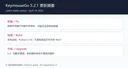
从旧版升级还应查看 5.2 的变化:界面升级到 PySide6,支持高 DPI;脚本改用 JSON5 并说明兼容旧脚本,插件系统则不兼容旧插件;原“执行速度”选项被移除,可按项目 Wiki 使用插件实现相应工作流。请分别检查脚本、插件和界面,不要把“旧脚本兼容”扩大为所有旧扩展都能使用。
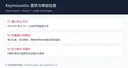
不小心一直循环怎么办? README 说明次数为 0 表示无限循环,并给出默认终止热键 F9。实际运行前应以当前界面配置为准,先熟悉终止方式,再使用有限次数;不要在尚未检查的脚本上设置 0。
脚本点击位置偏了怎么办? 先恢复录制时的窗口位置、显示缩放和目标界面,再检查脚本坐标及等待时间。动态弹窗或页面加载状态变化时,需要重新录制或调整脚本;坐标重放不能自动确认目标按钮是否还在原位。
Windows 7 或 32 位系统能直接用当前文件吗? 5.2.1 发布说明指出构建使用 Python 3.10,并把旧系统与 32 位版本列为需要自行调整构建的情况;不要把源码可修改当作现成附件兼容性。
旧插件为什么不能用了? 5.2 引入新的插件系统,官方明确不兼容旧插件;它与兼容旧脚本是两件事,应依据 Wiki 更新插件。
选择 KeymouseGo 下载文件后,先完成一次可撤销的录制与重放检查,再增加执行次数。保留原始脚本和已知可用配置,有助于区分安装问题、坐标偏移和升级兼容问题。
KeymouseGo download and setup guide: record and replay desktop input, review v5.2.1 fixes, check Windows package limits, and troubleshoot misplaced clicks.
KeymouseGo is an open-source project started by Tao Jiayuan (taojy123) for recording mouse and keyboard actions and replaying them on demand. It suits repetitive desktop work with a stable sequence, text input, and window layout. A recording does not understand the page: moving a window, changing display scaling, opening a dialog, or changing task timing can move the target of later clicks. Start with a short sequence in a blank document or another reversible workflow, set the repeat count to 1, and confirm the stop shortcut before extending it.
The example is visibly labeled v5.1. The 5.2 notes removed the old execution-speed control, so do not use this picture to locate that control in a current build or treat the illustrated repeat count as a default.
KeymouseGo_v5_2_1-win.exe. The Linux, Linux ARM64, and macOS files target other platforms; GitHub Source code archives contain source rather than a packaged application.
The project says recordings create scripts in the scripts folder. If the program or security software raises a warning, check the source and detection details. No release executable was downloaded, scanned, or run for this guide, so a warning cannot be classified here as a false positive.
The project marks 5.2.1 as Latest, released April 19, 2025. It fixes a specific problem: a key could fail to be recorded when its character was part of the hotkey string. This is not a universal fix for every shortcut conflict or recording failure. A later source commit date is also not a new packaged-release date.
When upgrading from an older release, also review 5.2: it moved to PySide6, enabled high-DPI scaling, changed scripts to JSON5 while retaining old-script compatibility, and introduced a plugin system incompatible with old plugins. The old execution-speed control was removed; the Wiki describes a plugin approach for related workflows. Check scripts, plugins, and controls separately instead of assuming every old extension remains compatible.
What if a script keeps repeating? The README says a repeat count of 0 means an infinite loop and lists F9 as the default stop shortcut. Confirm the actual current setting before running a script and begin with a finite repeat count.
Why are replayed clicks in the wrong place? Restore the recorded window position, display scaling, and target view, then review coordinates and delays. Dynamic dialogs and loading states may require a new recording or script edits. Coordinate replay does not verify that a button is still at its previous location.
Can the current Windows asset run directly on Windows 7 or a 32-bit system? The 5.2.1 notes identify Python 3.10 and describe older systems and 32-bit builds as cases requiring adjusted builds. Editable source does not establish compatibility of the supplied executable.
Why does an old plugin fail? Version 5.2 introduced a new plugin system explicitly incompatible with old plugins. This differs from old-script compatibility; follow the current Wiki for plugin changes.
After choosing a KeymouseGo download, check one reversible recording and replay before raising the repeat count. Keep the original script and a working configuration to distinguish setup problems, coordinate drift, and upgrade compatibility issues.
情報確認日:2026年10月20日
初回公開:2026年10月20日· 編集部による更新:2026年10月20日
已打包发行文件不需另装 Python,源码构建需要相应开发环境。 / A packaged release does not require a separate Python installation; building from source requires its development environment.
README 说明为无限循环;先确认终止热键,首次用次数 1。 / The README defines an infinite loop; confirm the stop control and start with count 1.
5.2 的新插件系统明确不兼容旧插件;旧脚本兼容性另行区分。 / The 5.2 plugin system is explicitly incompatible with old plugins; old-script compatibility is separate.
TeamSpeak 是面向游戏、团队、商务和社群的语音通信平台,官方介绍包含消息交流与服务器管理。本条目对应官方列出的 Windows 64 位 TeamSpeak 3 3.6.2。
微软官方 Windows 10 下载页提供媒体创建工具入口和安装介质制作说明,页面将 22H2 标示为最终版本。Windows 10 Home 和 Pro 支持已于 2025 年 10 月 14 日结束;LTSC 版本按各自生命周期执行。

LX Music 洛雪音乐助手桌面版:官方Windows安装包、2.12.6更新、列表备份与播放排查。 / Official desktop packages, release notes, playlist preservation and playback troubleshooting.

EA app(原 EADesktop)Windows游戏客户端:官方安装、EA账号与游戏库、自动更新和故障帮助。 / EA client setup, game library, account checks, automatic updates and troubleshooting.

R2V 是 Able Software 的 Windows 地图与工程图栅格转矢量工具。查看官方 7.5 试用版、安装要求、GIS/CAD 输出与数据检查建议。 R2V converts scanned maps and drawings into GIS/CAD vectors; includes official trial and setup guidance.

Windows磁盘空间分析,解释MFT扫描、实际占用、重复候选限制、4.33更新与个人/商业许可。 / Windows disk space analysis with MFT scanning, allocated space, duplicate limits, v4.33 notes and licensing.

Ant Renamer 经典版:Windows 批量改名、规则预览、2.13 更新与日期区别、高DPI设置及格式排查。 / Classic Windows batch renamer with rule previews, v2.13 notes, distinct program/package dates and display troubleshooting.

DeepSeek 安卓版是 DeepSeek 官方 AI 助手,支持文字对话、联网搜索与推理等商店展示功能。本文整理包名、Android 安装步骤、2.6.3 更新提示和连接排查;功能开放、响应速度与可用性可能受地区、网络、账号和服务状态影响,敏感资料提交前请先确认你的隐私需求。请以当前商店显示为准。 / DeepSeek for Android is an official AI assistant. Check its package, 2.6.3 update and setup; search and reasoning access vary by region and service status.

鼠大侠电脑端与安卓端官方入口指南,说明 Windows 安装、Android 无障碍权限、版本来源差异、更新记录与 FAQ。 / Shudaxia Windows and Android download, installation, permission and update guide.
搜狗五笔输入法提供五笔输入、词库同步和皮肤与配置定制。官网页面列出 V5.5(更新日 2025-12-31),兼容范围列为 XP/7/8/10;安装包构建未核验。
Pointofix 是屏幕虚拟荧光笔/标注工具。官方页面列出的版本为 1.8.0,日期为 2018-05-11,并提供安装版和免安装版;该官方列表较旧。
开间小店面向线下小店经营者,提供商品、库存和日常经营管理工具。