
装机后检查:硬件信息与基础诊断
在装机、升级或排查问题时核对硬件型号、传感器与基础健康信息。收录AIDA64 Extreme、CrystalDiskInfo、GPU-Z等站内已有工具,按实际用途选择适合自己的应用。
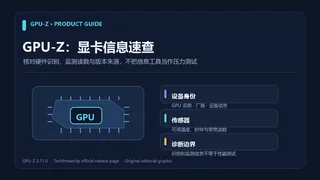
GPU-Z 是 TechPowerUp 的 Windows 显卡信息工具。本页核对 2.71.0 版本、传感器与 PCIe 更新,整理 GPU-Z 官方下载、安装步骤和识别异常排查。 / GPU-Z by TechPowerUp: review v2.71.0, Windows setup, GPU sensors, PCIe readings and troubleshooting.
Alias: GPU-Z、GPU Z、TechPowerUp GPU-Z、显卡信息检测工具
Contenido asistido por IA
Consulta la información básica del software y sus fuentes
The reviewed official download listing does not state a software license or redistribution terms; consult current publisher terms.
No installer was downloaded, executed, scanned, signature-checked, or hash-verified. This page does not make an independent security finding.
Fuente de verificación: https://www.techpowerup.com/download/techpowerup-gpu-z/
GPU-Z 是 TechPowerUp 的 Windows 显卡信息工具。本页核对 2.71.0 版本、传感器与 PCIe 更新,整理 GPU-Z 官方下载、安装步骤和识别异常排查。 / GPU-Z by TechPowerUp: review v2.71.0, Windows setup, GPU sensors, PCIe readings and troubleshooting.
GPU-Z 显卡信息与官方版本指南:核对 2.71.0、传感器读数、安装流程和故障排查。 / Windows GPU information guide, setup and troubleshooting.
GPU-Z 是 TechPowerUp 发布的 Windows 显卡信息工具,可查看 GPU 型号、显存、传感器读数与 PCIe 状态。本文依据官方页面核对 2.71.0 版本及更新内容,说明从哪里下载、如何安装和保存诊断信息,并整理显卡未识别、传感器为空或读数不一致时的排查方法,帮助你判断设备支持范围。
TechPowerUp 将 GPU-Z 描述为轻量级工具,用于显示显卡和 GPU 信息。它适合在装机、驱动更新或核对显卡型号时查看设备资料;传感器页显示哪些项目,取决于具体 GPU、固件和驱动提供的数据。GPU-Z 用于观察和记录信息,不能替代显卡压力测试、驱动修复或硬件维修,也不能只凭单项读数判断设备健康。
如果名称、显存或厂商字段与购买资料不一致,先记录 GPU-Z 版本、显卡型号和驱动版本,再与设备管理器及显卡厂商资料交叉核对。某些笔记本有核显与独显,工具可能显示多个适配器;这不一定表示识别错误。
TechPowerUp 官方下载页列出 GPU-Z 2.71.0,日期为 2026-09-22。更新记录新增 GeForce 50 系列热点温度和最热显存芯片温度报告;NVIDIA 高级页增加超频频率读数,传感器设置中还可启用 SYS、L2 与 Video clocks(默认关闭)。本版也新增 NVIDIA GPU 的 PCIe 带宽吞吐量传感器,以 GB/s 报告数据。
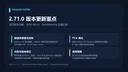
同一更新记录还包含部分 Intel 内存识别、DDR5 带宽报告及 Qualcomm Adreno 单位计数修正,并扩展了 NVIDIA、AMD、Intel 和 Qualcomm 设备支持。此处只摘要官网列出的改动;不能据此推断所有旧显卡都会出现新传感器,也不能将更新说明当作兼容性保证。后续版本以 TechPowerUp 当前发布页为准。
TechPowerUp 页面提供 Standard Version,当前版本区域标注文件名 GPU-Z.2.71.0.exe 和 11.9 MB。该大小来自网页标注,本次未下载或测量安装包。页面没有给出最低 Windows 版本;安装前请查看系统兼容提示,并以官方页面当前列出的版本为准。
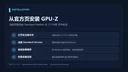
本页没有下载、执行、扫描或核验安装包签名与哈希,也没有验证其安装行为。TechPowerUp 下载页未列明最低 Windows 版本;若安装程序与当前系统不兼容,请查看官方发布页和系统提示,不要尝试来源不明的重打包版本。
如果 GPU-Z 没有列出预期的显卡,先确认 Windows 设备管理器是否能看到该设备,并检查当前使用的是核显还是独显。重启电脑、安装显卡厂商提供的适配驱动后再打开工具;若系统层面也未检测到设备,应先排查设备连接和驱动,而不是把问题归因于 GPU-Z。
温度、时钟或功耗项目为空时,先查看该 GPU 是否提供该传感器以及相关驱动是否正常;GPU-Z 2.71.0 中部分时钟读数需在传感器设置启用。PCIe 吞吐值也应结合工作负载、链路状态和设备信息来理解。记录 GPU 型号、驱动、GPU-Z 版本和出现问题时的操作,比单独截取一个数值更有利于排查。
GPU-Z 汇报检测到的信息,但不会修复驱动、提升性能或判定显卡不存在硬件故障。需要验证性能时,应使用适合的基准测试和稳定性测试,并留意温度、供电与厂商说明。
GPU-Z 2.71.0 的官方更新日期是什么? TechPowerUp 下载页将版本标为 2026-09-22;之后如有更新,应重新查看版本历史。
GPU-Z 安装包有多大? 官方页面列出 11.9 MB。这个数字是页面标注,本次没有下载文件进行实测。
为什么看不到温度或时钟? 不同 GPU 提供的传感器不同;一些时钟读数需要在 GPU-Z 传感器设置中开启。也要检查显卡驱动是否正常加载。
GPU-Z 显示的显卡名称不一致怎么办? 先确认设备管理器中的适配器、笔记本核显/独显情况和驱动版本,再与厂商规格交叉核对;不要单凭一个字段判断硬件真假。
页面是否确认了安装包安全或最低系统版本? 没有。本页仅引用官方发布页字段,未下载、扫描或校验安装包,也没有在该页核实最低 Windows 版本。

使用 GPU-Z 时,请从 TechPowerUp 官方下载页核对当前版本,再结合设备型号、驱动和传感器支持理解结果;安装包或硬件状态的最终判断仍应参考厂商资料。
GPU-Z 2.71.0 is TechPowerUp’s Windows GPU utility. Learn official download, setup, sensor and PCIe readings, release changes, and checks for missing data.
TechPowerUp describes GPU-Z as a lightweight utility for displaying information about a video card and GPU. It can help when checking a device after a PC build or driver update. Which sensor fields appear depends on the GPU, firmware, and driver data available to the utility. GPU-Z reports information; it is not a stress test, driver repair tool, or hardware repair service, and one reading alone does not establish device health.
If the name, memory, or vendor fields differ from purchase records, note the GPU-Z version, graphics card model, and driver version, then compare them with Device Manager and the board vendor’s specifications. Some laptops expose both integrated and discrete adapters, so multiple entries do not necessarily indicate a detection error.
TechPowerUp’s official download page lists GPU-Z 2.71.0 dated September 22, 2026. Its notes add GeForce 50 hotspot temperature and the hottest memory-chip temperature reporting. The NVIDIA advanced tab gains overclocking frequency readouts, while SYS, L2, and Video clock sensors can be enabled in sensor settings and are disabled by default. The release also adds a PCIe bandwidth-throughput sensor for NVIDIA GPUs, reported in GB/s.
The same notes list selected Intel memory-detection and DDR5 bandwidth-reporting fixes, a Qualcomm Adreno unit-count fix, and expanded support for NVIDIA, AMD, Intel, and Qualcomm devices. These are summaries of changes named on the vendor page. They do not mean every older graphics card gains new sensors or that a particular system is guaranteed to be compatible. Check TechPowerUp’s current release page for later versions.
TechPowerUp lists a Standard Version with the filename GPU-Z.2.71.0.exe and a page-stated size of 11.9 MB. The size is a listing value; this guide did not download or measure the installer. The reviewed page does not state a minimum Windows version, so check the current compatibility prompt and publisher listing before installing.
This page did not download, run, scan, or verify the installer’s signature or hash, and did not validate its installation behavior. The reviewed TechPowerUp listing gives no minimum Windows version. If the installer is incompatible with your system, check the current publisher page and Windows prompt instead of using an unclear repackaged copy.
If GPU-Z does not list the expected card, first check whether Windows Device Manager can see it and whether you are looking at an integrated or discrete GPU. Restart the PC and install an appropriate driver from the graphics-card vendor, then reopen the utility. If Windows itself cannot detect the device, investigate the device connection and driver before attributing the issue to GPU-Z.
When temperature, clock, or power fields are blank, check whether the GPU exposes that sensor and whether its driver loaded correctly; some clock readings in GPU-Z 2.71.0 must be enabled in sensor settings. Interpret PCIe throughput with the workload, link state, and device context. Recording the GPU model, driver, GPU-Z version, and the action that preceded the issue is more useful for troubleshooting than a single number.
GPU-Z reports detected information; it does not repair a driver, improve performance, or rule out hardware faults. For performance checks, use a suitable benchmark and stability test while following temperature, power, and vendor guidance.
What is the official date for GPU-Z 2.71.0? TechPowerUp’s download page lists September 22, 2026. Recheck the version history if a newer release appears.
How large is the GPU-Z installer? The official page lists 11.9 MB. This is a listing value; the file was not downloaded for measurement.
Why are temperature or clock readings missing? Sensor availability differs by GPU, and some clock readings must be enabled in GPU-Z sensor settings. Also check that the graphics driver loaded correctly.
What if GPU-Z reports a different model name? Check the adapter shown in Device Manager, integrated/discrete graphics on laptops, and the driver version, then compare with vendor specifications. Do not judge hardware authenticity from one field.
Does this page confirm installer safety or a minimum OS version? No. It cites the official listing, but the installer was not downloaded, scanned, or checksum-verified, and the reviewed page did not state a minimum Windows version.
For GPU-Z, verify the current version on TechPowerUp’s official page and interpret readings with the card model, driver, and sensor support in mind. Refer to vendor information for final installer and hardware decisions.
Información verificada: 19 oct 2026
Publicado por primera vez: 19 oct 2026· Revisión editorial: 19 oct 2026
TechPowerUp 下载页将版本标为 2026-09-22;如有更新,请重新查看版本历史。
传感器字段因 GPU 与驱动而异;部分时钟读数还需要在传感器设置中启用。
Check Device Manager, integrated/discrete adapters, and the installed driver, then compare with the board vendor's specifications.
No. The installer was not downloaded, scanned, signature-checked, or checksum-verified for this guide.
TeamSpeak 是面向游戏、团队、商务和社群的语音通信平台,官方介绍包含消息交流与服务器管理。本条目对应官方列出的 Windows 64 位 TeamSpeak 3 3.6.2。
微软官方 Windows 10 下载页提供媒体创建工具入口和安装介质制作说明,页面将 22H2 标示为最终版本。Windows 10 Home 和 Pro 支持已于 2025 年 10 月 14 日结束;LTSC 版本按各自生命周期执行。

LX Music 洛雪音乐助手桌面版:官方Windows安装包、2.12.6更新、列表备份与播放排查。 / Official desktop packages, release notes, playlist preservation and playback troubleshooting.

EA app(原 EADesktop)Windows游戏客户端:官方安装、EA账号与游戏库、自动更新和故障帮助。 / EA client setup, game library, account checks, automatic updates and troubleshooting.

R2V 是 Able Software 的 Windows 地图与工程图栅格转矢量工具。查看官方 7.5 试用版、安装要求、GIS/CAD 输出与数据检查建议。 R2V converts scanned maps and drawings into GIS/CAD vectors; includes official trial and setup guidance.

Windows磁盘空间分析,解释MFT扫描、实际占用、重复候选限制、4.33更新与个人/商业许可。 / Windows disk space analysis with MFT scanning, allocated space, duplicate limits, v4.33 notes and licensing.

XMBC 鼠标映射:Windows安装、应用配置与层、2.20.5修复、五键限制和重复输入排查。 / XMBC setup, application profiles and layers, v2.20.5 fixes, five-button limits and repeat troubleshooting.

Armoury Crate 设备管理与 Aura Sync 下载指南:核对华硕机型、Windows 安装要求、应用6.4.7及不同安装包版本。 ASUS device controls, lighting, official setup and version checks.

DS4Windows 是 Windows 手柄映射与虚拟控制器工具。本页整理 DS4Windows 3.5 社区延续版、DualShock/DualSense 配置、安装依赖和双输入排查。 / DS4Windows maps gamepad input and creates virtual controllers on Windows. This guide covers the v3.5 community continuation, setup, profiles, and duplicate-input troubleshooting.
JoyToKey 手柄映射工具:Windows 安装与 ZIP 设置、7.4 命令输入、配置迁移和共享软件许可说明。 / Windows controller mapping guide covering setup, version 7.4 commands, profile migration and shareware licensing.

FurMark 显卡压力测试与基准工具指南,介绍官方下载和平台选择、安装准备、测试条件记录、版本更新,以及打不开、画面异常和分数差异的排查思路。 FurMark GPU stress test guide with official setup, version notes, controlled comparisons and practical FAQs.

SysCeo 驱动总裁 Windows 在线版本 2.21.0.0,官方页面日期为 2026-09-15,列出桌面与 PE 驱动安装、在线和离线驱动库及 Boot Camp 匹配。本页整理页面更新说明、安装前硬件核对、系统还原准备和 MD5 的用途;下载入口只链接官方产品页,不提供站外文件直链。 / SysCeo lists Windows 2.21.0.0, desktop and PE use, online/offline libraries and Boot Camp matching. This guide explains release notes and cautious setup; the download entry links only to official product information.