云·原神是米哈游提供的 Android 云游戏客户端,本页解释其与完整《原神》包体的区别,并整理官网安装入口、网络排查及版本信息边界。 / Genshin Impact Cloud is miHoYo’s Android cloud gaming client. This guide covers its official entry, setup, network checks and release-information limits.
云·原神 Android 下载与安装指南:官网入口、网络排查、版本说明、设备要求和常见问题。 | Genshin Impact Cloud Android setup, official source, network checks, version and device requirements.
云·原神面向想在 Android 手机上体验《原神》云游戏的玩家,官网提供独立的云客户端入口。本指南说明它与完整游戏包的差异、官方 Android 安装步骤、账号和网络排查,并解释官网版本标记与设备要求信息的边界,帮助你判断网络条件、手机兼容提示与自己的使用场景是否匹配;下载前先核对官方客户端名称、下载项和系统提示。
中文
云·原神是什么:本地包体与云端客户端有何不同
云·原神是米哈游提供的《原神》云游戏版本。官方页面将其描述为使用实时云端技术的客户端,目标是让玩家不必下载完整《原神》包体即可进入游戏。这里说的是云版与完整本地包体的区别;Android 设备仍需安装云客户端,游戏画面则通过网络从云端会话传回。连接质量会影响操作响应,网络不稳定时可能出现加载等待或输入延迟。
如果你只想安装可离线运行的完整游戏,云·原神与本地版用途不同;如果希望避免下载完整游戏资源,可以先确认官方页面当前提供的区域、登录和服务提示。官网宣传的画质或帧率描述不代表每台手机和网络都能达到相同效果。本页没有对不同设备进行兼容或性能测试。
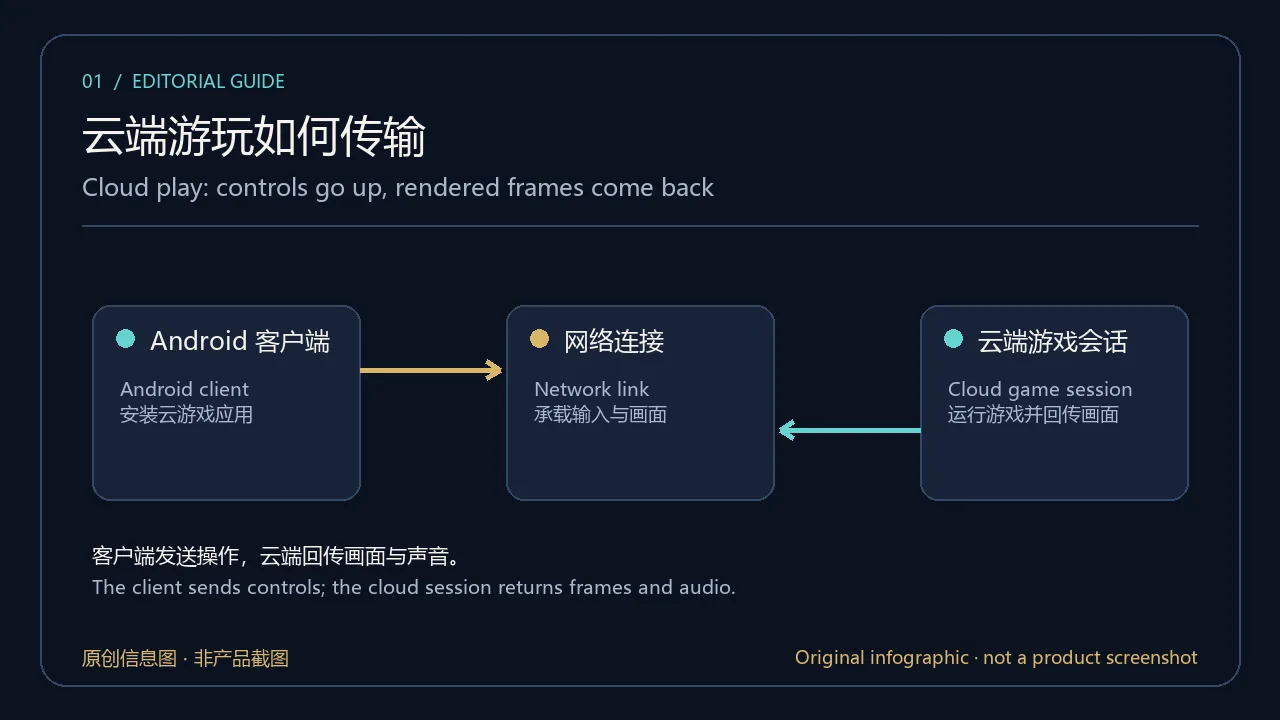
原创信息图:客户端、网络与云端游戏会话的基本关系;非产品截图。
云·原神 Android 下载与安装步骤
以下步骤依据米哈游官方云游戏平台的公开下载页整理;本次没有启动下载,也没有安装或运行 APK。
- 在浏览器打开 云·原神官网,进入页面顶部的“下载”。
- 在下载页找到明确写有“云·原神”的客户端卡片。页面同时列出《原神》完整客户端,先核对产品名称,避免选错安装入口。
- 在云·原神卡片中选择“Android 点击下载”或按页面提示扫码;不要从搜索广告、改包页面或来历不明的网盘获取安装文件。
- 按官方页面跳转和 Android 系统安装界面完成步骤。系统显示名称、来源或兼容性与预期不符时,先取消并回官网重新核对。
- 首次启动后按照官方客户端提示登录或继续。安装包大小、包名、签名和最低 Android 版本未在本次公开页面中核实,不能据此判断设备一定兼容。
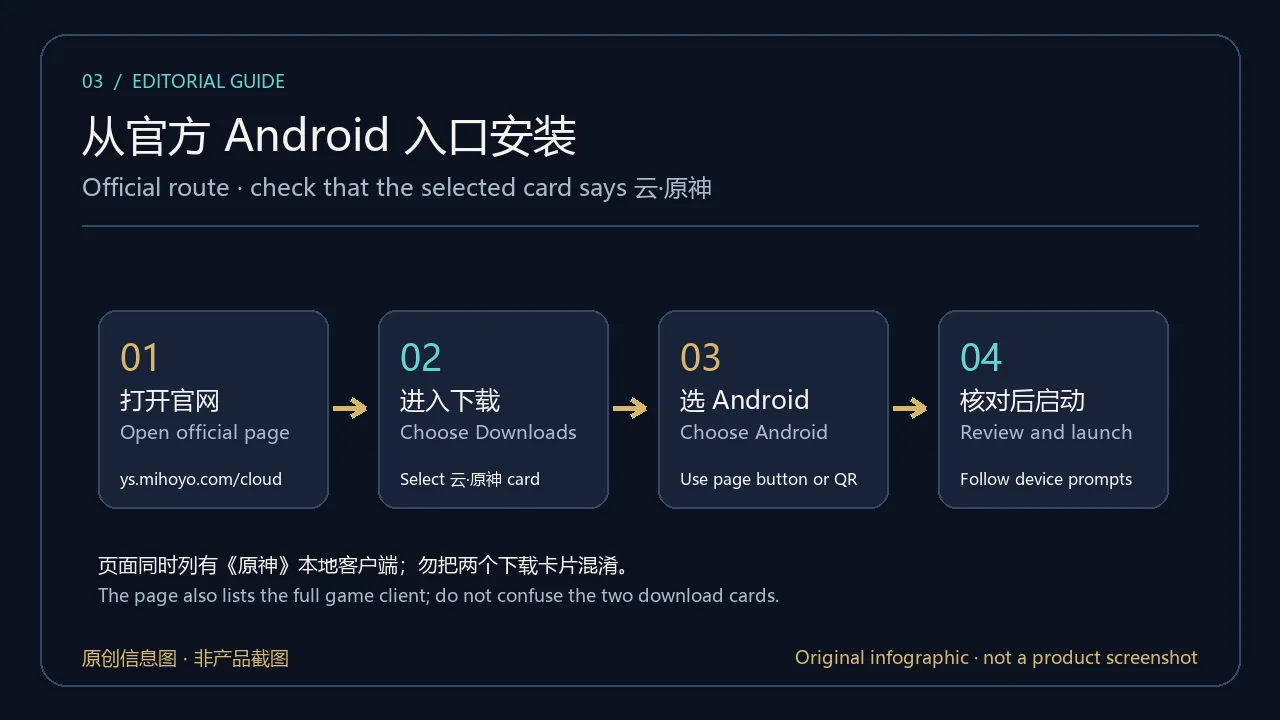
原创信息图:核对云·原神独立下载卡片并通过官方入口安装;非产品截图。
首次启动与网络准备:账号、连接和权限
打开官网时,本次浏览器页面显示了米哈游账号登录框;这是当时的页面状态,并不代表所有设备或访问地区都采用同一认证流程。若客户端要求登录,请检查地址是否仍属于米哈游官方域名,阅读登录页显示的用户协议与隐私政策,再按自己的账号恢复方式操作。不要在第三方下载页输入密码、验证码或账号恢复信息。
云端游玩需要客户端与服务建立网络连接。开始长时间游玩前,可先检查 Wi-Fi 或移动网络是否稳定,并留意运营商流量计费;如果操作响应变慢,先暂停其他大流量任务、重新连接网络,再重启官方客户端。官方页面出现“应用权限及功能介绍”入口,但本次页面没有展示 Android 客户端的逐项权限清单,因此不要把某一组权限描述成已核实的安装要求。
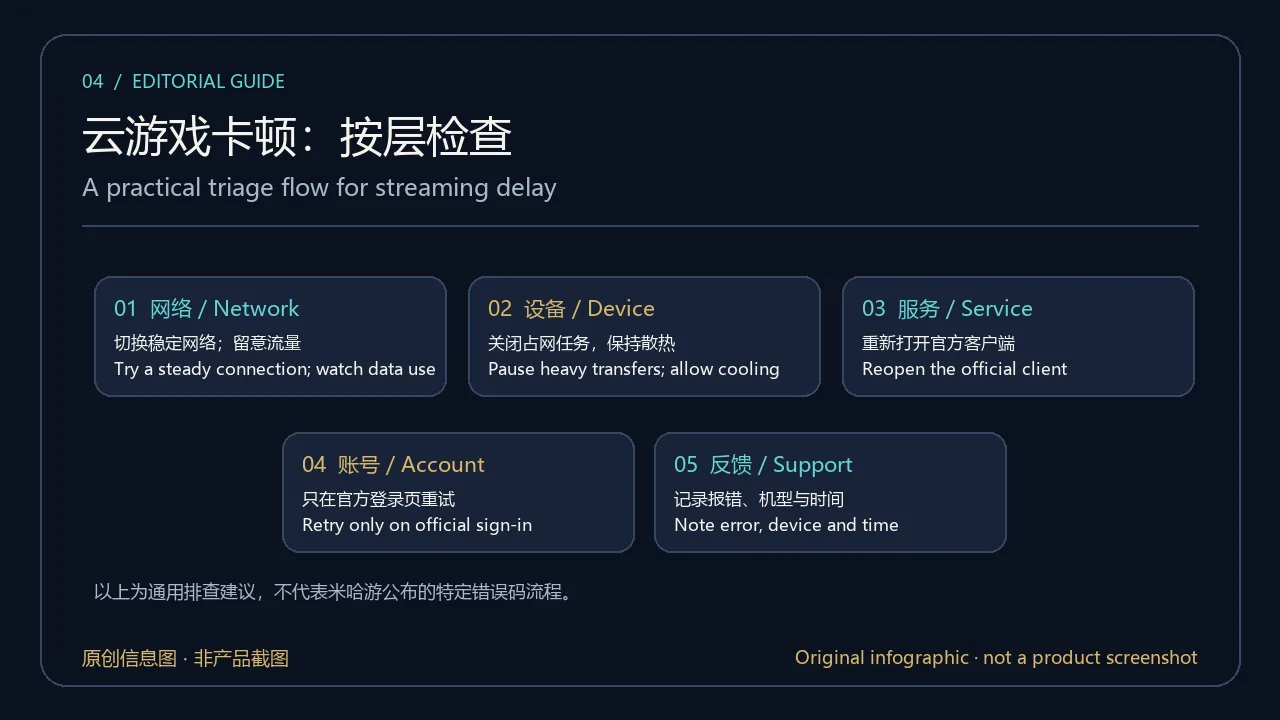
原创信息图:连接问题的通用分层排查建议,不代表官方错误码说明。
云·原神版本更新与 Android 系统要求
截至 2026 年 10 月 19 日,米哈游下载页在云·原神客户端卡片旁显示数字“7.1.0”,但页面没有明确标注这是 Android APK 构建版本、游戏内容版本还是其他页面标记。本页因此不把它填作已核实的当前 Android 版本,也不提供推测的发布日期。下载页没有列出逐项更新日志、最低 Android 版本、处理器架构、安装包大小或校验值;这些数据均应以之后发布的官方客户端说明为准。
如果你要核对更新,先打开官网的“下载”或“公告”入口,再检查 Android 客户端对应的版本说明。只看到版本数字不足以推断新增内容或修复项;其他平台的游戏更新公告也不能自动代表云客户端 APK 的更新日志。遇到安装不兼容提示时,记录设备型号、Android 版本和错误原文,向官方支持渠道确认,不要通过修改系统设置强行安装。
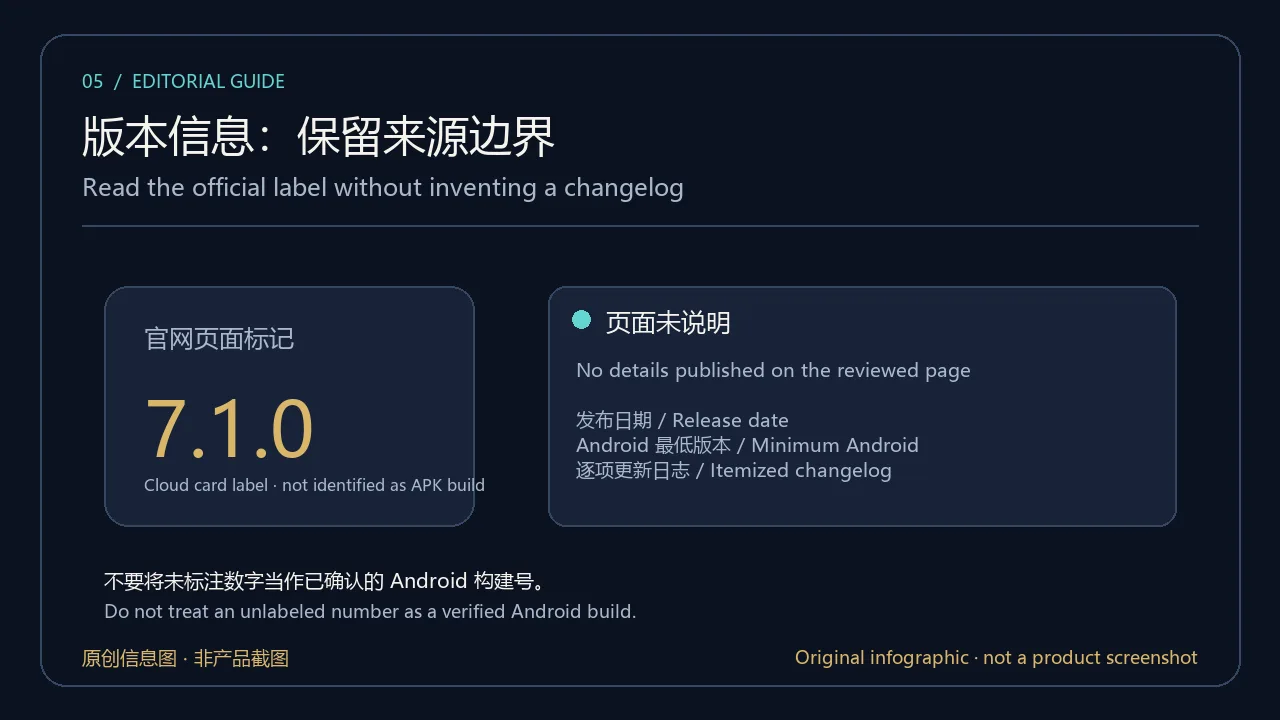
原创信息图:区分页面数字与可核实的 Android 发布说明;非产品截图。
常见问题 FAQ:云原神下载、安装与打不开
云·原神和《原神》Android 本地版一样吗?
不是同一下载项。官方页面分别列出完整《原神》客户端和《云·原神》客户端;云版依靠实时云端技术,页面称无需下载完整游戏包体。安装前请确认选中的是云·原神卡片。
云·原神 Android 版需要联网吗?
官方将它介绍为云游戏版本。云端游玩需要客户端与服务连接,因此网络质量会影响进入游戏和操作体验;页面没有公布可离线游玩的方式。
7.1.0 是当前 Android 客户端版本吗?
本次官网卡片旁出现了 7.1.0,但没有说明该数字的字段含义,也没有配套发布日期或变更记录。请查看当前官方客户端页面或应用内版本信息,不要把这个未标注数字当作已确认 APK 版本。
为什么安装后打不开或画面一直加载?
先检查网络连接和系统提示,再完整关闭并重新打开官方客户端。记录设备型号、Android 版本及错误信息;若登录页面异常,重新从官网进入。不要先清除应用数据,以免影响账号恢复或本地设置。
这个 APK 做过安全扫描吗?
没有。本页核对了官方产品页和下载入口,没有下载、执行、签名验证或扫描二进制。请只从米哈游官方页面进入安装流程,并查看 Android 展示的应用名称和权限提示;官方来源核对不等于独立安全审计。
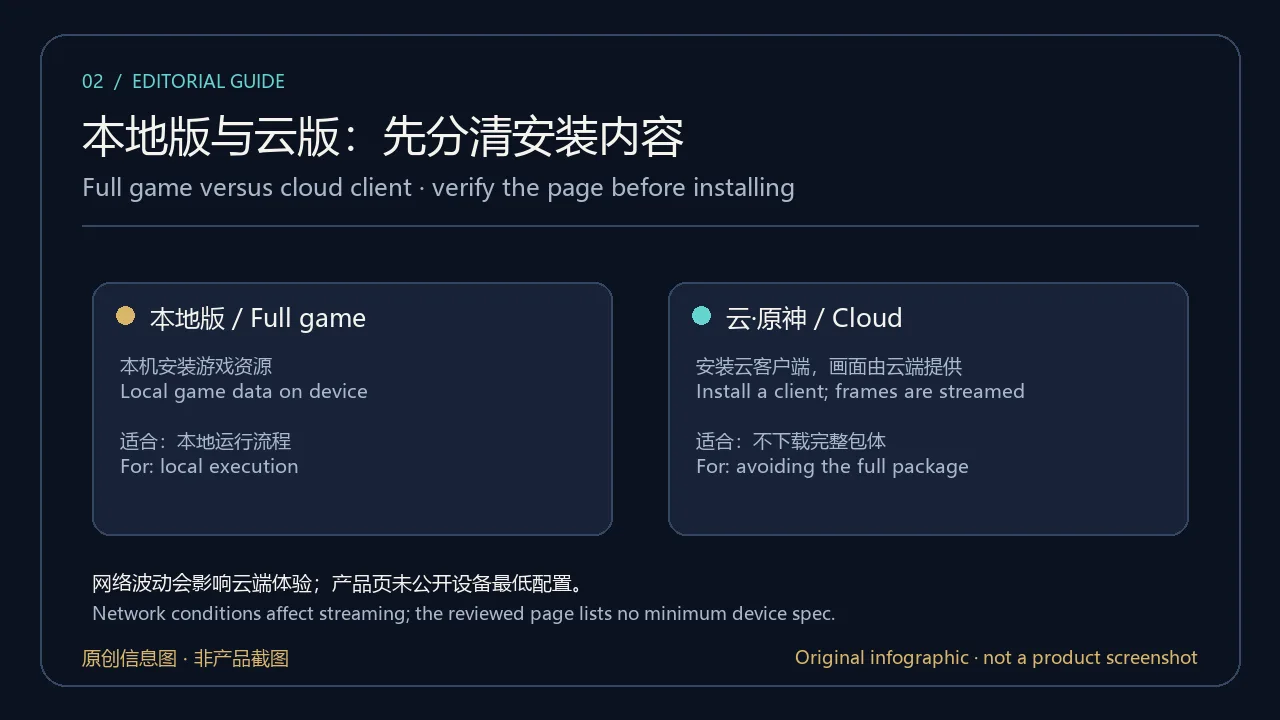
原创信息图:常见问题对应的入口、版本与网络检查;非产品截图。
下载云·原神 Android 客户端时,请从米哈游官方云游戏平台进入“下载”,核对“云·原神”卡片后再按设备提示操作。官方页面说明它是《原神》云游戏版本;本文未验证 Android 构建号、最低系统、包体或签名,具体兼容性和服务条件应以官方客户端当前说明为准。
English
Download Genshin Impact Cloud for Android from miHoYo's official page. This guide covers setup, network checks, updates, and compatibility information.
What is Genshin Impact Cloud? Local game versus cloud client
Genshin Impact Cloud is miHoYo's cloud gaming edition of Genshin Impact. Its official page describes real-time cloud technology and says players can enter the game without downloading the complete Genshin Impact package. That describes the difference from the full local game package; an Android user still installs a cloud client, while game frames are returned through a network session. Connection quality can affect response time, and an unstable link may cause loading delays or input lag.
If you want a full game that runs offline on the device, the cloud edition serves a different purpose. If avoiding the full game package is your goal, first review the official page's current region, sign-in and service prompts. The publisher's graphics or frame-rate wording is not a guarantee that every device and connection will deliver the same result. This page does not report a device compatibility or performance test.
Original diagram of the client, network and cloud session; not a product screenshot.
Genshin Impact Cloud Android download and installation
These steps follow miHoYo's public cloud gaming download page. No download was started, and no APK was installed or run for this review.
- Open the official Genshin Impact Cloud website in a browser and choose “Download” in the page navigation.
- Locate the client card explicitly labelled “云·原神” (Genshin Impact Cloud). The same page also lists the full Genshin Impact client, so verify the product name before selecting a download route.
- Choose “Android” on the Cloud card or scan the QR code as directed by the page. Avoid search ads, modified-package pages and unverified file shares.
- Follow the official destination and Android installer prompts. If the displayed app name, source or compatibility warning differs from what you expect, cancel and return to the official page to check the route.
- After installation, follow the client’s official sign-in or continue prompts. The reviewed page does not disclose the package size, package ID, signing certificate or minimum Android version, so this check alone cannot establish device compatibility.
Original route diagram for the separate Cloud client; not a product screenshot.
First launch: account, network and permission checks
When this official website was opened, the browser displayed a miHoYo account sign-in panel. That is an observation of the page at review time, not proof that every device or region follows the same authentication flow. If the client asks you to sign in, confirm that you are still on an official miHoYo domain, read the user agreement and privacy notice shown there, and use your normal account recovery method. Do not enter passwords, verification codes or recovery details on a third-party download page.
Cloud play requires a network connection between the client and the service. Before a long session, check that Wi-Fi or mobile data is stable and consider your carrier's data charges. If controls feel delayed, pause other heavy transfers, reconnect and restart the official client. The page exposes an “App permissions and function description” link, but the permission list itself was not available in the page text reviewed here. This guide therefore does not claim a specific set of required Android permissions.
Original layered checks for common streaming trouble; not an official error-code guide.
Genshin Impact Cloud updates and Android requirements
As of 19 October 2026, the miHoYo download page displayed “7.1.0” next to the Genshin Impact Cloud client card. It did not label that number as an Android APK build, game-content version or another page value. This guide therefore does not list it as a verified current Android release or assign it a release date. The reviewed page has no itemized changelog, minimum Android version, processor architecture, package size or checksum; consult later official client notes for those details.
To check for an update, open the official Download or Announcement area and look for notes that specifically identify the Android Cloud client. A number by itself does not establish what changed, and a game update notice for another platform is not automatically an Android cloud-client changelog. If installation reports incompatibility, record the device model, Android version and exact message, then ask official support. Avoid forcing an installation by changing system protections.
Original evidence card separating a page label from verified Android release information; not a product screenshot.
FAQ: Genshin Impact Cloud download, installation and loading
Is Genshin Impact Cloud the same download as Genshin Impact for Android?
They are separate entries on the official page. It lists the full Genshin Impact client and the Genshin Impact Cloud client. The Cloud page describes real-time cloud play and says the complete game package is not required. Confirm the Cloud card before installing.
Does Genshin Impact Cloud need an internet connection?
The publisher presents it as a cloud gaming edition. Cloud play needs the client to connect to the service, so network quality can affect launch and controls. The reviewed page does not describe an offline mode.
Is 7.1.0 the current Android client version?
The number appears next to the Cloud card, but the page does not define what it labels or provide a release date and change list. Check the current official client page or in-app version details instead of treating the unlabeled number as a verified APK build.
What should I do if the app will not open or keeps loading?
Check the connection and Android's displayed message, then fully close and reopen the official client. Note the device model, Android version and exact error. If sign-in fails, return to the official website. Avoid clearing app data as the first step because it may affect account recovery or local settings.
Has this APK been security-scanned?
No. This review checked the official product page and download entry only; it did not download, execute, verify the signature of or scan a binary. Start from miHoYo's official page and review Android's app name and permission prompts. Checking an official source is not an independent security audit.
Original checklist for source, version and network questions; not a product screenshot.
For a Genshin Impact Cloud Android download, start at miHoYo's official cloud gaming page, open Downloads and confirm the “云·原神” card before following device prompts. The publisher identifies it as a cloud version of Genshin Impact. This review does not verify an Android build number, minimum OS, package or signature; check the current official client notes for compatibility and service conditions.
Sources: miHoYo Genshin Impact Cloud home and download page; official account policies linked from that site. Verified 19 October 2026 (China Standard Time).