Windows 虚拟光驱与光盘映像目录工具;免费许可限非商业用途,高级功能另购。 | Windows virtual drive and disc-image catalog tool; Free License is non-commercial, with paid advanced options.
中文
DAEMON Tools Lite是一款Windows虚拟光驱和光盘映像管理工具,可装载ISO等映像并整理本地资料。本页提供DAEMON Tools Lite下载来源、12.6.0更新说明、安装步骤及FAQ,帮助你核对系统架构、免费许可证与合作伙伴选项,了解动态安装入口的使用条件,再选择合适的映像处理流程。
DAEMON Tools Lite 下载前先了解虚拟光驱与许可
DAEMON Tools Lite 由 Disc Soft 提供,主要用于装载本地光盘映像、整理映像目录以及从光盘创建映像。把 ISO 等文件装载到虚拟光驱后,Windows 可以像访问光盘一样读取其中的内容;装载本身并不等于安装映像里的程序,也不会替你判断其中的文件是否可信。开始前应确认映像来源,并只处理自己有权使用的数据。
官网将基础功能和高级功能分别展示:基础版本提供映像装载和目录管理,映像编辑、刻录、USB 与部分其他功能则另列付费选项。安装手册进一步说明免费许可证面向非商业用途,安装向导可能出现第三方合作伙伴选项,支持范围也有限。不要把“Lite”理解为所有功能均免费;商业使用应先核对适用许可证。
如果只是偶尔打开一个系统已支持的 ISO 文件,可以先评估现有系统功能是否足够;需要维护多种映像格式、组织常用映像或管理虚拟设备时,再比较本工具的功能和许可条件。映像管理器能否装载某个文件,与映像中应用的系统要求和授权是两个问题。
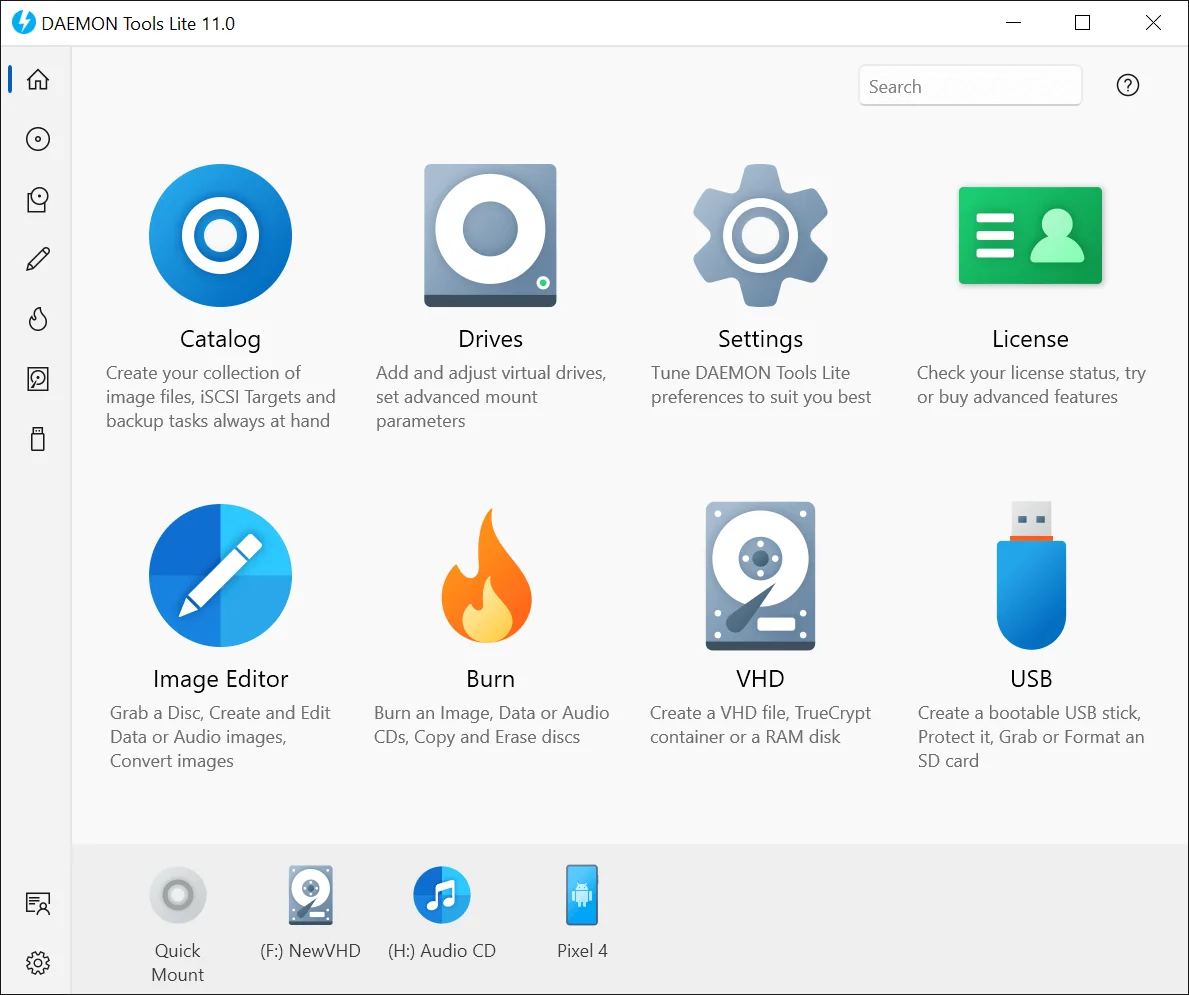
图片来源:官方产品页的演示图库,原图标题栏为 11.0,用于说明功能布局,不能视为 12.6.0 的实机截图;部分图标对应付费功能。
DAEMON Tools Lite 安装步骤与下载入口条件
- 先打开官方产品页,核对产品名称为 DAEMON Tools Lite,再从该页进入下载。本站记录的是官方动态入口,不保存会过期的 CDN 签名地址。直接打开入口若只返回下载目录,应回产品页重新选择 Lite 下载。
- 截至本次核对,正常匿名访问产品页后,下载请求返回文件名
DTLite1260-2470.exe,响应长度为 46,108,744 字节。本次只检查响应头,未下载安装器或验签;这些信息用于对应 12.6.0,不构成安全或完整离线安装保证。官网安装手册还描述了 DTLiteInstaller.exe 联网下载设置文件的流程,因此应为安装保留网络连接。
- 当前发布记录从 12.4.0 起要求 Windows 10 或更新版本的 64 位系统。旧产品兼容表还列出历史版本支持的旧系统,不应据此把 12.6.0 安装到 32 位 Windows 或 Windows 7/8。ARM 下载在官网单独列出,本页没有核对 ARM 文件,不把常规入口当成 ARM 包。
- 由你决定运行从官网取得的文件后,先阅读许可与隐私说明,再选择符合用途的免费或付费许可。查看“Configure setup options...”等配置入口,逐项核对安装位置、关联和合作伙伴选项;只选择自己需要且同意的内容。手册截图可能与当前版本有差异,以实际向导为准。
- 完成后先用一个已知来源的映像验证挂载和卸载流程。若安装提示重启,保存正在处理的文件再按提示操作。需要退出或卸载时先卸载正在使用的映像,保留原始映像文件,避免把移除虚拟驱动器误认为删除资料。

图片与流程来源:官方 Installation 手册。这是发布者的安装示意图,本次未执行安装,也未接受软件许可。
12.6.0 更新说明与版本日期边界
截至 2026 年 10 月 20 日,官方发布记录的当前版本标题为 DAEMON Tools Lite 12.6.0,匿名下载响应中的 DTLite1260-2470.exe 文件名与该版本对应。官方列出的更新内容包括整体性能改进、内部组件的小幅更新、核心功能改进,以及一项被标注为重要的安全修复;修复列表还包括小范围稳定性问题与少数边界场景下的行为问题。
发布者未在该条目中公开安全修复的具体漏洞编号或受影响条件,因此不能推断它解决了哪一种攻击,也不能据此称软件已经过独立安全审计。对于正在使用较早版本的用户,这条安全更新提示值得结合自己的环境评估;更新前先记录现有设置,卸载正在使用的映像并保存相关工作。
官网日期存在顺序冲突:12.6.0 条目标注的日期早于表格中 12.5.1 和 12.5.0 的日期。本页保留当前版本标签和原始日志内容,不自行修正日期,也不把网页抓取时间作为发布日期。下载入口是动态的,以官网随后显示的版本和实际文件名为准;本次未核对二进制内部版本、数字签名或离线完整性。
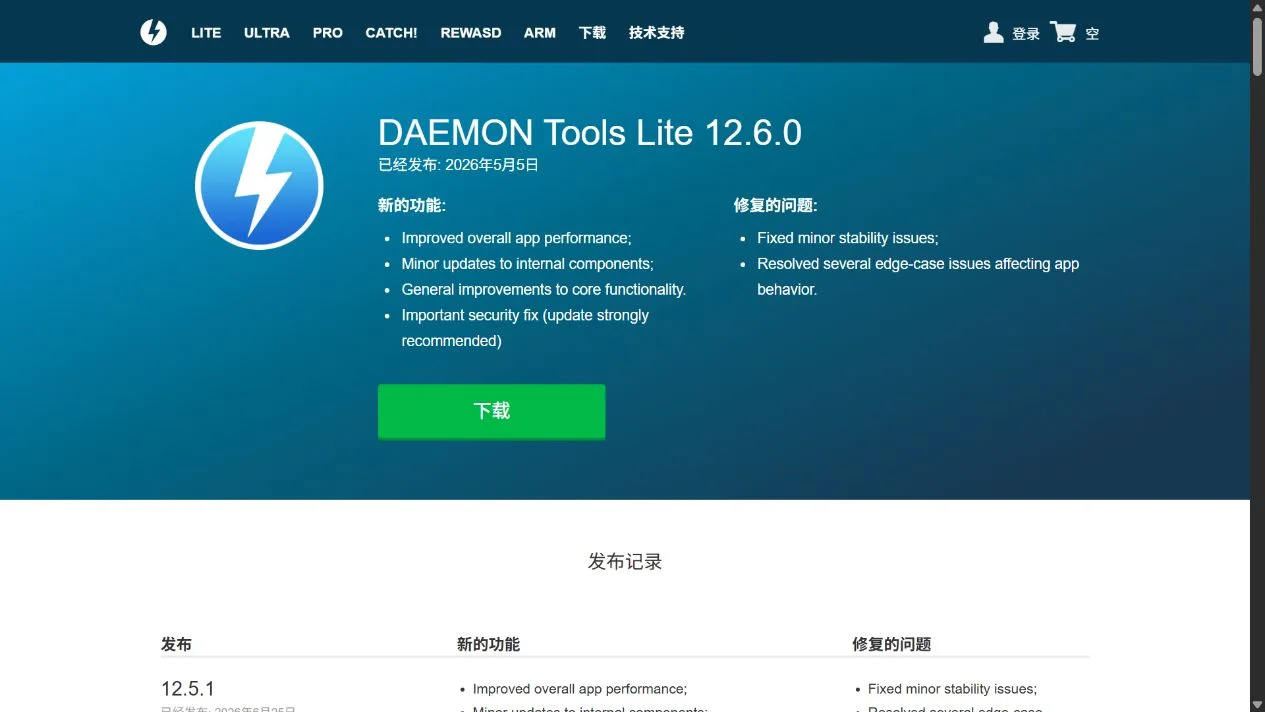
来源:官方发布记录。截图保留官网原文,正文已说明日期冲突;它不是软件运行画面或安全检测结果。
常见问题 FAQ:下载、打不开与映像装载
DAEMON Tools Lite 免费吗,工作电脑能用免费版吗?
官方安装手册将免费许可证限定为非商业用途,并提示安装向导会包含第三方选项。工作或商业用途应核对相应许可;映像编辑、刻录等高级功能也有单独付费项目,不能把基础免费许可理解为全部功能授权。
为什么下载链接打开后是网页,能得到完整离线包吗?
官方动态入口依赖先访问产品页建立正常的匿名会话,本次无需登录或付费即可观察到目标 EXE 响应。没有该会话时它可能返回下载目录。应从产品页正常操作;这里没有验证完整离线安装能力,也不提供临时签名地址。
下载后打不开或装不上怎么办?
先记录准确错误,确认当前版本要求的 Windows 10 或更新的 64 位环境,再核对文件来源、下载是否完整和系统提示。ARM 设备需检查官网专门入口。不要用关闭系统防护代替排错;无法确认文件来源时先停止运行并查官方帮助。
装载 ISO 后为什么仍不能运行里面的软件?
装载只让系统读取映像内容。里面的应用仍可能要求特定 Windows 版本、运行库、硬件或合法授权;加密、损坏或不支持的映像也需要分别处理。先区分“映像打不开”和“映像里的程序打不开”,再记录具体报错。
图片为什么显示 11.0,而页面介绍 12.6.0?
这是官网当前图库保留的旧界面示意,已在图片说明中标明;版本依据官方发布记录和本次下载响应,不从截图标题推导最新版。准备 DAEMON Tools Lite 下载时,先核对平台、用途与许可,再按官网指引安装和检查映像。
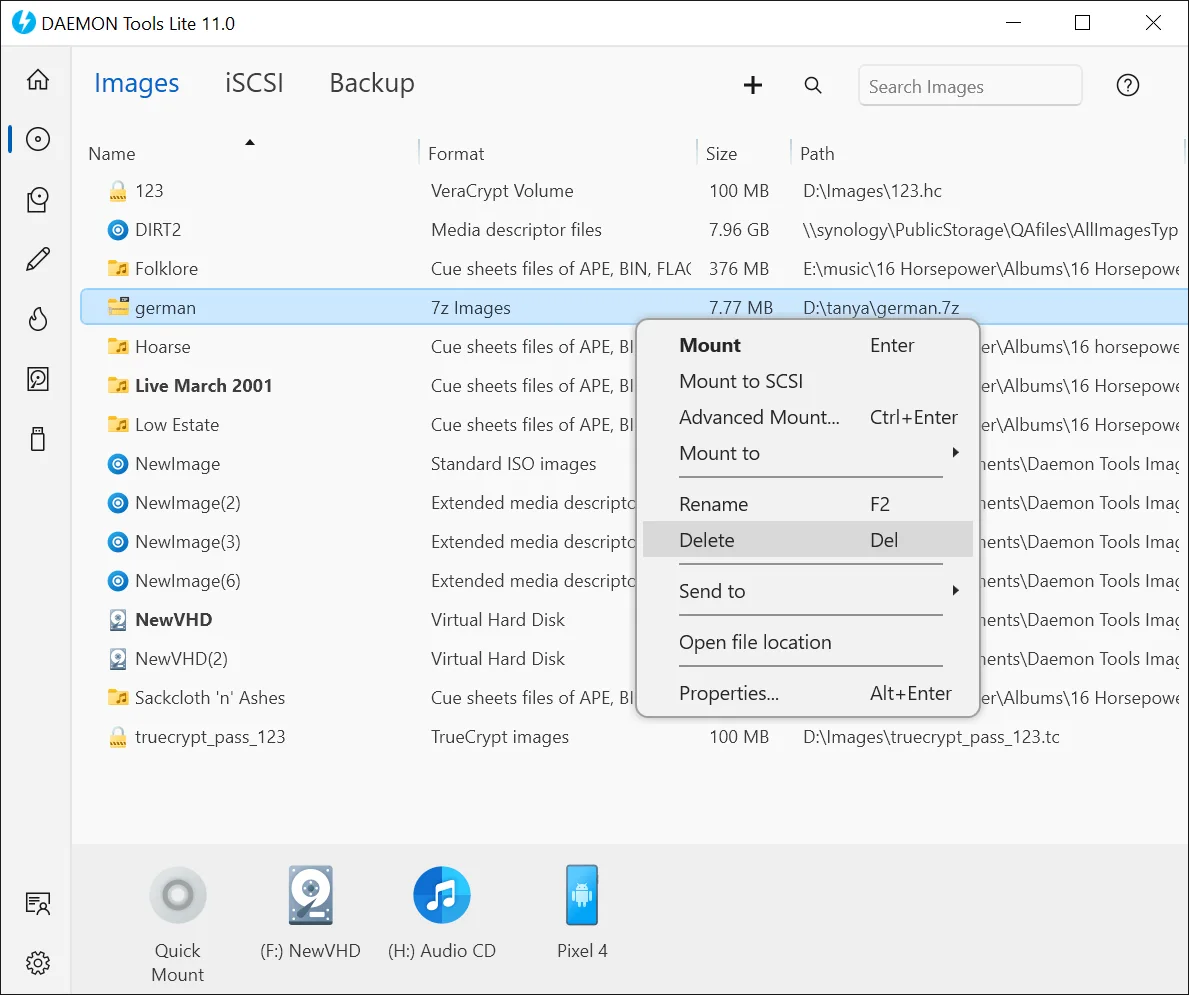
来源:官方产品演示图库。界面示意不证明某个映像文件的安全性,也不保证所有功能均属于免费许可。
English
Download DAEMON Tools Lite 12.6.0 for Windows virtual drives and disc images. Review installation, license choices, official release notes and practical FAQs.
DAEMON Tools Lite download: virtual drives and license choices
DAEMON Tools Lite is Disc Soft's application for mounting local disc images, keeping an image catalog and making images from discs. Mounting an ISO makes its contents accessible as a virtual disc; it does not install the programs inside or establish that those files are trustworthy. Check the image's origin and use only data you are entitled to access.
The product page separates basic image mounting and catalog functions from additional paid features, including image editing, burning and USB tools. The official installation guide limits the Free License to non-commercial use, notes third-party offers in the setup wizard and describes limited support. The Lite name does not mean every feature is free. Check the applicable license before business use.
For an occasional ISO, first consider whether your operating system's existing features meet the task. A separate manager becomes more relevant when you need to organize a collection, manage virtual devices or work with additional supported formats. Being able to mount an image does not establish that its contents meet your system or licensing requirements.
Source: the official product gallery. Its title bar says 11.0; this illustrates the layout rather than a tested 12.6.0 session. Some displayed tools require paid features.
DAEMON Tools Lite installation and the official download route
- Open the official product page, confirm DAEMON Tools Lite, then use its download option. The recorded route is dynamic; this page does not publish an expiring signed CDN URL. If a direct visit opens a downloads directory, return to the product page and choose Lite there.
- During this check, a normal anonymous product-page session returned
DTLite1260-2470.exe with a response length of 46,108,744 bytes. Only headers were inspected; the installer was not downloaded or signature-verified. This identifies the advertised 12.6.0 delivery, not a verified-safe or complete offline package. The official guide also describes a DTLiteInstaller.exe tool that downloads setup files, so keep an internet connection available.
- The release history states that version 12.4.0 and later require 64-bit Windows 10 or newer. Historical compatibility entries for older releases do not establish support for 12.6.0 on 32-bit Windows or Windows 7/8. The website lists an ARM download separately; that file was not checked for this page.
- If you choose to run the vendor's file, read its license and privacy information before choosing the appropriate Free or Paid License. Review configuration options, location, associations and any partner offers. Select only options you need and accept. The publisher's guide images may differ from the current wizard.
- Test mounting and unmounting with one known image after installation. Save work before any requested restart. Before removing a virtual drive or uninstalling the manager, unmount images in use and keep the original image files; these are different operations.
Source: the official Installation guide. This is the publisher's illustration. No installer was run and no license agreement was accepted during research.
Version 12.6.0 release notes and the date discrepancy
As checked on 20 October 2026, the current heading of the official release history is DAEMON Tools Lite 12.6.0, and the anonymous download response names DTLite1260-2470.exe. The vendor lists improved overall performance, minor internal-component updates, general core-functionality improvements and an important security fix. It also reports minor stability fixes and fixes for edge cases affecting application behavior.
The entry does not identify a vulnerability number or detailed affected conditions. It therefore cannot establish which attack is addressed or serve as an independent security audit. Existing users can consider the vendor's update recommendation in their environment, recording settings, unmounting images and saving work before proceeding.
Dates on the official page are inconsistent with version order: its 12.6.0 date precedes dates shown for 12.5.1 and 12.5.0. This page preserves the version label and documented changes without inventing a corrected release date or substituting the research date. The download route can change; check the vendor's current label and file name. Internal binary version, signing and complete offline operation were not independently verified.
Source: the official release history. The capture preserves the source text; the date discrepancy is explained above. It is not a running-app screenshot or a security assessment.
FAQ: download access, startup and disc images
Is DAEMON Tools Lite free for a work computer?
The official guide describes the Free License as non-commercial and warns that the setup wizard includes third-party offers. Check the applicable business license for commercial use. Advanced tools have additional paid options; a basic free license does not authorize every feature.
Why does the download open a webpage? Is this a full offline installer?
The vendor route uses the normal anonymous session created by visiting its product page. This check required no login or purchase to obtain the target EXE response. Without that session the route can return the downloads directory. Follow the product page normally. Complete offline installation was not established, and no temporary signed URL is republished here.
What should I check if the installer will not open?
Record the exact error, check the 64-bit Windows 10-or-newer requirement, confirm the vendor source and download completion, and read the system's specific warning. ARM devices need the separate vendor route. Do not replace diagnosis with disabling protection; stop if you cannot establish the file's origin and consult official help.
Why will a program inside an ISO not run after mounting?
Mounting exposes the files. The contained program can still require a particular operating system, runtime, hardware or valid license. A damaged, encrypted or unsupported image is a separate issue. Distinguish a failure to mount from a failure to launch an application, then troubleshoot the actual error.
Why do the illustrations show 11.0 while this page covers 12.6.0?
The current vendor gallery retains older interface examples, labelled here as such. The version comes from release notes and this check's download response, not from the screenshot title. Before a DAEMON Tools Lite download, confirm the platform, intended use and license, then follow the vendor's installation and image-management guidance.
Source: the official product gallery. This example does not establish the trustworthiness of an image or make every displayed tool part of the Free License.