游戏画面、窗口与运行体验工具
调整游戏窗口与显示方式,观察运行指标,并在适用的单机场景管理运行速度。收录Borderless Gaming Legacy、Lossless Scaling、MSI Afterburner等站内已有工具,按实际用途选择适合自己的应用。

Borderless Gaming Legacy 将窗口化游戏调整为无边框显示。官方免费最终版为 9.6.0,已停止维护,区别于 Steam 重写版。本文提供安装、窗口选择、缩放排查与官方日志。 / Free legacy download guide with setup, window selection, scaling checks and the publisher sunset notice.
Aliasse: Borderless Gaming、Borderless-Gaming、Borderless Gaming Legacy 9.6.0
Erfahre mehr über die Software und ihre Quellen
Legacy repository: GNU GPLv2.
Official pages and release metadata reviewed. No installer downloaded, signature checked, binary executed or security scan performed.
Borderless Gaming Legacy 将窗口化游戏调整为无边框显示。官方免费最终版为 9.6.0,已停止维护,区别于 Steam 重写版。本文提供安装、窗口选择、缩放排查与官方日志。 / Free legacy download guide with setup, window selection, scaling checks and the publisher sunset notice.
Borderless Gaming下载与安装说明:核对Legacy 9.6.0、无边框窗口、兼容排查和停止维护说明。 / Borderless Gaming download: legacy setup, windowed games, scaling tips and release notes.
Borderless Gaming下载与安装指南,聚焦官方免费Legacy旧版的无边框窗口用途,说明如何先启用游戏窗口模式、选择目标窗口并排查缩放与鼠标偏移问题,同时区分Steam重写版与9.6.0最终发行,依据官网更新说明介绍依赖更新、移除自动更新器和停止维护状态,帮助你按游戏兼容情况判断是否适用。
Borderless Gaming 的旧版官方仓库从 Codeusa 地址重定向到 andrewmd5。其目标是把已有的窗口化游戏调整为无边框铺满显示器,便于在游戏和其他桌面窗口之间切换。它需要游戏本身能够进入适当的窗口模式;效果受到游戏窗口实现、分辨率和系统缩放影响,因此不能保证所有游戏兼容或提高帧率。
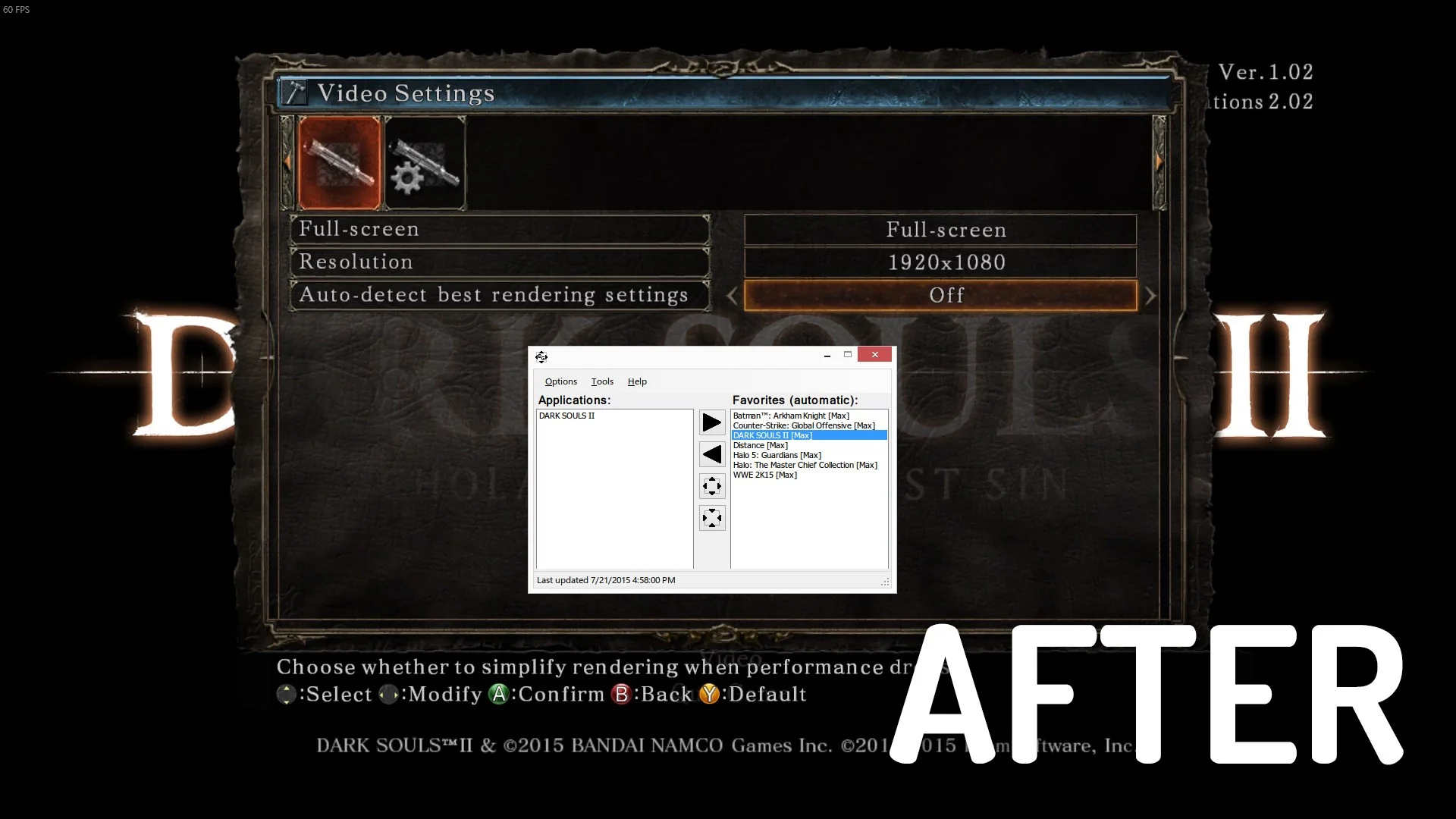
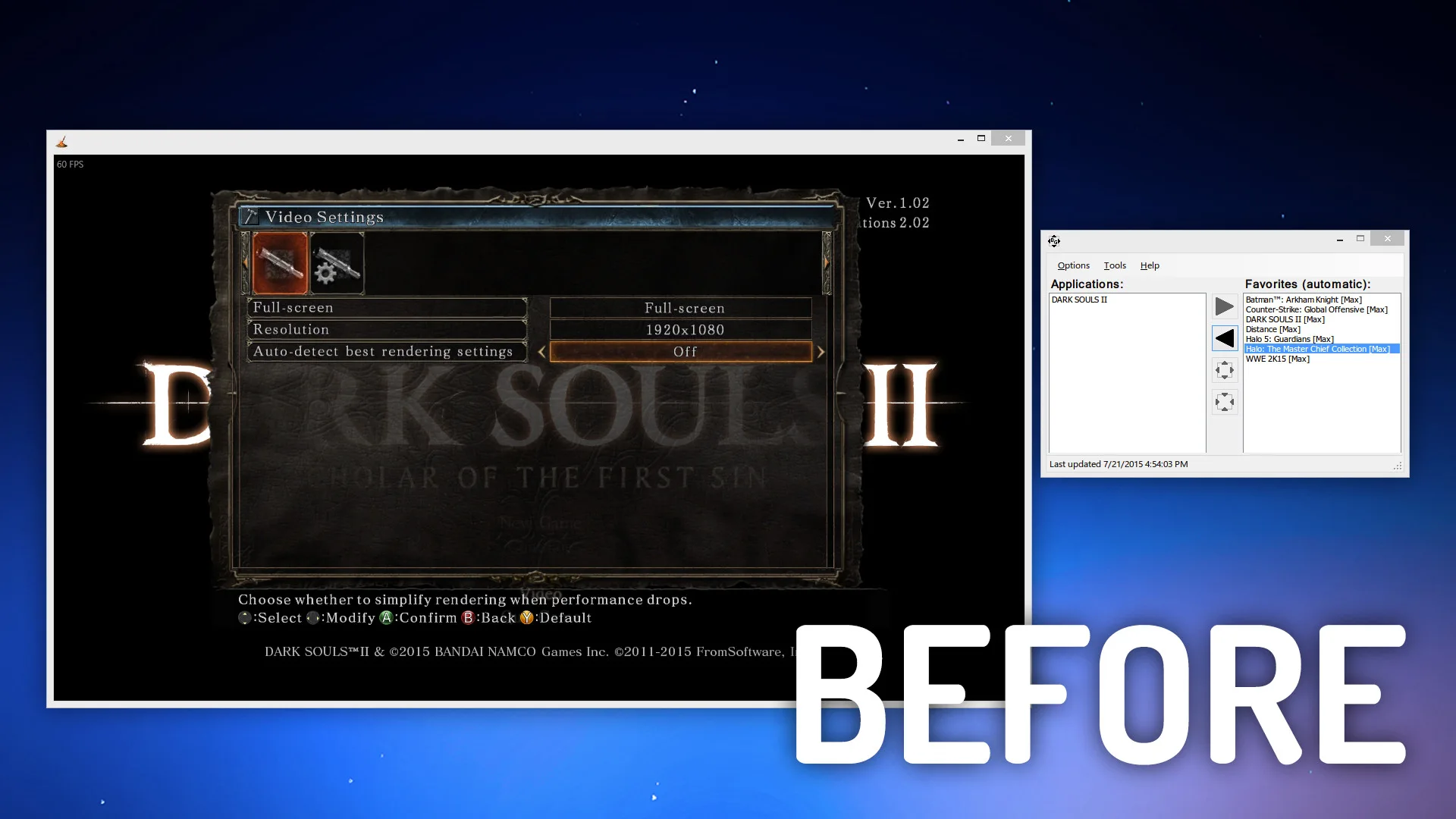
本页提供的是 Legacy 9.6.0 的资料。官方 legacy 站明确将它标为最终免费旧版,并写明已停止维护;Steam 上还有重写后的产品,具备另行说明的功能和发布节奏。不要把重写版的新能力、价格或兼容性声明直接转移到旧版。下图来自官方旧项目 README 使用的历史对比图,说明窗口状态的差别,不代表本次实测或 9.6.0 精确界面。
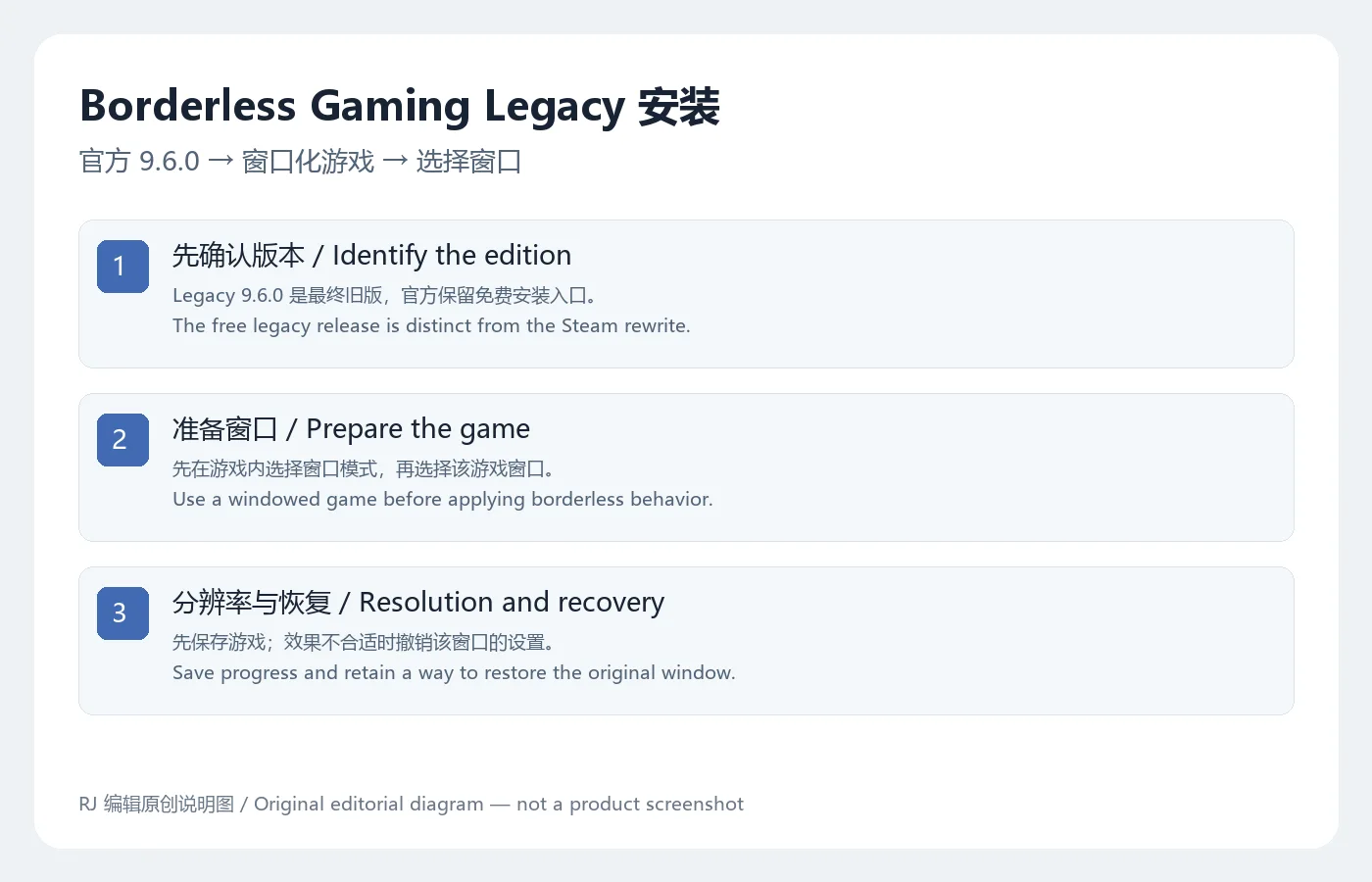
官方 legacy 页面提供匿名公开的 Download v9.6.0 入口,指向同域的 BorderlessGaming9.6_admin_setup.exe。本次没有取得或运行该文件,文件签名、大小和系统最低版本未进行独立检查;官网的“签名发布”说明属于发行者声明。
这里的流程是根据工具用途整理的操作建议,未进行本地游戏兼容测试。
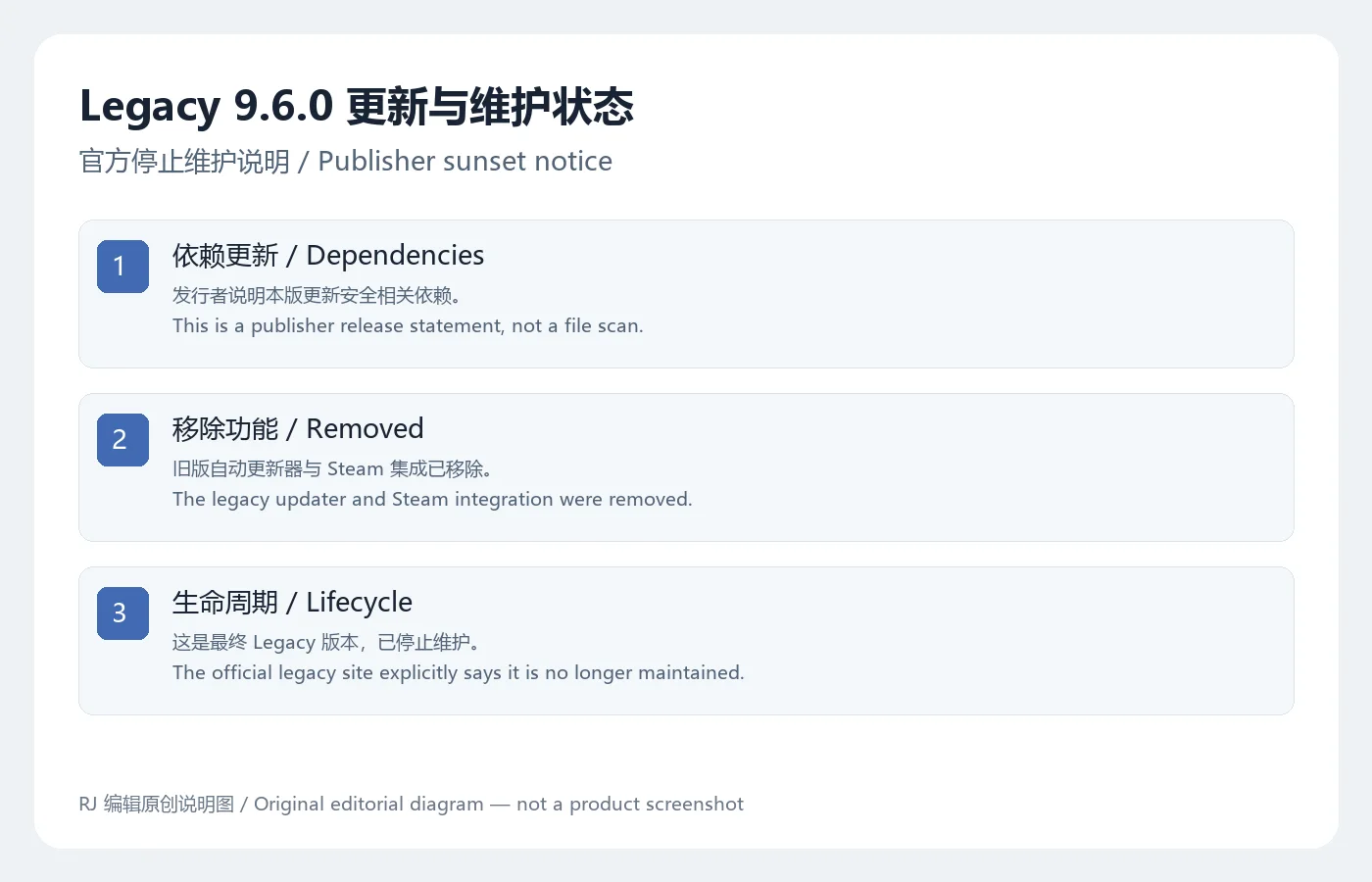
官方 9.6.0 发布说明将它称为 legacy 平台最终发行,并指向 legacy.borderlessgam.ing。该页面列出依赖更新、移除自动更新器、移除 Steam 集成和一些易用性改进,同时明确写明旧版不再维护。页面没有给出每项改进对应的详细问题编号或完整兼容列表,本页不补造具体修复项目。
移除自动更新器意味着不能依赖旧版自身继续获取后续更新;停止维护也意味着未来系统或游戏发生变化时,不应期待旧版持续适配。若你需要重写版中的功能,应另看官方链接到的 Steam 产品说明。Legacy 使用公开源代码仓库的 GNU GPLv2 许可信息,但软件许可证不能替代对其中展示的游戏内容或第三方素材的授权判断。
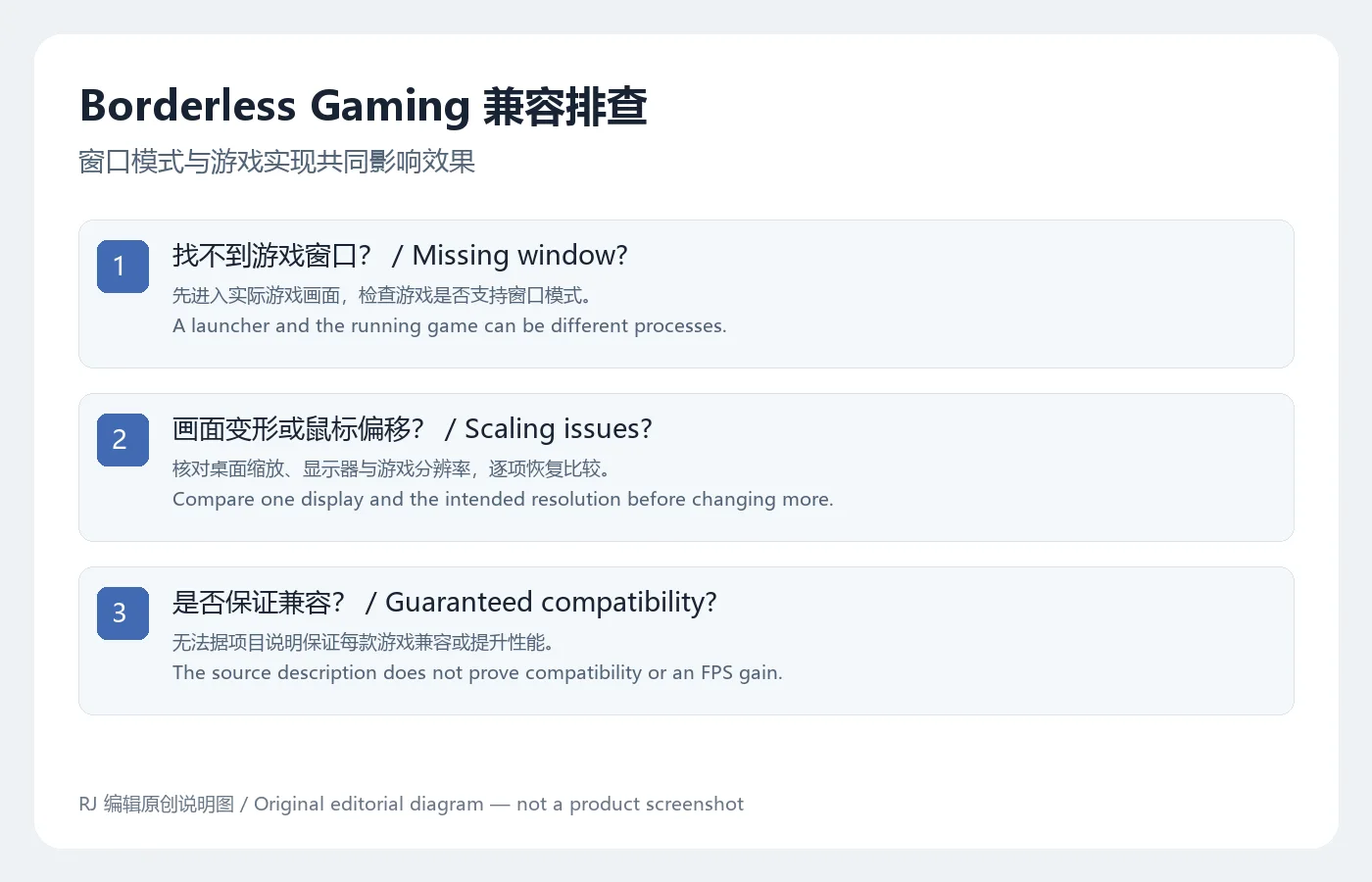
找不到目标时,先判断列表中是启动器还是已经进入的游戏窗口;部分游戏在主菜单后才建立实际渲染窗口。确认游戏支持窗口模式,再重新查看列表。若游戏自身提供可正常使用的无边框模式,可先比较它的行为,减少额外窗口调整的变量。不要因为列表里出现程序名称,就假定对该游戏的控制已经生效。
画面比例不对时,记录桌面分辨率、游戏分辨率、Windows 缩放百分比和目标显示器,再逐项比较。多显示器环境可先只针对一个目标屏幕检查。遇到鼠标坐标偏移、输入失效或游戏不接受窗口变更时,先恢复原来的窗口设置并保存报错;不必通过关闭游戏保护或反作弊来强行使用。官方历史截图中有收藏列表与窗口处理布局,但是否适合某款游戏,应以你的实际体验和游戏条款判断。
Borderless Gaming 9.6.0 是免费版吗?
官方 Legacy 页面明确保留免费最终旧版。Steam 重写版属于另一个分发版本,其条件应单独核对。
工具能把不支持窗口模式的游戏改好吗?
不能由项目用途得出这一保证。先确认游戏自身的窗口能力,效果还与渲染、缩放和输入实现有关。
为什么没有自动更新?
官方 9.6.0 说明已移除更新器,并停止维护 Legacy。官网链接仍存在不代表旧版会继续更新。
官方签名说明能证明文件绝对安全吗?
不能。本次未下载、验签或扫描安装器,发行者声明不能替代文件检查。选择 Borderless Gaming 下载前先了解 Legacy 的维护状态,安装后用已保存进度的窗口化游戏逐项检查,保留恢复原设置的方法。
Borderless Gaming download guide: install the free Legacy 9.6.0 release, configure windowed games, troubleshoot scaling and understand its maintenance status.
The legacy project's Codeusa repository redirects to andrewmd5. Borderless Gaming adjusts an already windowed game to fill a display without the usual window frame, which can make switching to other desktop windows more convenient. The game needs a suitable windowed mode. Results depend on its window implementation, resolution and system scaling, so compatibility or higher frame rates cannot be guaranteed.
This page covers Legacy 9.6.0. The official legacy site identifies it as the final free legacy release and explicitly says it is no longer maintained. A rewritten product is distributed on Steam with its own capabilities and release schedule. Do not transfer the rewrite's features, pricing or compatibility claims to the legacy version. The historical comparison image below comes from the old project's official README; it is not a new test or proof of the exact 9.6.0 interface.
The official legacy page offers an anonymous public Download v9.6.0 link to BorderlessGaming9.6_admin_setup.exe on the same domain. That file was not retrieved or run here. Its signature, size and minimum operating system were not independently inspected; the signed-release statement is the publisher's claim.
These are workflow recommendations based on the tool's purpose; no local game compatibility test was performed.
The official 9.6.0 release calls it the final legacy-platform release and directs readers to legacy.borderlessgam.ing. That page lists updated dependencies, removal of the updater, removal of Steam integration and basic quality-of-life improvements. It explicitly states that the version is no longer maintained. No detailed issue mapping or complete compatibility list is supplied, so no additional specific fixes are inferred here.
With the updater removed, the old application should not be relied on to deliver later updates. Its unmaintained status also means future changes to games or operating systems may not receive adaptations. Consult the publisher-linked Steam product separately if you need rewrite features. The public legacy repository identifies GNU GPLv2 licensing; that licence does not establish rights to unrelated game content or third-party material shown in examples.
If the target is missing, determine whether the listed process is a launcher or the running game. Some games create their rendering window only after entering a menu or session. Confirm windowed-mode support and then inspect the list again. If the game already has a working borderless option, compare that behavior first to reduce the number of window adjustments. A program name appearing in a list does not prove the intended action has taken effect.
For a distorted image, record desktop resolution, game resolution, Windows scaling percentage and the target display, then compare one setting at a time. In a multi-monitor arrangement, begin with one intended display. For offset mouse input, lost controls or a game that rejects window changes, restore the original mode and keep the error details. Do not force compatibility by disabling game protection or anti-cheat. The official historical UI image illustrates application and favorites lists; suitability depends on the actual game and its terms.
Is version 9.6.0 free?
The official Legacy page retains the final free legacy release. The Steam rewrite is a separate distribution whose current terms should be checked independently.
Can it fix a game that cannot run in a window?
That guarantee does not follow from the project's purpose. Confirm the game's own window support; rendering, scaling and input behavior also affect results.
Why is there no automatic update?
The publisher says the updater was removed in 9.6.0 and Legacy is no longer maintained. An available download link does not imply future updates.
Does the publisher's signed-release claim prove safety?
No. The installer was not downloaded, signature-verified or scanned for this review. Before a Borderless Gaming download, understand the Legacy maintenance status. After setup, test with saved progress and a windowed game, retaining a way to restore the original settings.
Informationen geprüft am: 19. Okt. 2026
Erstmals veröffentlicht: 19. Okt. 2026· Redaktionelle Überarbeitung: 19. Okt. 2026

网易云游戏 Android 客户端提供进入云端游戏与手机串流服务的入口。核对官网和应用宝下载渠道、版本冲突、安装步骤、连接排查与常见问题;最低系统要求及逐项更新说明未公开核实。 / NetEase Cloud Gaming for Android provides a mobile route to cloud sessions and game streaming. Check publisher and store routes, conflicting version displays, setup and troubleshooting; minimum OS and itemized release notes were not verified.

samperson 的 Desktop Goose 桌面伴随鹅指南:核对 Windows v0.31 与 Mac v0.22 文件标签,了解作者获取入口、自愿支持、安装资料及历史更新索引。完整运行行为、系统最低要求及最新构建状态尚未确认。 Desktop companion guide with OS file selection, setup checks, voluntary support and attributed update evidence.

OpenSpeedy 是 Windows 开源游戏变速工具,可调整选定进程的时间倍率并设置快捷键。页面整理 3.3.17 更新、安装步骤和在线游戏反作弊风险。 / OpenSpeedy is an open-source Windows game speed controller for selected processes. This page covers v3.3.17, setup, and anti-cheat risks.

Roblox 是 Roblox Corporation 提供的 Android 用户创作游戏平台。本页整理 Google Play 官方入口、安装步骤、家庭与账号检查、商店更新信息及登录和连接故障排查。 / Roblox is Roblox Corporation's Android platform for user-created experiences. This guide covers the official store, setup, family checks, updates, and login or connection troubleshooting.

Android小说阅读应用,含听书、漫剧与兴趣推荐;整理应用宝7.4.1.32信息、安装与活动规则核对方法。 / Android reading app with listening, animated comics and recommendations; includes store version 7.4.1.32, setup and activity-term checks.

云·原神是米哈游提供的 Android 云游戏客户端,本页解释其与完整《原神》包体的区别,并整理官网安装入口、网络排查及版本信息边界。 / Genshin Impact Cloud is miHoYo’s Android cloud gaming client. This guide covers its official entry, setup, network checks and release-information limits.