
Snapseed for Android 4.1
Broader RAW formats including DNG, ARW, RAF, NEF, CR3, ORF, PEF etc.; more undo and redo in tools; many more improvements and bug fixes (not itemized).
· Record revision: Oct 21, 2026
Snapseed 安卓版使用 RAW 编辑、局部蒙版与可撤销工具处理照片;整理 4.1 更新、Android 安装、导出和格式排查。 / Snapseed for Android edits photos with RAW tools, masking and reversible changes; covers version 4.1, installation, export and format troubleshooting.
Aliases: Snapseed、Snapseed photo editor
Learn about the software and its sources
Google Play listing does not specify the app licence. / Google Play 条目未注明应用许可证。
com.niksoftware.snapseed
Snapseed 安卓版使用 RAW 编辑、局部蒙版与可撤销工具处理照片;整理 4.1 更新、Android 安装、导出和格式排查。 / Snapseed for Android edits photos with RAW tools, masking and reversible changes; covers version 4.1, installation, export and format troubleshooting.
Snapseed 安卓版是 Google 开发的照片编辑器,支持 RAW 调整、局部蒙版和可撤销编辑。本文整理 Snapseed 下载核对、安装步骤与 4.1 更新内容,并说明照片导出、编辑回退和常见问题;还提供图像选择、局部调整及存储空间检查建议,帮助定位导出失败,格式兼容性以设备与应用提示为准。
Google Play 官方条目名称为 Snapseed,应用包名为 com.niksoftware.snapseed,开发者显示 Google LLC。商店将其介绍为照片编辑器,并称包含 30 多种专业工具与滤镜;条目列出 RAW 与 JPG 编辑、智能蒙版、批量编辑、Snapseed 相机及可撤销编辑等能力。这里记录的是商店当前展示,不代表本站对所有设备和照片格式做过兼容测试。
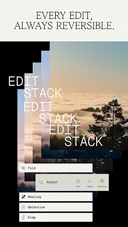
Google Play 官方条目配图,展示 Snapseed 的产品与编辑场景;具体界面随应用版本变化。 / Official store image showing the product and editing context; the UI can change between versions.
若照片需要精细调整,可从原始照片副本开始,先观察整体明暗与色彩,再使用局部蒙版限制调整范围。Snapseed 商店介绍称智能蒙版可帮助选择主体或背景,批量编辑则可把常用处理应用于多张照片;批量处理前建议先用一张副本确认效果,避免不适合的色调同步到整组图片。
应用商店说明支持 JPG 和 RAW,并提到版本 4.1 扩展了 RAW 格式范围。不同相机生成的 RAW 文件、图像尺寸和设备资源占用可能不同,遇到无法打开的素材时,先核对格式和文件是否完整,再尝试导出为常用格式。编辑中利用撤销/重做比较前后效果;需要保留原片时,不要覆盖唯一原始文件。
 商店截图仅作功能示例;实际工具布局与 RAW 支持依当前版本、文件和设备而异。 / Store image is illustrative; tools and RAW support depend on the current app, file and device.
 安装前在设备商店核对名称、开发者与兼容提示。 / Verify the title, developer and compatibility notice in your device’s store before installing.
本次核对的 Google Play 条目显示更新时间 2026 年 10 月 13 日,“最新动态”注明 Snapseed 4.1。条目列出的变化包括:扩展 RAW 格式支持(示例包含 DNG、ARW、RAF、NEF、CR3、ORF、PEF 等);常用工具编辑时增加更多撤销与重做支持;并提到其他改进和问题修复,但没有逐项列出所有修复内容。
更新前再次打开应用商店,确认自己所在地区和设备收到的版本、更新说明及兼容信息。更新后若某类 RAW 仍无法读取,不要假设 4.1 支持所有相机型号;检查具体扩展名、文件完整性和设备空间,并用一张副本验证编辑与导出。页面更新时间是商店标签,不应当作所有设备的实际安装时间。
 更新依据为商店“最新动态”文本;没有把泛化的“其他改进”扩写成未列明的修复。 / Update details follow the store’s notes; unspecified improvements are not expanded into invented fixes.
Snapseed 安卓版的官方包名是什么? Google Play 页面使用 com.niksoftware.snapseed,开发者显示 Google LLC。安装前应同时核对两项,避免选择仅名称相似的应用。
Snapseed 4.1 支持哪些 RAW 格式? 商店更新说明举例列出 DNG、ARW、RAF、NEF、CR3、ORF、PEF 等,并表示扩展了支持范围;这不保证所有相机变体、压缩模式或设备均可读取。遇到失败时先检查文件是否完整,并从一张副本开始测试。
导出失败或找不到处理后的照片怎么办? 检查设备剩余空间、照片访问授权和应用显示的保存位置。用一张较小的副本测试导出,等保存完成后再到相册或文件管理器确认结果;若仍失败,记录设备型号、Android 版本、文件格式及错误提示。
编辑会覆盖原片吗? 商店介绍称编辑过程支持撤销和恢复原图。重要照片仍建议保留单独备份,并通过副本验证最终导出,以免误删或覆盖源文件。
Snapseed 是否收费或带广告? 当前 Google Play 条目称该应用没有订阅、购买、广告或水印。具体条目和服务情况可能变化,安装前可查看当地商店当前说明。
 配图来自官方商店,不构成设备兼容性或文件安全检测结论。 / Official store image; it is not a device compatibility or file-safety test.
下载 Snapseed 前先确认 Google Play 开发者和包名;编辑时保留原片或使用副本,逐张测试蒙版、RAW 读取和导出。遇到问题时记录文件格式、设备信息与实际提示,再按当前商店说明检查更新。
Snapseed Android edits RAW photos with masks and reversible tools. Check the Play listing, install steps and version 4.1 notes; format support varies by device.
The official Google Play entry is named Snapseed, uses package com.niksoftware.snapseed, and lists Google LLC as its developer. The listing describes a photo editor with more than 30 tools and filters, including JPG and RAW editing, smart masking, batch editing, Snapseed Camera and reversible edits. These are store claims, not a compatibility test performed on every device or photo format.
Official store artwork showing the product and editing context; the app interface can change between versions.
For detailed work, begin with a copy of the original image. Review overall exposure and color first, then use a local mask to limit an adjustment to the subject or background. Snapseed’s listing describes smart masking and batch editing; test a batch look on one copy before applying it across a group, so an unsuitable tone is not propagated to every photo.
The store says Snapseed edits JPG and RAW images, and the 4.1 notes announce broader RAW format support. Camera RAW files, image dimensions and device resources can differ. If a file will not open, check the format and file integrity before trying a common export format. Use undo and redo to compare changes, and keep the only original file unchanged when you need a recoverable source.
Store imagery illustrates the app; actual layout and RAW support depend on the current build, file and device.
Confirm the title, developer and compatibility notice in your device’s store before installing.
The Google Play listing reviewed here showed an update date of October 13, 2026. Its “What’s new” section welcomed users to Snapseed 4.1 and listed broader RAW support, with examples including DNG, ARW, RAF, NEF, CR3, ORF and PEF; more undo and redo actions within editing tools; and additional improvements and bug fixes that were not individually specified.
Reopen the store before updating to check the version and compatibility information available for your region and device. If a particular RAW image still fails after updating, do not assume that 4.1 supports every camera variant. Check the extension, file integrity and available storage, then test editing and export on a copy. A store listing date is not the date every device installed the update.
The update summary follows the store’s “What’s new” notes; unspecified fixes are not invented.
What is the official Android package name? The Google Play entry uses com.niksoftware.snapseed and lists Google LLC as developer. Verify both details before installation.
Which RAW formats does version 4.1 support? The store notes give examples such as DNG, ARW, RAF, NEF, CR3, ORF and PEF while describing broader support. This does not guarantee every camera variant, compression mode or device will work. Check the file and test a copy if opening fails.
What can I check if export fails or the result is missing? Review free storage, photo permissions and the save location shown by the app. Test export with a smaller copy, wait for it to finish and then check your photo library or file manager. If the issue persists, record the device, Android version, file format and exact error.
Will editing overwrite my original? The store describes reversible editing and restoring the original. Keep a separate backup of important photos and validate the exported result from a copy.
Does Snapseed include subscriptions, purchases or ads? The current Google Play listing says it has no subscriptions, purchases, ads or watermarks. Check the listing in your region for current terms before installing.
Official store imagery is not a device compatibility or file-safety test.
Before downloading Snapseed, verify its Google Play developer and package. Keep an original or work from a copy, then test masking, RAW import and export on your device. If something fails, note the file format, device details and exact message before checking for updates.
Information verified: Oct 21, 2026
First published: Oct 21, 2026· Editorial revision: Oct 21, 2026

Snipaste 是适用于 Windows、macOS 和 Linux 的截图、标注与贴图工具。页面整理官方 2.11.3 版本、系统包型、F1/F3 使用步骤和授权区别。 / Snipaste captures, annotates, and pins images on Windows, macOS, and Linux. This guide covers official version 2.11.3, package types, F1/F3 workflow, and licensing.

CorelDRAW Graphics Suite 2026 是适用于 Windows、Mac 与 Web 的商业矢量绘图和版式设计套件,官网提供 15 天试用、订阅及一次性购买选项。本文整理 Windows 系统要求、官方试用入口和 v27.2 补丁前置版本。 / CorelDRAW Graphics Suite 2026 is a commercial vector and page-layout suite for Windows, Mac and Web. This guide covers Corel's 15-day trial, system requirements and v27.2 update prerequisites.

R2V 是 Able Software 的 Windows 地图与工程图栅格转矢量工具。查看官方 7.5 试用版、安装要求、GIS/CAD 输出与数据检查建议。 R2V converts scanned maps and drawings into GIS/CAD vectors; includes official trial and setup guidance.
Spline Windows 桌面版:官方安装入口、三维场景与交互、计划权限及产品更新边界。 / Official Windows desktop entry, 3D scenes, interactions, plan limits and dated product notes.

BlueScreenView 蓝屏转储阅读指南:官方入口、免安装步骤、停止代码与驱动线索解读、1.55历史更新、空白列表和转储隐私。 / BlueScreenView guide to official setup, minidump records, driver clues, historical 1.55 changes and privacy-aware troubleshooting.
B612咔叽是Android拍照与照片编辑应用;腾讯应用商店详情介绍智能美颜、贴纸、AI特效、滤镜和拼图功能。