
手机绘画与照片编辑工具
在 Android 手机上完成插画草稿、照片修饰、拼贴和日常图片创作。收录Adobe Photoshop Express、MediBang Paint、Snapseed等站内已有工具,按实际用途选择适合自己的应用。

美易(Picsart)是 Android 照片与视频编辑应用,功能涵盖 AI 创作、背景移除、对象擦除、贴纸、模板与拼贴。Google Play 显示含广告和应用内购买,当前页面未展示版本号。 | Picsart is an Android photo/video editor with AI tools, cutouts, stickers, templates and collages. The Play listing shows ads and in-app purchases; no version is shown.
AI 辅助内容
了解软件的基本信息与来源
未披露 / Not disclosed
com.picsart.studio
美易(Picsart)是 Android 照片与视频编辑应用,功能涵盖 AI 创作、背景移除、对象擦除、贴纸、模板与拼贴。Google Play 显示含广告和应用内购买,当前页面未展示版本号。 | Picsart is an Android photo/video editor with AI tools, cutouts, stickers, templates and collages. The Play listing shows ads and in-app purchases; no version is shown.
美易(Picsart)是 Android 图片与视频编辑应用,提供 AI 生成、背景移除、对象擦除、贴纸、模板和拼贴工具。本文依据 Google Play 官方条目说明美易下载、权限与内购提示、安装方式和最新更新内容;页面未公开准确版本号,建议通过商店核对地区可用性,避免使用来历不明的 APK,并按官方步骤安装。
美易适合手机端快速修图与社交内容制作:可对照片进行人像修饰、背景移除和对象擦除,也能用贴纸、文字、拼贴和模板组合图像。Google Play 还介绍 AI 图片与视频工具、效果和短片编辑。商店标注含广告及应用内购买;高级工具、模板或生成能力可能受套餐和地区影响。发布或上传作品前,请确认照片权限、素材授权与隐私设置。
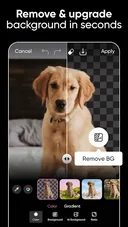
Google Play 页面显示更新日期为 2026 年 10 月 2 日;公开说明称本次处理了一些错误,并指出新功能、贴纸和模板会持续推出。页面没有显示可核实的当前版本号,因此请在 Google Play 的应用详情中查看设备实际可更新版本。广告、内购和地区可用性也以商店当时信息为准。

Q:Picsart 可以免费使用吗? A:Google Play 标注含广告和应用内购买;购买内容及价格请以当前商店页面为准。
Q:哪里下载美易 Android 版? A:使用 Google Play 官方条目;本页没有核实可公开使用的 APK 文件。
Q:为什么页面没有版本号? A:所查商店页面显示更新日期和更新说明,但未显示具体版本号。
Q:使用照片前要注意什么? A:Google Play 的开发者数据安全说明列出多类数据收集或分享情况,建议先查看权限和隐私设置。
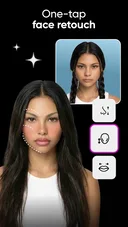
Picsart edits Android photos with AI, cutouts, stickers and templates. See official install steps, purchase notes and update info; no version number is listed.
Picsart brings photo and video editing to Android, including retouching, background and object removal, stickers, text, templates and collages. Google Play also lists AI creation and video tools. Ads and in-app purchases are disclosed; check current plan limits, permissions and privacy settings before sharing personal images.
Google Play shows an update date of October 2, 2026. Its release note mentions bug fixes and ongoing additions of features, stickers and templates. The listing does not show a verifiable current version number; check the store page on your device for the available update.
Q: Is Picsart free? A: Google Play marks the app as ad-supported with in-app purchases; check current pricing before buying.
Q: Where can I install the Android app? A: Use its official Google Play listing. This page has not verified a public APK file.
Q: Why is no version number shown? A: The listing provides an update date and note but no current version number.
Q: What about photo privacy? A: Review the developer-provided Play Data safety disclosure and app permissions before uploading personal images.
资料核验日期:2026年10月20日
首次发布:2026年10月20日· 编辑修订:2026年10月20日

Snipaste 是适用于 Windows、macOS 和 Linux 的截图、标注与贴图工具。页面整理官方 2.11.3 版本、系统包型、F1/F3 使用步骤和授权区别。 / Snipaste captures, annotates, and pins images on Windows, macOS, and Linux. This guide covers official version 2.11.3, package types, F1/F3 workflow, and licensing.

CorelDRAW Graphics Suite 2026 是适用于 Windows、Mac 与 Web 的商业矢量绘图和版式设计套件,官网提供 15 天试用、订阅及一次性购买选项。本文整理 Windows 系统要求、官方试用入口和 v27.2 补丁前置版本。 / CorelDRAW Graphics Suite 2026 is a commercial vector and page-layout suite for Windows, Mac and Web. This guide covers Corel's 15-day trial, system requirements and v27.2 update prerequisites.

R2V 是 Able Software 的 Windows 地图与工程图栅格转矢量工具。查看官方 7.5 试用版、安装要求、GIS/CAD 输出与数据检查建议。 R2V converts scanned maps and drawings into GIS/CAD vectors; includes official trial and setup guidance.
BlueScreenView 蓝屏转储阅读指南:官方入口、免安装步骤、停止代码与驱动线索解读、1.55历史更新、空白列表和转储隐私。 / BlueScreenView guide to official setup, minidump records, driver clues, historical 1.55 changes and privacy-aware troubleshooting.
Spline Windows 桌面版:官方安装入口、三维场景与交互、计划权限及产品更新边界。 / Official Windows desktop entry, 3D scenes, interactions, plan limits and dated product notes.
B612咔叽是Android拍照与照片编辑应用;腾讯应用商店详情介绍智能美颜、贴纸、AI特效、滤镜和拼图功能。