LX Music 洛雪音乐助手桌面版:官方Windows安装包、2.12.6更新、列表备份与播放排查。 / Official desktop packages, release notes, playlist preservation and playback troubleshooting.
中文
LX Music 桌面版是基于 Electron 与 Vue 的音乐软件,提供搜索、歌单及播放列表管理。本文介绍洛雪音乐助手下载、Windows 安装与免安装包选择,整理 2.12.6 更新日志和无法播放的排查思路,说明桌面版与手机版的区别、数据备份位置及开发计划变化,帮助你按系统选择官方文件并保留个人列表。
LX Music 桌面版下载:先区分桌面程序与移动版
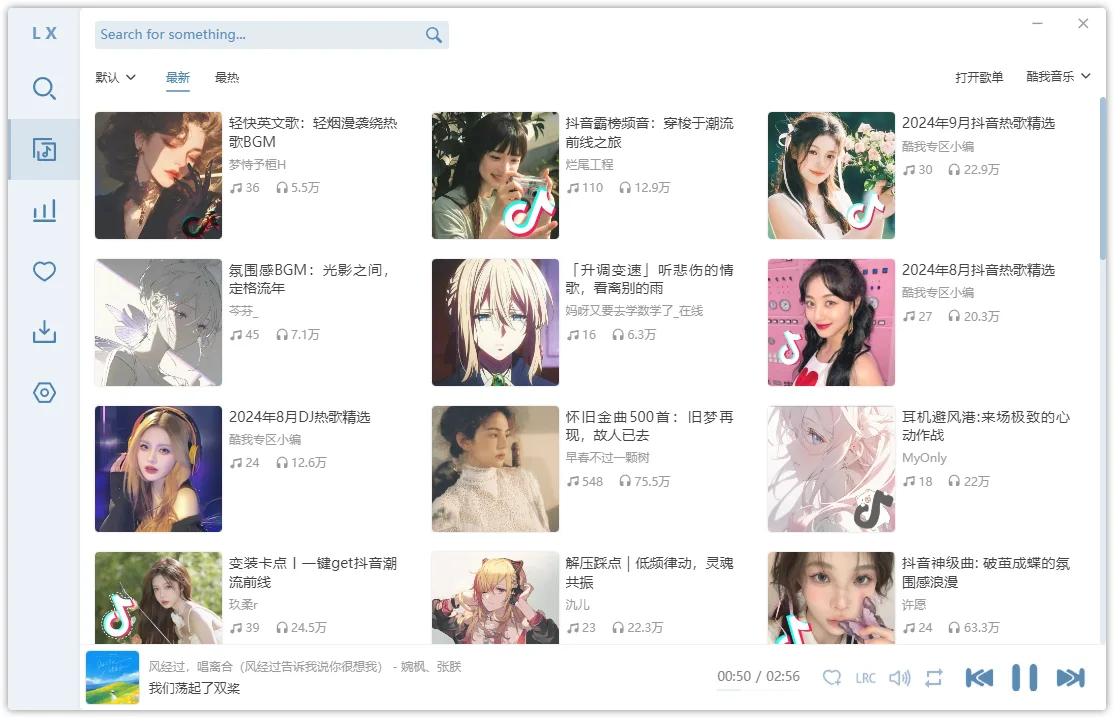
LX Music(洛雪音乐助手)桌面版由 lyswhut 维护,使用 Electron 与 Vue 开发。界面把搜索、在线歌单、排行榜、个人列表和播放控制集中在同一窗口,适合需要整理音乐列表、切换播放内容的电脑用户。项目另有独立的 LX Music Mobile 仓库;Android 的 APK 不能代替 Windows 桌面安装包。
官方 README 指明,桌面版的原始发布渠道只有 GitHub Releases。第三方转载页上的“免费版”“高速版”等名称不能证明文件来自作者,也不能证明带有额外功能。使用前应阅读项目许可证及补充条款;软件免费与音乐内容的使用权是两件事,不能据此推断所有歌曲都可免费获得。
搜索、歌单与数据:为什么有列表却不能播放
在桌面版中,在线目录和实际音频链接来自不同环节。官方 README 说明,程序会把歌曲名称和艺术家等信息交给用户在设置中选择的自定义源,再使用源返回的音频链接。因此搜索结果存在,不等于对应链接仍然有效,也不等于软件能够核实音频与曲目信息完全一致。
遇到无法播放时,先记录是所有曲目失败、某个平台失败,还是只有一首歌失败,再检查网络、所选源和官方常见问题。不要把来源不明的脚本或收费解锁服务当成必须安装的组件。个人列表属于自己的数据,更新前可先备份;Windows 默认数据目录为 %APPDATA%/lx-music-desktop,程序目录中存在 portable 文件夹时,项目说明可改用该文件夹保存数据。

LX Music Windows 安装步骤与安装包选择
- 打开 官方 v2.12.6 发布页,先确认文件名属于
lx-music-desktop,再区分正式版与测试版。本页采用正式版资料。
- 普通 64 位 Windows 电脑可选择作者列出的
lx-music-desktop-v2.12.6-x64-Setup.exe;ARM 设备使用相应 ARM64 包。不要仅依据文件大小判断架构。常规版本自 2.5.0 起不再默认支持 Windows 7/8/8.1,旧系统需另外核对带 win7 的专用文件。
- 使用安装版时打开
Setup.exe 并按向导选择安装位置。若选择 green.7z 免安装包,先用支持 7z 的解压工具完整解压,再运行其中的 lx-music-desktop.exe,不要直接在压缩包预览窗口运行。
- 首次启动后浏览设置,确认列表与播放操作符合自己的习惯。已有用户先保留个人数据,再验证播放、收藏与窗口显示;保留具体报错有助于区分安装问题与音频来源问题。
安装包说明提醒,特殊旧系统构建缺少安全更新。官方仓库宽泛的“Windows 7 及以上”平台列表,应结合当前文件与下载文档理解,不能当成所有安装包均兼容旧系统的保证。此处仅记录公开文件元数据,没有下载安装器或独立检测其内容。
2.12.6 更新日志、自动更新与项目发展
所查官方 Releases 将 2.12.6 标为最新正式版,发布时间为 2026 年 9 月 19 日。该版优化 tx 推荐歌单列表和禁用透明窗口时的边框显示,修复打开部分 kg 歌单时歌曲丢失、Windows 7 无法启动,以及禁用透明窗口后按 F11 无法全屏的问题。这些是该发行版明确记录的变化,不将界面示例里的歌单内容当成新功能。
官方安装包文档区分两种更新方式:安装版支持自动更新,访问 GitHub 不畅可能导致更新失败,此时可从原始发布页手动获取安装包;免安装版不支持自动更新,需要自行更换程序文件。更新前保留个人列表和数据,完成后先确认原来的使用场景是否正常。
作者同时说明,后续开发精力将主要转向新项目 Any Listen。它是另一个项目,不能把其 WebDAV、独立播放列表等功能自动归到 LX Music 2.12.6,也不能据此承诺 LX Music 已终止维护或将按固定周期更新。

常见问题 FAQ:下载安全、旧系统与播放故障
官网写支持 Windows 7,为什么普通安装包打不开?
项目的平台总览与每个安装包的要求不同。下载文档说明常规版本从 2.5.0 起不再默认兼容 Windows 7/8/8.1;旧系统应核对专用构建,同时考虑其缺少安全更新的限制。不能把一次启动修复理解为长期系统支持承诺。
为什么搜索到了歌,却提示换源失败或不能播放?
搜索目录与音频链接并非同一数据。记录失败范围、网络状态与报错,按官方常见问题排查所选源,不要反复重装程序来替代问题定位,也不要默认付费解锁能解决故障。
覆盖更新会不会丢失我的列表?
不能为所有安装方式保证结果。先识别默认数据目录或自己的 portable 目录并备份,再按所选包的方式更新;不要把清空个人数据目录当成通用修复办法。
文件被安全软件拦截,是否可以直接加白?
不要仅凭项目的开源说明或“误报”表述做决定。先核对原始发布渠道与具体告警,保留文件信息,必要时向安全厂商或项目反馈。进行 LX Music 桌面版下载时选对系统与文件、保留自己的列表,通常比混用不同平台包更容易排查问题。

English
LX Music Desktop download guide: choose a Windows package, install the player, review 2.12.6 release notes, preserve playlists and troubleshoot playback issues.
LX Music Desktop download: identify the desktop project
LX Music Desktop, also called 洛雪音乐助手, is a music application maintained by lyswhut and built with Electron and Vue. Its window groups search, online playlists, charts, personal lists and playback controls. LX Music Mobile is a separate Android project: an APK is not a substitute for a Windows desktop installer.
The official README identifies GitHub Releases as the only original distribution channel for the desktop project. Labels such as “free edition” or “accelerated edition” on a mirror do not establish publisher provenance or extra features. Review the repository license and supplementary terms. A free application does not grant rights to every recording shown in its catalog.
Search, playlists and data: a result is not a working stream
Online catalog metadata and playable audio links follow different paths. The README explains that the player passes song and artist information to the custom source selected in settings, then uses the returned audio link. A search result therefore does not establish that a stream still works, or that the returned audio exactly matches the listed recording.
When playback fails, distinguish all-track failures, one-provider failures and a single-track problem before investigating connectivity, the selected source and the official FAQ. Unknown scripts or paid unlocking services are not documented installation prerequisites here. Preserve personal lists before changing versions. Windows normally stores data in %APPDATA%/lx-music-desktop; the README also describes using a portable folder in the program directory for portable data storage.
LX Music installation steps for Windows
- Open the official v2.12.6 release and confirm that the assets belong to
lx-music-desktop. Choose the stable release rather than assuming a beta is more suitable.
- For a typical 64-bit Windows PC, the publisher lists
lx-music-desktop-v2.12.6-x64-Setup.exe. ARM devices require the corresponding ARM64 package. Standard builds no longer default to Windows 7/8/8.1 support from version 2.5.0; those systems require separate review of the win7 assets.
- For an installer, open the selected
Setup.exe and follow its location and installation prompts. For a green.7z portable package, extract the entire archive with a compatible tool, then run lx-music-desktop.exe from the extracted folder.
- Review settings on first launch. Existing users should retain their data before changing program files, then check their own playback, favorites and window behavior. Keep the exact error so an installation problem can be separated from a source problem.
The download documentation warns that special legacy-system builds lack security updates. Read the repository's broad Windows platform list alongside package-specific guidance. No installer was downloaded, executed or independently inspected for this guide; the recorded link is public release metadata.
Version 2.12.6 release notes and update behavior
The reviewed official Releases page marks 2.12.6, published September 19, 2026, as the latest stable version. It optimizes tx recommended playlists and window borders when transparency is disabled. Fixes address missing tracks in certain kg playlists, failure to start on Windows 7, and F11 fullscreen failure with transparency disabled. These changes come from the release notes; the example playlist artwork is not treated as a new feature.
Official package guidance says installer editions support automatic updates. Slow or unavailable GitHub access can prevent an update, in which case users may obtain the installer manually from the original channel. Portable editions do not update automatically. Preserve personal lists and data before replacing files, then verify the workflow that matters to you.
The maintainer also states that development effort will mainly move to Any Listen. That is a separate project. Its WebDAV and independent-playlist features should not be attributed to LX Music 2.12.6, and the announcement does not establish a fixed future release schedule or an unconditional end of maintenance.
FAQ: package choice, warnings and playback failures
Why does a normal package fail on Windows 7?
The general platform list does not describe every asset. The download guide says normal builds stopped defaulting to Windows 7/8/8.1 compatibility from 2.5.0. Review the dedicated legacy assets and their security-update limitation. A release-specific startup fix is not a long-term operating-system support guarantee.
Why can a track appear in search but fail to play?
Catalog data and audio links are different inputs. Record the affected tracks, provider, connection and error, then follow the official FAQ. Reinstalling the desktop program repeatedly does not identify a broken source, and a paid unlocking service is not an established remedy.
Will an update preserve every playlist?
That cannot be guaranteed for every installation method. Locate and back up the normal data folder or your portable folder first. Do not delete personal data as a generic troubleshooting step.
Should I allowlist a file flagged by security software?
Open source status and a developer's false-positive explanation do not settle an individual alert. Verify the original release channel, retain the detection details and seek help from the security vendor or project when needed. For an LX Music Desktop download, choose the correct system package and preserve your lists before changing versions.