


Inkscape 位图描摹
了解如何在 Inkscape 中把位图描摹为 SVG 路径,比较亮度阈值、边缘检测、颜色量化与中心线方法,并检查路径复杂度。基于官方教程整理,未实测,菜单可能因版本而异。

Inkscape 1.4.4 是一款 GPL v2 开源 SVG 矢量绘图软件,可用于插画、图标、标志、海报和图表制作;查看 Windows、macOS、GNU/Linux 官方安装入口、版本变化与已知限制。
Consulta la información básica del software y sus fuentes
GNU General Public License v2 (GPL v2)
Inkscape 1.4.4 是一款 GPL v2 开源 SVG 矢量绘图软件,可用于插画、图标、标志、海报和图表制作;查看 Windows、macOS、GNU/Linux 官方安装入口、版本变化与已知限制。
Inkscape 1.4.4 是免费开源的 SVG 矢量绘图软件,适合插画、图标、海报和图表创作。本文整理 Windows、macOS、Linux 官方安装步骤、版本更新、启动及扩展问题,并说明 GPL v2 许可、兼容信息与已知限制,帮助你核对 1.4.4 版本并选择合适的安装来源及更新前准备事项。
Inkscape 是桌面矢量图形编辑器,适合制作 SVG 插画、图标、标识、海报和图表,也可编辑既有 SVG 文件。需要可缩放图形、路径和文字布局的设计者、教育工作者与日常创作者,可以先从官方教程和示例了解操作方式。软件按 GPL v2 发布;用它制作的图像文件许可仍由作者及素材权利人决定。
官方将 Inkscape 描述为开源的可缩放矢量图形编辑器。1.4.4 发行说明列出调色板、星形与多边形旋转按钮、界面和文档翻译更新等变化。它适合绘制标志、图示、地图、排版元素和可编辑 SVG;复杂印刷或协作流程可先确认目标软件对 SVG/PDF 的兼容性。以下内容依据官方资料整理,本稿未下载或实测安装包。
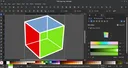
图示为 Inkscape 1.4 旧版界面,并非 1.4.4 截图。截图作者 VulcanSphere;软件画面由 Inkscape contributors,画布中的 GTK 标志另由 Andreas Nilsson 创作。Wikimedia Commons 页面列 GNU GPL v2 或更新版本、GFDL 1.2 或更新版本及 CC BY-SA 3.0 Unported。按 CC BY-SA 3.0 标注作者与许可:原图说明、许可文本;GTK 标志署名独立保留,不代表作者或项目背书。
官方页面给出的 Windows 版本要求说明是 Inkscape 1.3.x 至少需要 Windows 8.1;该页没有明确列出 1.4.4 的最低系统要求,因此这里不把 1.3.x 要求推定为 1.4.4 要求。
本次官方页面未提供统一适用于所有发行版的最低 Linux 版本或硬件要求,具体兼容性应按所选包格式和发行版资料核对。
官方发行页显示 Inkscape 1.4.4 发布于 2026 年 5 月 6 日,是维护与错误修复版本。发行说明概述约 20 项崩溃修复、25 项以上错误修复和性能改进,并列出新调色板、星形及多边形的旋转按钮、27 项界面翻译更新、15 项文档翻译更新,以及 Windows ARM 安装文件。这里仅概括官方列出的范围,不替代完整发行说明:官方 1.4.4 发行页。
官方已知问题指出,从命令行启动的 macOS Inkscape 可能无法使用扩展,包括图形界面中的扩展及命令行扩展调用。问题与 1.4.3 为官方 DMG 加入的安全功能有关。可先从 Finder 正常打开应用;如仍需命令行工作流,请查阅官方已知问题及跟踪信息。
官方说明,在部分 GTK 版本的 Wayland 环境下,移动停靠标签或关闭浮动对话框可能导致崩溃,也可能弹出错误的浮动对话框。保存工作,先避免触发相关操作,并核对当前 GTK 版本、桌面会话及上游问题记录;这是发行页所述的已知问题,不代表所有 Linux 桌面都会发生。
先确认下载的架构与设备相符,并按官方 Windows 页面建议在更新前卸载旧版。Windows 用户可继续查看官方启动问题 FAQ;如果使用压缩版,确认已解压到独立空目录。
SVG 是该软件的主要矢量格式之一,但不同应用对滤镜、字体、扩展和特定 SVG 功能的支持可能不同。跨系统交接前保存源文件,并按接收方工作流检查字体和效果;需要稳定交付时,也可按项目要求另存或导出 PDF。
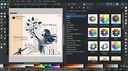
第二张为西班牙语 Inkscape 1.4 旧版界面,同样不是 1.4.4 截图。截图作者 Seba4108,依 CC BY-SA 4.0 使用并署名:原图说明、许可文本。画面里的绘图作品作者为 Inkonic,保留作品来源说明;作者及权利人未表示对 RJ.tools 背书。
本条目使用的 Inkscape 官方图标:原作者 Andrew Michael Fitzsimon,官方品牌页列许可为 CC BY-SA 3.0,同时说明标志是注册商标。图标仅用于识别软件,并链接注明来源与许可;本页面与 Inkscape 项目无官方隶属或背书关系。品牌及商标政策。
Inkscape 软件按 GNU GPL v2 许可;许可针对程序及相关软件包、扩展和源代码。官方页面将其称为自由与开源软件,但本次资料未核实具体付费方案或零售价格,不将许可名称等同于价格承诺。官方下载入口和 1.4.4 版本信息以官方发行页为准。
核验日期:2026-10-17(Asia/Shanghai)。官方发行、平台、品牌和许可页面均于该日回读;未下载、运行或安全扫描安装包。
Inkscape 1.4.4 is a free SVG vector editor. See Windows, macOS, and Linux setup steps, release highlights, GPL v2 licensing, and startup or extension help.
Inkscape is a desktop vector graphics editor for creating and editing SVG illustrations, icons, logos, posters, and diagrams. Designers, educators, and other creators who need scalable artwork can start with the official tutorials and examples. The program is licensed under GPL v2; the license for artwork made with it depends on its creators and any source material used.
The official project describes Inkscape as an open-source scalable vector graphics editor. Version 1.4.4 adds a palette and a control for rotating stars and polygons to an upright position, alongside interface and documentation translation updates. It suits editable SVG artwork and diagrams. Check SVG or PDF compatibility with the receiving workflow before preparing print or handoff files. This guide summarizes public documentation; the installer was not downloaded or tested.
This image shows the older Inkscape 1.4 interface, not version 1.4.4. Screenshot by VulcanSphere; the software is by Inkscape contributors, and the GTK logo in the canvas is by Andreas Nilsson. Wikimedia Commons lists GNU GPL v2 or later, GFDL 1.2 or later, and CC BY-SA 3.0 Unported. Attribution and license: file page and CC BY-SA 3.0. GTK artwork credit remains separate; no endorsement is implied.
The Windows page states that Inkscape 1.3.x requires Windows 8.1 or later, but it does not specify a minimum requirement for 1.4.4; this guide does not infer one.
The official page reviewed here does not provide one minimum Linux version or hardware requirement for all distributions. Check the selected package format and distribution documentation.
The official release page dates Inkscape 1.4.4 to May 6, 2026 and describes it as a maintenance and bug-fix release. It reports about 20 crash fixes, more than 25 bug fixes and performance improvements, a new palette, a star and polygon rotation button, 27 updated interface translations, 15 updated documentation translations, and Windows on Arm installation files. This is a summary, not a replacement for the official release notes.
The official known-issues section says extensions may not work when Inkscape for macOS is started from the command line, including extensions in the GUI and command-line extension calls. The issue relates to a security feature added for official macOS DMGs in version 1.4.3. Try opening the app normally from Finder; for command-line workflows, consult the official release notes and issue links.
The release notes report that, with some GTK versions on Wayland, moving a docked tab or closing a floating dialog may crash, and undocking can select the wrong dialog. Save work, avoid the affected interaction, and check the GTK version, desktop session, and upstream GTK issue. The report does not mean every Linux desktop is affected.
Confirm that the downloaded architecture matches the device and uninstall the previous version before updating, as the Windows instructions advise. Windows users can also consult the official startup FAQ. If using a compressed archive, extract it to a separate empty folder.
Not necessarily. Font availability, filters, extensions, and application support can affect how SVG content appears elsewhere. Keep the editable source file and check the recipient's workflow; export PDF when that better fits the delivery requirements.
This is an older Spanish-language Inkscape 1.4 screen, not a 1.4.4 screenshot. Screenshot by Seba4108, used under CC BY-SA 4.0: file page and license. The artwork shown is credited to Inkonic on the source page. No endorsement is implied.
The official Inkscape logo used as the product icon was created by Andrew Michael Fitzsimon. The branding page identifies it as a registered trademark and licenses the logo under CC BY-SA 3.0. It is used here only to identify the software, with attribution and license links; this page has no official affiliation with or endorsement from Inkscape. See the branding and trademark policy.
Inkscape is licensed under GNU GPL v2; the official licensing page says this applies to the program, packages, extensions, and source code. The project describes the software as free and open source, but the sources reviewed here do not establish a retail price or paid plan. See the official 1.4.4 release page.
Verified on October 17, 2026 (Asia/Shanghai). Official release, platform, branding, and license pages were reviewed. The installer was not downloaded, run, or security-scanned.
Información verificada: 17 oct 2026
Publicado por primera vez: 17 oct 2026· Revisión editorial: 17 oct 2026
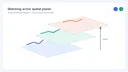
中文:Mental Canvas Draw 用笔触构建分布在不同深度平面上的场景,并支持三维导航与自由动画。Windows 版由官网链接至 Microsoft Store,要求触控屏和主动式笔;商店标注免费下载并含应用内购买。 English: Mental Canvas Draw places strokes on spatial planes and supports 3D navigation and free animation. The publisher links Windows users to Microsoft Store; touchscreen and active pen are required, and the Store listing notes in-app purchases.

R2V 是 Able Software 的 Windows 地图与工程图栅格转矢量工具。查看官方 7.5 试用版、安装要求、GIS/CAD 输出与数据检查建议。 R2V converts scanned maps and drawings into GIS/CAD vectors; includes official trial and setup guidance.

Snipaste 是适用于 Windows、macOS 和 Linux 的截图、标注与贴图工具。页面整理官方 2.11.3 版本、系统包型、F1/F3 使用步骤和授权区别。 / Snipaste captures, annotates, and pins images on Windows, macOS, and Linux. This guide covers official version 2.11.3, package types, F1/F3 workflow, and licensing.

CorelDRAW Graphics Suite 2026 是适用于 Windows、Mac 与 Web 的商业矢量绘图和版式设计套件,官网提供 15 天试用、订阅及一次性购买选项。本文整理 Windows 系统要求、官方试用入口和 v27.2 补丁前置版本。 / CorelDRAW Graphics Suite 2026 is a commercial vector and page-layout suite for Windows, Mac and Web. This guide covers Corel's 15-day trial, system requirements and v27.2 update prerequisites.
BlueScreenView 蓝屏转储阅读指南:官方入口、免安装步骤、停止代码与驱动线索解读、1.55历史更新、空白列表和转储隐私。 / BlueScreenView guide to official setup, minidump records, driver clues, historical 1.55 changes and privacy-aware troubleshooting.
B612咔叽是Android拍照与照片编辑应用;腾讯应用商店详情介绍智能美颜、贴纸、AI特效、滤镜和拼图功能。
屏幕截图、标注与屏幕录制工具,可记录麦克风、系统音频及摄像头等用户选择的输入。